

Every missed call, lost appointment detail, or delayed invoice is a direct failure in your customer experience. These issues are not isolated incidents; they are symptoms of a fragmented operational backend. When your customer data, scheduling tools, and communication platforms are disconnected, your clients feel the friction. This damages your reputation and directly impacts your revenue. A true all-in-one business app is engineered to solve this problem by creating a single source of truth for every customer interaction. It ensures a seamless, professional experience from the first website visit to the final payment, empowering your team to deliver superior service. This guide explains how centralizing your tools is the foundation for building stronger, more profitable customer relationships.
Key Takeaways
- Consolidate your tech stack to eliminate operational drag: Managing multiple, disconnected applications creates friction, wastes time, and leads to costly errors. A single, unified platform replaces this chaos with a central command center, streamlining workflows from lead capture to final payment.
- A true all-in-one solution is defined by its core integrations: Your business requires a complete operating system, not just a random assortment of tools. A platform must seamlessly connect CRM, appointment scheduling, payment processing, and local marketing to be considered a comprehensive solution.
- Select your platform with a disciplined evaluation framework: First, identify your specific operational bottlenecks. Then, match those problems to a platform’s core features and validate your choice with a hands-on trial to ensure it solves your real-world business challenges.
What Is an All-in-One Business App?
An all-in-one business app is a single platform designed to consolidate critical business functions. Instead of juggling separate, disconnected tools for scheduling, customer management, invoicing, and marketing, you manage every aspect of your operation from one central dashboard. This model eliminates the inefficiency and data silos created by a fragmented tech stack, where information is scattered across multiple subscriptions and logins.
These platforms integrate essential operations, from customer relationship management (CRM) to payment processing and website lead capture. The core purpose is to replace operational chaos with a streamlined system, saving you time and improving productivity. Think of it as the central operating system for your business. Rather than paying for five, ten, or even fifteen different software subscriptions that don’t communicate with each other, you invest in one unified solution.
For a small business owner, this consolidation is not a luxury; it’s a competitive necessity. Managing multiple apps drains your most valuable resources: time and focus. An integrated platform ensures that a new lead from your website automatically enters your CRM, an appointment is scheduled without manual entry, and an invoice is sent and tracked in the same system. By centralizing your tools, you stop managing software and start focusing on your core work: serving customers and growing your business.
Ditch Multiple Tools: Why a Single Platform Wins
Managing a business with a dozen different apps isn’t resourceful; it’s a liability. Juggling separate tools for appointments, payments, customer communication, and marketing creates operational drag. Each new subscription adds another login to remember, another interface to learn, and another dataset to sync. This approach creates fragmented workflows that drain your time and energy, leading to costly errors and missed opportunities. When your customer data lives in one app and your payment history in another, you never get a complete picture of your business’s health.
The solution is to eliminate the chaos. An all-in-one platform consolidates these critical functions into a single, unified dashboard. Instead of fighting with compatibility issues and manual data entry, your team operates from one source of truth. This integration allows you to automate tasks, streamline communication, and make decisions based on complete, accurate information. With centralized customer data, you can track every interaction from the first call to the final payment, all in one place. This efficiency frees you to focus on high-value work instead of managing software.
The primary obstacle to making this change is often inertia. Teams get comfortable with existing tools, even if they are inefficient. However, clinging to outdated processes is a significant barrier to growth. Breaking these old habits is a strategic decision to build a more resilient and scalable operation. By moving to a unified platform, you aren’t just adopting new software; you are implementing a more intelligent operating system for your entire business. The short-term effort of switching is a small price for the long-term gains in productivity and control.
The Non-Negotiable Features of an All-in-One App
An effective all-in-one platform is not a random collection of tools. It is a strategic operating system engineered to eliminate operational friction and accelerate growth. Managing a business with a dozen different apps is not resourceful; it is a critical bottleneck that drains your time, creates dangerous data silos, and costs you customers. The constant switching between your scheduler, your CRM, your invoicing software, and your marketing tools is a recipe for inefficiency and missed opportunities. A true all-in-one solution replaces this chaos with a single, unified command center.
Any platform claiming to be a comprehensive solution must include a core set of features that work in perfect sync. These are not optional add-ons or nice-to-haves; they are the foundational pillars of a modern, competitive small business. If a platform lacks even one of these components, it creates a gap in your workflow, forcing you back to the fragmented, multi-app model you need to escape. This list defines the absolute essentials required to centralize your operations, dominate your local market, and build a business that runs with precision. Anything less is just another app, not a complete business solution.
Customer Relationship Management (CRM)
Your customer data is your most valuable asset. A Customer Relationship Management (CRM) system is the command center for this data, centralizing every interaction, purchase history, and client detail. This is not just a digital address book; it is the engine for personalized communication and long-term loyalty. An integrated CRM ensures that every part of your business, from marketing to invoicing, operates with a complete picture of the customer. The right platform provides the benefits of a CRM by unifying client information with all other business functions, creating a single source of truth that drives smarter decisions and stronger relationships. It eliminates guesswork and empowers your team to deliver exceptional service at every touchpoint.
Appointment Scheduling and Management
Stop wasting time with back-and-forth emails and phone calls to book appointments. An integrated scheduling tool automates this entire process, empowering clients to book directly from your website or marketing messages based on your real-time availability. This eliminates double bookings and no-shows while presenting a professional, modern experience for your customers. Effective appointment management solutions do more than just fill your calendar; they streamline your daily operations, send automated reminders, and integrate directly with your CRM and invoicing systems. This ensures a smooth, automated workflow from the initial booking all the way to the final payment, freeing up your team to focus on revenue-generating work instead of administrative tasks.
Lead Management and Website Optimization
Your website must be more than a digital brochure; it must be your best salesperson, working 24/7 to generate business. This requires a system to capture, track, and convert every visitor into a paying customer. An all-in-one platform connects your lead capture forms, web chat, and call tracking directly to your CRM. This allows you to optimize website lead management by immediately engaging new prospects and measuring the true return on your marketing efforts. When you can see exactly which channels are driving revenue, you can stop wasting money on ineffective strategies and start making data-driven decisions to grow your business with predictable, measurable results.
Local SEO and Online Presence Management
For service-based businesses, visibility is everything. If local customers can’t find you online, you don’t exist. Effective local SEO for small businesses goes beyond a few keywords; it involves managing your Google Business Profile, ensuring your business information is consistent across all online directories, and actively generating positive reviews. A true all-in-one platform integrates these functions, connecting your online presence directly to your lead generation and sales data. This allows you to see a clear line from your local search ranking to your bottom line, proving the value of your marketing investment and solidifying your position as the go-to provider in your area.
Payment Processing and Invoicing
Delayed payments disrupt cash flow and create unnecessary administrative work. A modern business needs a system that makes getting paid fast and simple. Integrating payment processing into your all-in-one app allows you to send professional invoices with a “pay now” button, accept credit cards online or in the field, and automate payment reminders. Consolidating your payments solutions for small businesses eliminates the need for a separate merchant account and simplifies your accounting. This accelerates your revenue cycle, reduces outstanding invoices, and gives you a real-time view of your company’s financial health from a single dashboard, putting you in complete control of your cash flow.
Communication Tools (SMS, Messaging, Chat)
Missed chats and scattered messages are missed opportunities that directly impact your revenue. Your business needs a centralized system to manage all client communications, whether they come from a text message or website chat. A unified inbox brings every conversation into one place, ensuring you and your team can provide prompt, professional responses without switching between apps. Integrating text marketing and all chats and messages into your core platform allows you to automate appointment reminders, send follow-ups, and maintain a complete communication history for every client. This history is tied directly to their CRM profile, providing critical context for every interaction.
Reviews and Reputation Management
In the digital world, your reputation is your currency. Positive online reviews build trust and provide the social proof needed to attract new customers. An all-in-one platform should automate the process of requesting reviews from satisfied clients at the perfect moment, like right after a successful job or a five-star service experience. This proactive approach ensures a steady stream of positive feedback on critical sites like Google. With integrated reviews and reputation management solutions, you can monitor your online standing, respond to feedback from a single dashboard, and turn your happy customers into your most powerful and cost-effective marketing asset.
All-in-One vs. Multiple Apps: A Cost and Efficiency Breakdown
Managing a business with a patchwork of different applications may feel resourceful, but it’s a significant operational bottleneck. The true cost of using multiple apps extends far beyond the sum of their subscription fees. It’s measured in lost time, data entry errors, and fragmented customer experiences. Juggling separate tools for your CRM, scheduling, payments, and marketing creates friction that slows down your team and inhibits growth.
A unified platform isn’t just about convenience; it’s a strategic decision to build a more resilient and efficient business. By consolidating your operations, you create a single source of truth that empowers your team to work faster and smarter. Let’s break down the real-world impact of choosing one integrated system over a dozen disconnected ones.
Analyze the Cost: Single vs. Multiple Subscriptions
Take a moment to add up the monthly fees for every app your business uses. The total is likely higher than you expect. Now, consider the hidden costs: the time your team spends managing different logins and billing cycles, the overlapping features you pay for twice, and the financial risk of errors caused by manual data transfer. Eliminating redundant software is the first step to cutting unnecessary expenses. An integrated system consolidates these costs into a single, predictable subscription. With a platform like HubSpark, you get streamlined payment solutions and financial reporting in the same place you manage your customers, eliminating the need for separate invoicing and payment processing tools. This consolidation directly protects your bottom line.
Centralize Data and Streamline Workflows
When your customer data lives in separate apps, you create information silos. Your marketing team can’t see sales data, and your service team doesn’t have a customer’s full payment history. This fragmentation leads to disjointed customer interactions and inefficient internal processes. The constant need to switch between platforms is mentally and operationally exhausting for your team. A unified platform with strong CRM benefits centralizes all customer information. Every interaction, from the first website visit to the final invoice, is tracked in one place. This gives your team a complete view of the customer journey, enabling them to provide superior service and identify new opportunities without hunting for information.
Eliminate Complexity and Reclaim Your Time
Your most valuable asset is time, and a fragmented tech stack is a major drain on it. Think about the hours spent training employees on multiple systems, troubleshooting integration problems, and manually moving data between applications. This is time that could be spent acquiring new customers or improving your services. An all-in-one solution removes this complexity. With a single interface for tasks like appointment management and customer communication, you drastically reduce the learning curve for your team. By automating workflows and consolidating tools into one dashboard, you reclaim countless hours and empower your team to focus on high-impact work instead of tedious administrative tasks.
Evaluating the Top All-in-One Business Apps
The market is crowded with platforms claiming to be the ultimate all-in-one solution. The reality is that not all of these systems are created equal. The right choice depends entirely on your business model and operational priorities. A marketing agency focused on content creation has fundamentally different needs than a plumbing company managing daily service calls. A platform that excels at one is rarely the best fit for the other.
This evaluation will dissect the leading contenders in the all-in-one space. We will cut through the marketing hype to expose each platform’s core strengths, intended use case, and inherent limitations. The goal is to provide a clear, direct comparison that equips you to select a system built to solve your specific business problems. We will analyze each app based on its primary function, whether that is marketing automation, internal project management, or complete business operations. This analysis provides the framework to identify the solution that aligns with your actual day-to-day needs, rather than one that simply offers a long list of disconnected features.
HubSpark – The Complete Small Business Operating System
HubSpark is not just a collection of tools; it is a unified operating system designed specifically for small, service-based businesses. It centralizes every critical function, from attracting local customers with powerful Local SEO and listings management to closing the deal with integrated invoicing and payment processing. Unlike platforms that bolt on features, HubSpark was built from the ground up to manage the entire customer lifecycle in one dashboard. This means your CRM, appointment scheduler, and reputation management tools work together seamlessly, eliminating data silos and wasted time. For a business that needs to manage jobs, customers, and its online presence efficiently, HubSpark provides the singular, intelligent solution.
Zoho One – For Enterprise-Level Features
Zoho One presents an extensive suite of over 40 applications, positioning itself as a solution for nearly any business function imaginable. Its strength lies in its sheer breadth, covering everything from finance and HR to analytics and project management. However, this enterprise-level scope can create unnecessary complexity for a small business. Navigating and integrating this vast ecosystem requires significant time and resources, often leaving you with a collection of powerful but underutilized tools. While comprehensive, it lacks the specialized focus on the specific operational workflows of local service businesses, such as integrated appointment management and reputation requests tied directly to completed jobs. It’s a powerful toolkit, but not a streamlined operating system.
HubSpot – For a Marketing-First Approach
HubSpot is a dominant force in the marketing automation space. Its platform is built around a powerful CRM and excels at inbound marketing strategies, including email campaigns, content management, and lead nurturing. If your primary business goal is to execute complex digital marketing funnels, HubSpot offers a robust solution. However, for service-based businesses, its operational capabilities are secondary. Core functions like job scheduling, dispatching, invoicing, and managing online reviews are not native to its platform. You will find yourself relying on third-party integrations to handle the day-to-day tasks of running your business, which reintroduces the very fragmentation an all-in-one app is meant to solve.
Monday.com – For Project Management Focus
Monday.com is an excellent tool for internal team collaboration and project management. Its visual, customizable workflows make it highly effective for tracking tasks, managing deadlines, and keeping teams aligned on specific projects. It shines as a replacement for spreadsheets and scattered to-do lists. However, it is not a comprehensive business management platform. It lacks the customer-facing features essential for service businesses, such as a built-in CRM, appointment scheduling, payment processing, and reputation management. While it can organize your internal work, it does not manage your customer interactions or your business’s public presence, making it a project tool rather than a complete business solution.
Salesforce Essentials – For a CRM-Centric Model
Salesforce is the industry standard for Customer Relationship Management, and its Essentials plan packages that power for small businesses. The platform is built to manage customer data, track sales pipelines, and automate communication with leads and clients. Its core strength is providing a deep, 360-degree view of the customer relationship. The limitation is that its focus remains squarely on the sales process. Operational necessities for service businesses, like integrated appointment management, local SEO, and streamlined payment collection, are often handled through AppExchange add-ons. This creates a CRM-centric system that requires external integrations to function as a true all-in-one platform, increasing both cost and complexity.
Decoding the Price: What All-in-One Software Really Costs
The sticker price of an all-in-one platform is only part of the equation. To accurately assess the financial impact on your business, you must understand the total cost of ownership. This isn’t just the monthly fee you see advertised; it’s the complete investment required to get the software running and delivering value. This includes potential costs for implementation, data migration, team training, and ongoing support. Unlike the chaotic and unpredictable billing that comes from juggling multiple app subscriptions, a single, unified platform provides a clear and stable financial forecast. This allows for better budgeting and eliminates surprise expenses that disrupt your cash flow.
The real cost of using separate tools for your CRM, scheduling, and payments isn’t just the sum of their subscription fees. It’s also the price you pay in lost productivity, data silos, and customer experience failures. A single platform is designed to eliminate these operational taxes. The key is to approach your evaluation methodically. You must analyze the pricing structure, take full advantage of trial periods to test functionality, and aggressively uncover any potential hidden fees before you sign a contract. A thorough evaluation ensures the solution you choose becomes a genuine operational asset that accelerates growth, not an unexpected financial drain that hinders it.
Subscription vs. One-Time Payments: Which Model Is Right?
The vast majority of modern business software operates on a subscription model, typically billed monthly or annually. This Software-as-a-Service (SaaS) approach is standard because it provides your business with continuous updates, security patches, and access to customer support. One-time payment models are rare and often apply to outdated, downloadable software that lacks ongoing development. When evaluating subscription plans, look for discounts on annual commitments. Providers frequently offer significant savings for paying a year upfront compared to a month-to-month plan. Calculate the total cost of ownership for both options to determine which payment structure aligns with your company’s cash flow and long-term financial strategy.
Identify and Avoid Hidden Costs
The most significant “hidden cost” is often the inefficiency of your current system. Juggling multiple apps leads to wasted time, data entry errors, and missed opportunities, all of which impact your bottom line. Consolidating with a platform like HubSpark eliminates these operational drains. When evaluating a new all-in-one solution, ask direct questions about costs beyond the subscription fee. Are there charges for implementation, data migration, or adding more users? Does premium customer support cost extra? A transparent provider will clearly outline what is included in your plan. Scrutinize the pricing page and terms of service to ensure there are no surprises down the road.
Overcoming the Hurdles of Switching to an All-in-One Solution
Transitioning your entire operation to a new platform is a significant move. It requires a strategic approach to manage the three core components of the change: your data, your team, and your technology. While the thought of migrating systems can seem daunting, a clear plan eliminates the friction and positions your business for accelerated growth. The primary challenges are not insurmountable; they are predictable hurdles that you can clear with proper preparation.
The goal is to move from a fragmented collection of apps to a streamlined operational hub without disrupting your business. This involves more than just installing new software. It requires a methodical data transfer, a focused effort to get your team on board, and a proactive stance on any technical issues. By addressing these areas head-on, you ensure the transition is an investment in efficiency, not a source of chaos. The biggest mistake is underestimating the process. The most successful transitions are those that are meticulously planned and executed with precision, ensuring every piece of your business is accounted for before you make the switch.
Plan Your Data Migration and System Integration
Your business runs on data: customer contacts, appointment histories, and payment records. Moving this information correctly is the foundation of a successful transition. Start by auditing your existing data to determine what is critical to transfer. Not all data is created equal, so identify the essential records you need from day one. Proper planning for data migration is the key to minimizing disruptions. Create a step-by-step checklist for exporting data from your old systems and a clear timeline for importing it into the new platform. A well-managed customer relationship management (CRM) system is central to this process, acting as the primary repository for your client information.
Drive Team Adoption with Effective Training
The most powerful software is useless if your team doesn’t use it. The biggest challenge in any system change is often breaking old habits. Your team is accustomed to their current workflows, so resistance or slow adoption is natural. Counter this with comprehensive, hands-on training. Schedule dedicated sessions to walk everyone through the new platform’s core functions, focusing on how it makes their specific jobs easier. Appoint a power user or internal champion who can provide peer-to-peer support. Effective training is not a one-time event; it is an ongoing process that helps your employees embrace the new system and maximize its benefits for your business.
Address Compatibility and Technical Issues Head-On
Juggling multiple tools creates fragmented workflows and inevitable compatibility issues. A primary reason for switching to an all-in-one platform is to eliminate this exact problem. A truly integrated system like HubSpark is designed to prevent these technical headaches from the start. Before you switch, confirm that the new platform can handle all your critical operations, from payment solutions to customer messaging. During the transition, work closely with the software provider’s support team to address any technical questions immediately. Proactively managing the technical side of the switch ensures a smooth, efficient changeover without lost productivity.
A Framework for Choosing the Right All-in-One App
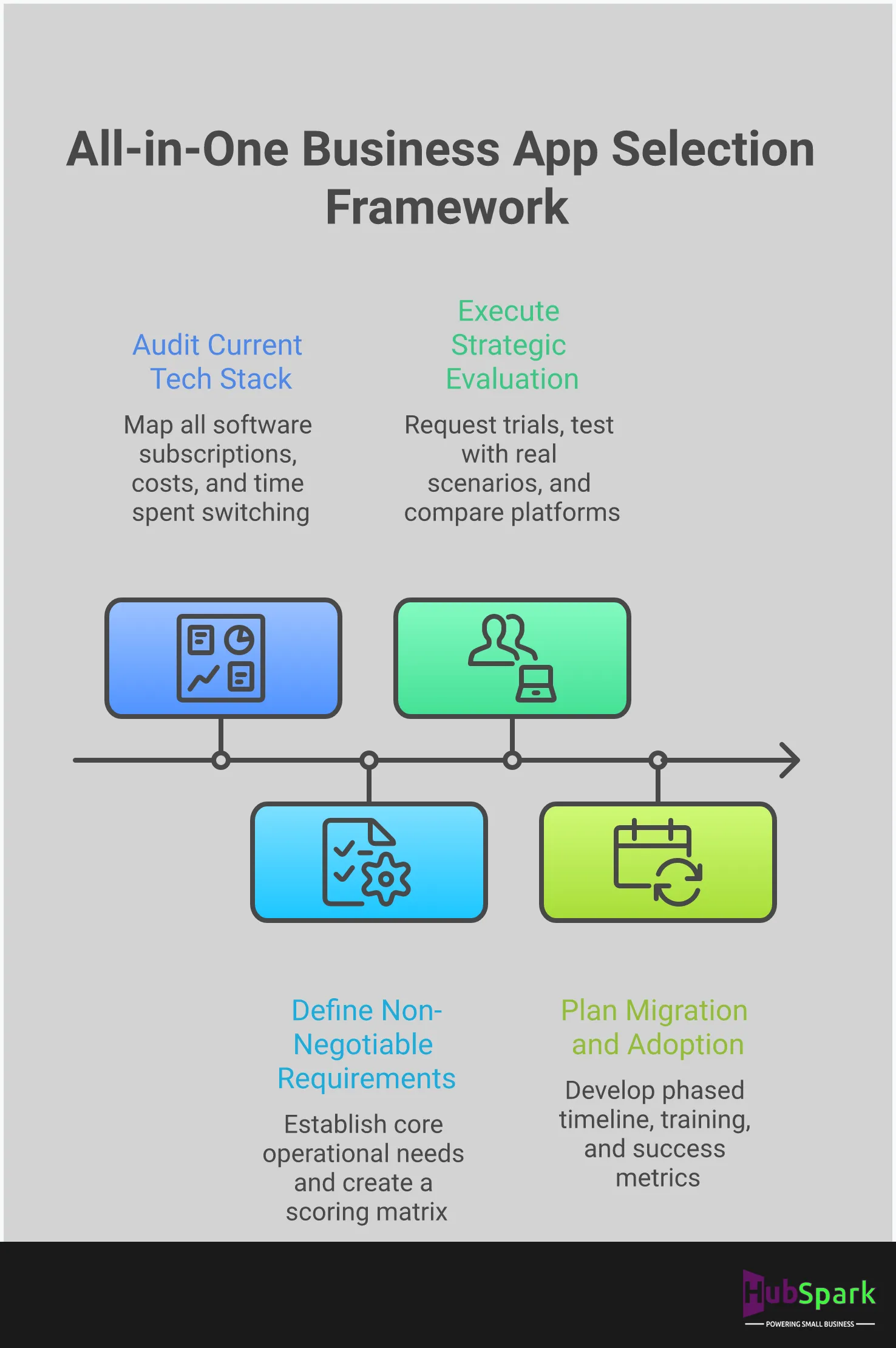
Selecting a single platform to run your business is a significant decision. A haphazard choice leads to wasted time, frustrated staff, and a system that creates more problems than it solves. To avoid this, you need a clear, methodical framework. This isn’t about getting distracted by flashy features; it’s about a disciplined evaluation of your operational reality against the platform’s capabilities. A successful transition requires a precise understanding of your current bottlenecks and a clear vision for a more efficient future.
The right all-in-one app should feel like a natural extension of your business, not a foreign system you have to fight with. It centralizes control, automates repetitive tasks, and gives you the data you need to make smarter decisions. The process for finding this platform can be broken down into three direct steps: assess your current operations, align the app’s features with your specific business needs, and validate your choice with hands-on testing. Following this framework will ensure you select a tool that not only replaces your fragmented tech stack but also accelerates your growth.
Assess Your Current Business Operations
Before you can choose the right solution, you must accurately diagnose your current problems. Start by mapping your daily workflows from the initial customer contact to the final payment. Where are the breakdowns? Are you losing leads because your website form is clunky? Is your team wasting hours manually entering customer data into multiple systems? Using the right apps is critical for staying organized and productive, but you first need to identify which parts of your business lack organization.
Pinpoint the exact operational pain points that cost you time and money. This could be anything from managing online reviews to scheduling appointments and coordinating dispatches. A clear assessment gives you a concrete list of problems that need solving. This list becomes your scorecard for evaluating any potential all-in-one platform. Without this initial step, you risk choosing a system that doesn’t address the fundamental inefficiencies holding your business back.
Align App Features with Your Business Needs
Once you have a clear list of your operational challenges, the next step is to match them to specific software features. If your assessment revealed that you struggle with online visibility, then strong local SEO and listings management tools are non-negotiable. If missed calls and disorganized follow-ups are the issue, then a unified inbox with integrated phone and SMS capabilities is a priority. The goal is to find a platform that offers a comprehensive solution tailored to your specific requirements.
A true all-in-one platform like HubSpark unifies everything your business needs, from customer management and invoicing to payments and reputation management. Don’t get sold on a long list of features you’ll never use. Instead, focus on the core functions that directly address the pain points you identified. The right app will provide a cohesive set of tools that work together to streamline your entire operation, eliminating the need to patch together multiple, disconnected applications.
Beyond the Hype: Real User Reviews of All-in-One Apps
Marketing materials show you the ideal version of a product. Real user reviews reveal its true performance. Before you commit to a platform that will become the operational core of your business, it is critical to analyze feedback from other business owners. Their experiences provide the most accurate measure of an app’s day-to-day reliability, usability, and the quality of its customer support.
This is not about finding a platform with zero negative reviews. It is about identifying patterns. Do users consistently praise the platform’s stability? Do they find the features intuitive or cumbersome? Is the support team a genuine partner in their success? Answering these questions separates the adequate solutions from the truly transformative ones. Look for reviews that describe how the software solved a specific operational bottleneck, as this indicates a tangible return on investment. A platform that centralizes your entire operation must be vetted with extreme care, and firsthand accounts are your most valuable source of intelligence. Ignore the hype and focus on the evidence presented by people who use the tool every single day to run a business just like yours.
User Feedback on Performance and Reliability
For a service business, downtime is not an option. A glitch in your scheduling software or a lag in your payment processor directly impacts your revenue and reputation. That is why reliability is the first thing to scrutinize in user reviews. A superior all-in-one platform must perform flawlessly as the single source of truth for your operations. Look for comments that focus on system stability, speed, and data integrity.
Business owners report that a truly unified system eliminates the weak points created by juggling multiple apps. As one review notes, HubSpark unifies everything from local SEO and Google Business Profile management to invoices and payments into one intelligent platform. This consolidation is the foundation of reliability. When your core functions operate from a single, stable dashboard, you spend less time troubleshooting tech and more time running your business.
What Users Say About Features and Usability
An extensive feature list is useless if the tools are difficult to use. The purpose of an all-in-one app is to simplify your work, not add another layer of complexity. User reviews offer a clear window into the platform’s true usability. Pay attention to how users describe the interface and the process of integrating the software into their daily routines. The goal is to find a system that feels like a natural extension of your workflow.
Effective platforms combine powerful tools like a CRM for business growth with the simplicity needed for rapid adoption. Users often highlight the ability to automate key functions as a major advantage, allowing them to “manage your most important business functions on autopilot.” This is the mark of exceptional design: the platform works for you, streamlining everything from lead capture to final payment without requiring constant manual oversight.
Evaluating Customer Support Experiences
When an issue arises, the quality of customer support becomes paramount. A slow or unhelpful support team can bring your operations to a halt. When reading reviews, look beyond simple ratings and examine how users describe their support interactions. Did the support team resolve the issue quickly? Were they knowledgeable and professional? The best software providers act as partners, invested in helping you solve problems and optimize your use of the platform.
Think of it this way: you use software to manage your company’s reputation, so your software partner must be equally committed to managing theirs. Excellent support helps you build trust in the platform and its ability to support your business long-term. A strong reputation management strategy starts with reliable partners, and your all-in-one app provider should be at the top of that list.
Your Blueprint for a Seamless All-in-One App Implementation
A successful transition to an all-in-one platform is not accidental; it is engineered. Moving from a fragmented tech stack to a unified system requires a clear, strategic plan. This blueprint outlines the critical steps to execute a seamless implementation, ensuring your business capitalizes on the new system from day one. Follow this framework to manage the migration, train your team effectively, and measure the return on your investment.
Establish Your Migration Timeline
A defined timeline is the foundation of a smooth transition. Start by auditing your existing tools and identifying the essential data to migrate, such as customer lists, appointment histories, and financial records. Map out a phased approach: data export, system configuration, and a firm go-live date. This prevents operational chaos and ensures continuity. While the initial investment can seem like a challenge, consolidating your software stack ultimately reduces long-term costs. A well-structured timeline allows you to manage resources efficiently and execute the switch with minimal disruption to your daily operations.
Train Your Team to Maximize Adoption
Your new platform is only as effective as the team using it. The primary challenge in any system change is breaking old habits. To overcome this, implement a mandatory, hands-on training program. Focus on how the new system simplifies daily tasks and eliminates previous frustrations. Demonstrate the direct benefits, like how a unified messaging inbox centralizes all client communication. Appoint a power user or team lead to champion the new software and provide peer support. Clear documentation and ongoing training will transform resistance into proficiency, ensuring you get the maximum value from your investment.
Measure Your ROI and Define Success
Success must be quantifiable. Before you migrate, define what a successful transition looks like for your business. Establish clear key performance indicators (KPIs) to track progress. These could include a reduction in monthly software subscriptions, an increase in positive online reviews, or a higher lead conversion rate. A true all-in-one system connects your marketing efforts directly to revenue. HubSpark, for example, links your local SEO performance to lead capture and customer conversion, allowing you to measure a tangible return on investment. Eliminating redundant software not only saves money but also reduces the risk of errors that cost you customers and create rework for your team.
Related Articles
- 7 Best Small Business Management Software of 2026
- Small Business Management Software | HubSpark Solutions
Frequently Asked Questions
Is an all-in-one app actually more cost-effective than the individual apps I’m already using? When you calculate the true cost, a single platform is almost always more cost-effective. The expense of using multiple apps goes beyond the sum of their subscription fees. You must also account for the cost of lost productivity from switching between systems, the financial risk of data entry errors, and the time your team wastes on manual tasks. A unified platform consolidates these expenses into one predictable fee and eliminates the operational drag that quietly drains your revenue.
What if my business has a very specific need that an all-in-one platform doesn’t cover? This is a valid concern, which is why choosing a platform designed for your industry is critical. Many generic platforms lack the specialized tools a service business requires. A true all-in-one operating system like HubSpark is built specifically to manage the entire workflow of a service business, from local SEO and lead capture to appointment management and payment processing. The goal is to find a system where your core operational needs are native features, not afterthoughts or integrations.
How complicated is it to transfer my existing customer and appointment data to a new platform? The complexity of data migration depends entirely on your preparation. A successful transition is a planned process, not a sudden switch. You should begin by auditing your current data to identify what is essential to move. Reputable software providers offer tools and support to guide you through exporting information from your old systems and importing it correctly into the new one. With a clear plan, data migration becomes a manageable project, not a major obstacle.
My team is used to our current tools. How can I ensure they will actually use the new system? Team adoption hinges on demonstrating clear value. The new system must make their jobs easier, not more complicated. The key is effective, hands-on training that focuses on how the platform solves their specific daily frustrations, such as eliminating double data entry or centralizing customer communications. When your team sees that a unified dashboard allows them to work more efficiently, they will be more likely to embrace the change.
All these platforms sound similar. How do I decide which one is truly the best for my service-based business? You must look past the marketing and evaluate each platform’s core function. Many systems are designed for a different type of user. For example, HubSpot is built for marketing teams, and Monday.com is for internal project management. A service-based business has unique operational needs, including job scheduling, reputation management, and local search visibility. The right choice is a platform built from the ground up to solve these specific challenges, integrating every step of the customer journey from the initial search to the final payment. Download HubSpark today!

I am a serial entrepreneur with a 20+ year background in marketing & advertising, with a specific focus on SEO/online/digital marketing. I have a passion for helping owners of small & medium sized businesses grow rapidly through organic search engine optimization & digital marketing. I am blessed to lead a team of some of the most hard working, brilliant, and passionate team to help all of our clients reach their revenue goals!
 App Today!