

The inefficiency of a disconnected software stack is a direct drain on your profitability. When your team wastes time searching for files across different devices, untangling email attachments, and questioning which document is the latest version, you are losing money. This operational chaos is a bottleneck that prevents your business from performing at its peak. A centralized cloud storage system is the solution. It consolidates your critical files into one accessible, secure location. The right platform does more than just store data; it integrates with your workflow, connecting files to client profiles, projects, and communications. Finding the best cloud storage for small business is about eliminating these bottlenecks and implementing a system that accelerates your entire operation, turning wasted time into productive work.

Key Takeaways
- Choose integration over fragmentation: Standalone storage apps create data silos and operational bottlenecks. Select a platform that embeds file management directly into your CRM and daily workflows to centralize control and accelerate your processes.
- Make security a mandatory requirement: Your business data is a core asset, not an afterthought. Your cloud storage must include end-to-end encryption, two-factor authentication, and detailed audit logs as standard features to protect client information and maintain compliance.
- Align your choice with your core operations: Do not select a one-size-fits-all solution. Identify your primary business need, such as real-time collaboration or secure data backup, and choose the provider whose core function directly solves that specific operational challenge.
Why Cloud Storage is Non-Negotiable for Your Business
Relying on local hard drives or a single office server to store your business-critical files is an operational risk you cannot afford. A lost laptop, a crashed hard drive, or a simple miscommunication about the latest version of a quote can create significant bottlenecks and financial losses. To operate efficiently and securely, your business requires a centralized, accessible system for its data. This is not a luxury; it is a foundational requirement for growth.
Cloud storage eliminates these risks by allowing you to store, manage, and access your digital files through the internet. It provides a single source of truth for your entire operation, ensuring your team can work together and access the same up-to-date documents, whether they are in the office or at a client site. This flexibility means your technicians can pull up job specifications on a tablet, and your office manager can send an invoice from any computer, streamlining your entire workflow.
Beyond accessibility, professional cloud storage services provide robust security and disaster recovery. Your data is protected from physical theft, hardware failure, and unforeseen events. The best services offer automatic backups, which means you can quickly restore files and get back to business with minimal disruption. This is your digital insurance policy, safeguarding your client records, financial documents, and project files against catastrophe.
As your business expands, managing file access becomes increasingly complex. A centralized cloud system gives you complete control over user permissions, allowing you to define who can view, edit, and share specific files and folders. Instead of untangling a web of disconnected files spread across multiple devices, you have a scalable infrastructure that grows with your team. This control is essential for maintaining data integrity and ensuring confidential information remains secure.
Evaluating the Top Cloud Storage Providers
Selecting a cloud storage provider requires a clear understanding of your operational needs. The market offers a range of solutions, from collaborative suites to high-security vaults. This evaluation breaks down the top contenders to help you identify the system that aligns with your business goals, whether that’s real-time document editing, comprehensive data backup, or integrated file management within a larger business operating system.
HubSpark’s Integrated File Management
HubSpark centralizes your operations, and file management is a core component of that strategy. Instead of a standalone storage app that creates another data silo, our platform integrates file storage directly into your workflow. You can attach contracts to client profiles in the CRM, share project files within team messages, and link documents to appointments. This approach eliminates the inefficiency of switching between applications. Your critical files are always in context, accessible right where you do your work. This isn’t just storage; it’s an operational asset designed to accelerate your processes and maintain a single source of truth for your business data.
Google Drive
Google Drive is built for collaboration. Its primary strength lies in its seamless integration with Google Docs and Sheets, making it the standard for teams that need to co-author and edit documents in real-time. As noted by PCMag, its collaboration features are a key differentiator. With 15 GB of free storage to start, it offers an accessible entry point for small businesses. If your team already operates within the Google Workspace ecosystem, Drive is a logical and powerful extension. It centralizes your documents and facilitates a fluid, collaborative workflow without the friction of downloading and re-uploading files.
Microsoft OneDrive
For businesses standardized on Microsoft 365 and Windows, Microsoft OneDrive is the superior choice. Its deep integration into the Microsoft ecosystem is its greatest asset. PCMag calls it the best overall cloud storage solution because of its user-friendly design and compatibility across all major devices, including Android, iPhone, and Mac. This makes sharing and collaborating on files straightforward, especially when working with Word documents, Excel spreadsheets, or PowerPoint presentations. If your operations depend on Microsoft software, OneDrive provides a cohesive and efficient file management experience that feels like a natural part of your existing tools.
Dropbox Business
Dropbox Business has built its reputation on reliable file synchronization and simple, intuitive sharing capabilities. It excels at ensuring your files are always up-to-date across all your devices, which is critical for teams on the move. According to Business.com, its strength also lies in its ability to integrate with a variety of third-party tools, making it a flexible hub for your files even if you use a diverse software stack. For businesses that need a dependable, no-fuss solution for storing and sharing files with both internal teams and external clients, Dropbox provides a proven and effective platform.
IDrive Business
IDrive Business is a strong contender for businesses prioritizing comprehensive data backup at an affordable price. Its standout features include the ability to back up files from an unlimited number of devices, including servers and external hard drives, all under a single account. This makes it a highly cost-effective solution for protecting all your company’s critical data. PCMag highlights its robust backup options and affordability as key advantages. If your primary need is not just file storage but a secure and complete backup system to safeguard against data loss, IDrive offers a powerful and economical solution.
Proton Drive
When data security is your top priority, Proton Drive is the definitive choice. It is engineered around privacy, offering end-to-end encryption that ensures only you and your authorized users can access your files. This security is grounded in strict Swiss privacy laws, providing an additional layer of protection. As Business.com points out, this focus on privacy makes it an excellent choice for businesses that handle sensitive client information or proprietary data. For law firms, financial advisors, or any business where confidentiality is non-negotiable, Proton Drive delivers the high-level security required to protect your most valuable assets.
Critical Features to Demand From Your Cloud Storage
Selecting a cloud storage provider is not about finding a digital filing cabinet. It’s about implementing a core operational system for your business. The right solution streamlines workflows and protects your most valuable asset: your data. The wrong one creates bottlenecks, security risks, and operational chaos. As you evaluate your options, don’t settle for basic storage. Demand a platform built for business-level performance.
The features that distinguish a professional-grade service from a consumer-level one are clear and non-negotiable. These capabilities directly impact your team’s efficiency, your data’s security, and your ability to scale without friction. Before committing to any provider, verify that it delivers on these five critical functions. Anything less is a compromise your business cannot afford to make. Your cloud storage should be a tool that accelerates growth, not an obstacle that complicates it.
Secure File Sharing and Permissions
Your business regularly handles sensitive information, from client contracts to financial records. Your cloud storage must give you absolute control over who can access this data. Look for a solution with granular permissions that allow you to define whether a user can view, edit, or comment on a file or folder. This is essential when collaborating with team members, contractors, or clients. The ability to set and revoke access instantly ensures your data remains secure and prevents unauthorized changes or distribution. A system without robust sharing controls is a liability.
File Versioning and Recovery
Mistakes happen. A critical file gets deleted, or a contract is overwritten with incorrect changes. A professional cloud storage solution acts as your safety net with file versioning and recovery. This feature automatically saves previous versions of your documents, allowing you to restore an earlier draft with a few clicks. It provides a complete revision history, showing who made changes and when. This isn’t just a convenience; it’s a crucial function for maintaining data integrity, resolving disputes, and recovering from errors that could otherwise be catastrophic for a project or client relationship.
User Access and Management
As your business grows, so does your team. Your cloud storage must scale with you, and that starts with centralized user management. You need a simple, efficient way to add or remove team members and adjust their access levels from a single dashboard. This prevents former employees from retaining access to company data and ensures new hires have the files they need from day one. A system that complicates user management creates security gaps and administrative headaches. Demand a platform that makes it easy to maintain a clear and secure overview of all user accounts and permissions.
Cross-Device Synchronization
Your team works from the office, from home, and on the go. Your files must be accessible wherever they are. Reliable cross-device synchronization ensures that the latest version of every file is available on desktops, laptops, tablets, and smartphones. For a service business with technicians in the field, this is fundamental. An HVAC technician needs to pull up the latest work order on a tablet, and a sales rep needs to access a presentation from their phone. Seamless sync eliminates delays and empowers your team to be productive from any location, on any device.
Application Integration
Your cloud storage should not operate in a silo. To achieve maximum efficiency, it must connect with the other software you use every day. Look for a provider that offers strong application integration with tools like your CRM, project management software, and communication platforms. When your systems work together, you eliminate the need to constantly switch between apps, download, and re-upload files. This creates a smoother workflow and reduces the chance of error. An integrated environment is the foundation of a streamlined, modern business operation, which is why platforms like HubSpark build these capabilities directly into a unified system.
Decoding Cloud Storage Pricing: What You’ll Actually Pay
The advertised monthly fee for a cloud storage service is just the starting point. To determine the true cost, you must look deeper at the pricing structure and how it aligns with your business operations. The total investment depends on your data volume, team size, and the specific features you require to operate efficiently. Many businesses get locked into plans that become prohibitively expensive as they grow, simply because they didn’t analyze the fine print. Before you commit, you must evaluate the provider’s scalability, pricing model, and any potential hidden fees. This analysis ensures you select a solution that supports your financial health and operational needs without creating future budget crises. A smart decision here protects your bottom line and provides a predictable, stable cost structure for a critical business utility.
Understanding Storage Limits and Scalability
Cloud storage eliminates the need for physical servers by allowing you to manage digital files over the internet. Its primary advantage is flexibility; you can increase or decrease your storage capacity as your business needs change. However, not all plans are created equal. A basic plan might offer 1 TB of storage, but if your team regularly works with large files like high-resolution photos or video, you will hit that limit quickly. Your provider must offer a clear and affordable path to scale. A plan that grows with you is an asset, while one with steep overage fees is a liability. This is especially critical as you accumulate more client data within your business CRM.
Comparing Per-User vs. Storage-Based Models
Cloud storage providers typically use one of two pricing models: per-user or storage-based. A per-user model charges a flat rate for each team member with access, which is common for platforms emphasizing collaboration. A storage-based model charges for a specific amount of storage shared across an unlimited number of users. To choose correctly, you must do the math for your business. If you have a small team with large data needs, a storage-based plan is likely more economical. If you have a large team that only needs to store documents, a per-user plan might be the better fit. Small businesses often spend between $50 and $200 per month, so modeling your costs is a critical step in managing your business payments.
How to Maximize Free Trials
Never purchase a cloud storage solution without testing it first. A free trial is your opportunity to validate that the platform works for your team’s specific workflows. Don’t just sign up and browse the features. Create a structured evaluation plan. Start by identifying two or three core team members to participate. Give them specific tasks to complete, such as uploading a large project folder, sharing a file with an external client, and recovering a previous version of a document. This hands-on approach reveals any friction points or limitations before you make a financial commitment. Use this trial period to see how a truly integrated platform like HubSpark can streamline your operations compared to a standalone tool.
Identifying Hidden Costs and Fees
The most common surprise in cloud storage billing comes from hidden fees. Many providers charge extra for services you might assume are included. Watch out for data transfer fees (egress fees), which are charges for moving your data out of the provider’s servers. Other costs can include fees for exceeding storage or user limits, charges for priority customer support, and add-on costs for critical security features. Essential protections like 256-bit AES encryption and two-factor authentication should be standard, not premium upgrades. A provider that nickel-and-dimes you for security is not a true partner in protecting your business and its reputation.
A Security Breakdown: Protecting Your Business Data
Your business data, from customer lists to financial records, is one of your most critical assets. Protecting it is not an IT problem; it is a core business function. When your data is scattered across multiple applications, you create multiple points of failure. A single weak link can expose your entire operation. A professional-grade cloud storage solution must be built on a foundation of uncompromising security.
Evaluating a provider’s security requires looking beyond marketing claims. You must scrutinize their protocols for data protection, access control, and operational transparency. These are not optional features or premium add-ons. They are the minimum requirements for any platform you entrust with your company’s information. The following security pillars are non-negotiable for any serious business.
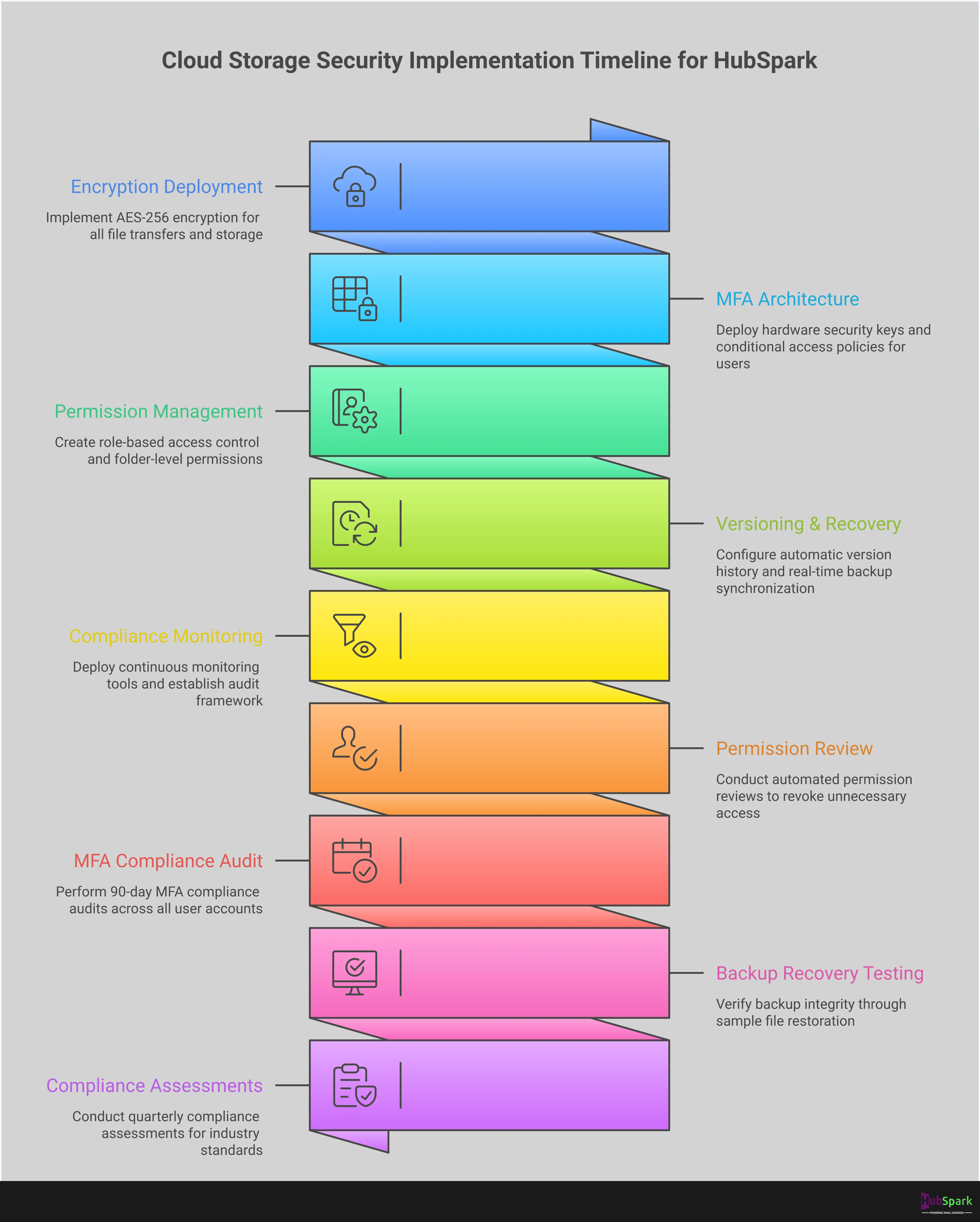
Data Encryption Standards
Encryption is the process of converting your data into an unreadable code to prevent unauthorized access. Your cloud storage provider must use robust encryption both when your files are in transit (being uploaded or downloaded) and at rest (stored on their servers). This ensures that even if a server is physically compromised, your data remains secure. For businesses in specific industries, such as healthcare or finance, adherence to standards like HIPAA is not just best practice; it is a legal requirement. Do not consider any provider that fails to meet these fundamental encryption benchmarks.
Two-Factor Authentication (2FA)
A password alone is an inadequate defense. Two-factor authentication adds a critical second layer of security, requiring a user to provide a second piece of information, like a code sent to their phone, before granting access. This simple step can prevent the vast majority of unauthorized access attempts caused by stolen or weak passwords. Implementing 2FA across your business tools is one of the most effective security measures you can take. Any platform that manages sensitive customer relationship management data must offer and enforce this feature.
Activity Monitoring and Audit Logs
You need complete visibility into who is accessing your company’s files and when. Activity monitoring and audit logs provide a detailed, unchangeable record of every action taken within your storage environment. This includes file views, edits, downloads, and deletions. This level of transparency is essential for internal accountability and for quickly identifying and responding to suspicious activity. If a security issue arises, these logs are indispensable for tracing the source and scope of the breach. A lack of audit trails is a significant operational risk.
Regulatory Compliance
Depending on your industry and location, you may be legally required to comply with specific data protection regulations like GDPR for European customer data or HIPAA for health information. Using a non-compliant cloud storage provider exposes your business to severe financial penalties and reputational damage. Before selecting a solution, verify its compliance certifications. A trustworthy provider will be transparent about the regulations they adhere to, especially for critical functions like processing payments solutions or storing client records.
A Head-to-Head Comparison: Strengths and Weaknesses
Making a decision on cloud storage requires a clear-eyed assessment of what each platform delivers against what your business actually needs. The market is crowded with options, each with a distinct operational focus. Some prioritize seamless collaboration, while others are built for maximum security or comprehensive data backup. This comparison is not about finding a single “best” provider; it’s about identifying the most efficient tool for a specific job. Your choice will directly impact your team’s workflow, data security, and budget. A service-based business that shares project files with clients has different requirements than a firm that must archive sensitive records for compliance.
As you evaluate these contenders, consider how they fit into your existing software stack. A standalone storage solution can solve one problem but may fail to address the larger issue of operational disconnect. The goal is to centralize control, not add another disconnected app to your workflow. This breakdown cuts through the marketing noise to give you the critical data points needed to make a decisive choice. We will examine the core strengths and critical weaknesses of the leading platforms, so you can align your investment with your operational goals and eliminate inefficiencies.
Google Drive
Google Drive is the default choice for businesses heavily invested in the Google Workspace ecosystem. Its primary strength is the flawless integration with tools like Google Docs and Sheets, which allows for efficient real-time team collaboration. The platform offers a generous 15 GB of free storage, making it an accessible entry point. However, its security features present a significant weakness for businesses handling sensitive information. Shared files lack native password protection, and broader privacy concerns persist.
Storage and Cost: You get 15 GB for free, which is shared with Gmail and Google Photos. Paid Google One plans begin at $1.99 per month for 100 GB.
Microsoft OneDrive
For businesses operating on Windows and using the Microsoft 365 suite, OneDrive is the most logical and integrated solution. It functions as a native extension of the operating system, providing a cohesive experience across applications like Word, Excel, and Teams. Its design is clean, and it performs reliably across all devices, including Mac, Android, and iOS. The main drawback is its limited utility outside of the Microsoft environment. If your business does not subscribe to Microsoft 365, OneDrive loses much of its collaborative power and becomes a less compelling option.
Storage and Cost: The free plan includes 5 GB. Additional storage is included with Microsoft 365 plans, which start at $9.95 per month.
Dropbox Business
Dropbox is a well-established player known for a feature set that extends far beyond simple file storage. It includes tools for online document editing, screen recording, and even password management. This extensive functionality makes it a powerful, all-in-one content platform for some teams. The trade-off is cost and complexity. The platform can feel unnecessarily complicated for businesses that only need secure file sharing. With a small 2 GB free tier and premium pricing, Dropbox Business is one of the more expensive options on the market.
Storage and Cost: The free plan offers 2 GB. Paid plans start at approximately $11.99 per month.
IDrive and Proton Drive
For businesses with highly specific priorities, IDrive and Proton Drive offer specialized solutions. IDrive is an extremely affordable option that merges cloud storage with complete device backup capabilities. You can back up unlimited devices and even create a physical copy of your data. While its interface is less polished, its value for data redundancy is exceptional. Proton Drive is built entirely around security. It uses end-to-end encryption, guaranteeing that no one, not even Proton, can access your data. It is the definitive choice for businesses where confidentiality is non-negotiable.
Storage and Cost: IDrive offers 10 GB for free, with paid plans starting as low as $2.99 per year. Proton Drive provides 5 GB for free, with paid plans starting around $2 per month.
Matching a Solution to Your Business Operations
Your cloud storage choice should directly support your daily workflow, not complicate it. The right platform depends entirely on your operational priorities. A roofing company with crews in the field has different needs than a law firm managing sensitive case files from a central office. Before you commit to a provider, define your primary use case. This clarity will dictate which features are essential and which are simply noise. Stop looking for a one-size-fits-all solution and start matching the technology to your specific business demands.
For Real-Time Team Collaboration
If your team frequently co-authors documents, spreadsheets, or presentations, you need a platform built for simultaneous work. This eliminates version control issues and accelerates project completion. For this, Google Drive is an excellent choice, offering seamless integration with Google Docs and Sheets. This setup allows your sales team to update a quote while an admin reviews the details in real time. The goal is to create a single source of truth for every project, ensuring everyone works from the most current information without endless email attachments.
For Secure Backup and Recovery
Your business data is one of your most valuable assets. Losing client records, invoices, or project files due to hardware failure or a cyberattack is a critical threat. Your storage solution must double as a robust backup system. A service like IDrive is designed for this purpose, combining cloud storage with comprehensive backup features. It allows you to secure data from unlimited devices, including servers and external hard drives. This isn’t just about storage; it’s about implementing a disaster recovery plan that ensures your business can continue operating no matter what happens.
For Remote and Mobile Workforces
When your team operates outside the office, they need immediate access to job files, client information, and schedules from any device. This is non-negotiable for service businesses with technicians in the field. Microsoft OneDrive excels here, integrating smoothly with Windows and Microsoft 365. Its user-friendly mobile apps make it simple for your team to share files and collaborate from anywhere. This capability ensures a technician can pull up schematics on a tablet onsite, directly improving efficiency and the customer relationship.
For Industry-Specific Needs
Certain industries operate under strict data security and privacy regulations. If you manage medical records, legal documents, or financial data, compliance is mandatory. Violations lead to severe penalties and destroy client trust. Before selecting a provider, verify that it adheres to essential regulations like HIPAA for healthcare or GDPR for handling European customer data. A reputable cloud storage service will be transparent about its compliance standards. Choosing a compliant provider is a fundamental step in protecting both your clients and your business from significant legal risk.
Overcoming Key Implementation Challenges
Switching to a new cloud storage system presents operational hurdles. A successful transition is not about the technology alone; it’s about strategy. Anticipating and planning for challenges like data migration, team adoption, and system integration is the difference between a streamlined upgrade and a chaotic disruption. Address these three areas directly to ensure a smooth implementation and immediate return on your investment.
Executing a Seamless Data Migration
Moving your company’s data is a critical operation that demands precision. The goal is to transfer all files securely and efficiently with zero data loss or business interruption. Start by auditing your current data. Archive old, unnecessary files and organize what remains into a logical structure. This simplifies the process and reduces clutter in your new system. A quality cloud solution offers the flexibility to scale your storage as needed, so you can adjust resources during the migration. Plan the migration for a low-activity period, like a weekend, to minimize impact on your team’s productivity.
Driving Team Adoption
Your new cloud storage is only effective if your team uses it correctly. Resistance to change is common, so your adoption strategy must be clear and decisive. Mandate the new system from day one. Provide straightforward training that focuses on the workflows your team uses most. The best way to ensure adoption is to choose a system that integrates with tools they already use, like their email or project management software. By making the new platform an integral and seamless part of their daily tasks, you eliminate the friction that causes employees to revert to old, inefficient methods.
Integrating with Existing Systems
A new tool must not create new problems. Your cloud storage solution must integrate flawlessly with your existing business software, from your CRM to your accounting platform. A fragmented system where data is siloed across incompatible apps is a major operational bottleneck. This is why an all-in-one platform is the superior model. HubSpark’s integrated file management works directly with your customer relationship management (CRM) and other business tools, eliminating the integration challenges that come with standalone storage providers. This centralized approach ensures data flows freely where it’s needed, accelerating your operations instead of slowing them down.
The Power of Integrated vs. Standalone Storage
Choosing a cloud storage provider isn’t just about buying digital space; it’s a strategic decision that impacts your entire operation. Many business owners default to standalone storage solutions like Dropbox or Google Drive. While familiar, these tools operate in a vacuum. They create another island of data that doesn’t communicate with your CRM, your invoicing system, or your scheduling software. This fragmentation is a direct bottleneck to efficiency, forcing your team to constantly switch between apps and manually connect information.
An integrated storage solution, by contrast, is built directly into your core business operating system. It’s not just a place to keep files; it’s a dynamic part of your workflow that connects information to action. This approach eliminates the need to constantly switch between applications, search for client files, or manually attach documents to customer records. When your file storage is part of a unified platform, everything is housed within a single dashboard, turning your digital files from a passive repository into an active business asset.
Centralize Control and Simplify Access
As your team grows, managing who has access to which files becomes a significant operational challenge. Standalone systems often require you to manually add and remove users across different platforms, creating security risks and administrative headaches. An integrated system provides centralized management for user permissions. From one dashboard, you can control access based on roles and responsibilities, ensuring that sensitive information is protected and that team members only see the files relevant to their work. This simplifies onboarding new employees and securely offboarding former ones, giving you complete control over your company’s data.
Accelerate Workflows, Not Just Store Files
The primary function of standalone storage is just that: storage. It doesn’t inherently make your team work faster. An integrated solution, however, is designed to accelerate your processes. Many modern platforms offer more than just storage, bundling in advanced collaboration tools that are part of a larger system. Imagine attaching a signed contract directly to a customer’s profile in your CRM software, linking project blueprints to a scheduled job, or accessing an invoice from a client’s communication history. This level of integration eliminates wasted time spent searching for documents and ensures every piece of data is contextually available where you need it.
Fortify Security and Ensure Compliance
Data security is not something you can afford to get wrong. While many standalone services offer basic protections, integrated platforms often provide a more robust security framework. Because they manage the entire customer lifecycle, from lead capture to payment, these systems are built with comprehensive security in mind. Reputable cloud storage services adhere to critical privacy and security regulations, which is essential if you handle sensitive client information. By choosing an integrated solution, you are adopting a system where security and compliance are core components, not add-ons, protecting your business and your customers from risk.
The Final Verdict: Making the Right Choice
Selecting a cloud storage provider is a critical operational decision, not just an IT expense. The right choice streamlines your workflow, while the wrong one creates data silos and security risks. There is no single “best” provider; there is only the provider that best aligns with your company’s specific needs for security, collaboration, and integration. To make a decisive choice, evaluate your options against these four operational pillars.
Prioritize Seamless Integration
Your cloud storage cannot operate in a vacuum. It must function as a natural extension of your existing business tools. Before committing, confirm that the provider integrates flawlessly with your current office suite, whether it’s Google Workspace or Microsoft 365. This alignment minimizes setup hassle and ensures your team can maintain productivity without learning a disruptive new system. A storage solution that works with your CRM, project management software, and communication tools eliminates friction and centralizes your data flow, which is the foundation of an efficient operation.
Scrutinize Security and Compliance
For a small business, a data breach is a catastrophic event. Your cloud storage is the vault for your most sensitive information, from client contracts to financial records. Therefore, security is not a feature to compare; it is a non-negotiable requirement. Verify that any potential provider offers end-to-end encryption, two-factor authentication, and detailed audit logs. Furthermore, ensure the service adheres to any industry-specific regulations you are subject to. Reputable cloud storage services follow important rules for security and privacy, such as HIPAA for healthcare or GDPR for handling European data.
Balance Your Budget with Essential Features
While cost is always a factor, the cheapest option is rarely the most valuable. Instead of focusing solely on the price per terabyte, analyze the features that directly impact your team’s efficiency. Does the service offer robust file versioning to recover from accidental deletions? Can you set granular user permissions to control data access? When you consider your budget, weigh it against the platform’s security protocols, integration capabilities, and management tools. The goal is to invest in a solution that provides a clear return through improved productivity and data protection.
Test Before You Commit
Never purchase a business-wide solution based on a features list alone. A platform that looks perfect on paper may have a clunky interface or poor synchronization that frustrates your team. Reputable providers understand this and offer free trials. Use this opportunity to test the system in a real-world environment. Always start with a free trial or a pilot program with a small group of users. Assign a specific project and evaluate the platform’s performance on file sharing, collaboration, and mobile access before deploying it across your entire organization.
Related Articles
- Document Management Software for Businesses – HubSpark
- Small Business Management Software | HubSpark Solutions
Frequently Asked Questions
I already use a free service like Google Drive for personal files. Is a paid business plan really necessary? Yes, it is. Free, consumer-grade plans lack the critical features a business requires to operate securely and efficiently. Business plans provide essential tools like centralized user management, granular file permissions, detailed activity logs, and priority customer support. These features give you control over your company’s data, protect you from security risks, and ensure you can recover files in a disaster, which are non-negotiable functions for any serious business.
How secure is my data, really? Can the cloud storage provider see my files? Professional cloud storage services use end-to-end encryption, which means your files are converted into an unreadable code before they even leave your device. This code can only be unlocked by an authorized user with the correct key. For providers like Proton Drive, this means not even their own employees can access your data. Always verify that a provider uses this level of encryption to ensure your sensitive business information remains completely confidential.
What’s the biggest mistake businesses make when choosing a cloud storage provider? The most common mistake is treating cloud storage as a separate, isolated tool. Business owners often choose a familiar standalone app without considering how it connects to their other essential software, like their CRM or invoicing system. This creates data silos and forces your team to waste time switching between applications. The correct approach is to select a system where file management is integrated directly into your core operational platform, ensuring your data is always connected and accessible where you need it most.
How much storage space does my business actually need? This depends entirely on the types of files you work with. A business that primarily handles text documents and spreadsheets may only need a few hundred gigabytes. However, if you manage high-resolution photos, videos, or large design files, you will require several terabytes. Start by auditing your current file storage to get a baseline, and then project your needs for the next year. A quality provider will offer scalable plans that allow you to easily increase your storage as your business grows.
Is it difficult to switch from one cloud storage provider to another? Switching providers requires a clear plan but is not inherently difficult. The process involves migrating your data from the old system to the new one. To make this seamless, you should first organize and clean up your existing files, archiving anything you no longer need. Most professional services offer tools or support to help with the migration. Plan the final transfer during a period of low business activity, like over a weekend, to prevent any disruption to your team’s workflow.

I am a serial entrepreneur with a 20+ year background in marketing & advertising, with a specific focus on SEO/online/digital marketing. I have a passion for helping owners of small & medium sized businesses grow rapidly through organic search engine optimization & digital marketing. I am blessed to lead a team of some of the most hard working, brilliant, and passionate team to help all of our clients reach their revenue goals!
 App Today!