
Your iPhone is your mobile office, but if your invoicing process is disconnected from the rest of your operations, you’re creating unnecessary work. A standalone app that only generates a PDF is a bottleneck, not a solution. It forces you into manual data entry, creates reconciliation headaches, and delays your cash flow. The search for the best invoice app for iPhone is not about finding another single-purpose tool to add to your collection of disconnected software. It’s about finding a system that integrates billing directly into your workflow. A superior app centralizes your client data, appointments, and payment processing into one command center, eliminating friction and transforming a tedious administrative task into a seamless, revenue-accelerating function.
Key Takeaways
- Choose an integrated platform, not a single-purpose tool: A standalone app creates data silos and manual work. Select a system that connects invoicing directly to your CRM and payment processing to eliminate errors and streamline your entire operation.
- Implement features that shorten your payment cycle: Your app must actively accelerate cash flow with non-negotiable functions like multiple payment gateways, direct payment links, and automated reminders that ensure you get paid faster.
- Evaluate the true cost beyond the subscription price: “Free” or low-cost plans often hide expenses in transaction fees and feature limitations. Analyze the total cost, including the operational drag from missing automation, to make a sound financial decision.
What Defines a Superior iPhone Invoice App?
Not all invoice apps are created equal. A basic app lets you send an invoice; a superior app functions as a command center for your cash flow. For a service-based business owner, the right tool doesn’t just create a document, it accelerates payments, reinforces your brand, and eliminates administrative friction. The difference lies in a specific set of non-negotiable features that separate simple tools from strategic business assets. A truly effective app must be more than a digital invoice pad; it needs to be an integrated part of your operational workflow.
First, the interface must be intuitive and fast. You don’t have time to fight with complicated software on a job site. A superior app allows you to generate and send a professional invoice in minutes, not hours. This includes robust customization features that let you add your company logo, brand colors, and personalized messages. Every invoice that leaves your phone is a reflection of your business, and it must look professional and polished. This consistency builds trust and reinforces your brand identity with every customer interaction.
Next, a top-tier app must offer seamless integration and payment flexibility. An isolated invoicing tool creates more work by forcing you to manually reconcile data with your other systems. The best apps connect directly with payment processors, CRMs, and accounting software. This ensures your financial records are always accurate and up-to-date. Offering clients multiple ways to pay, such as credit cards and bank transfers, is also critical. Flexible payment solutions remove barriers for your customers, which means you get paid faster.
Finally, demand real-time tracking and automation. A superior app gives you complete visibility into the status of your invoices. You should be able to see precisely when a client has viewed and paid an invoice without having to ask. This real-time tracking is essential for managing your cash flow effectively. Furthermore, automated payment reminders eliminate the need for awkward follow-up calls and emails. The app should handle the persistent, professional follow-up for you, freeing you to focus on running your business.
Evaluating the Leading iPhone Invoice Apps
Selecting an invoice app is a critical operational decision. The right tool does more than generate a bill; it accelerates your cash flow, professionalizes your brand, and integrates with your core business functions. A fragmented approach, where invoicing is disconnected from your customer management and scheduling, creates unnecessary work and slows down payments. The goal is to find a system that streamlines the entire process from appointment to payment, not just one that creates a PDF.
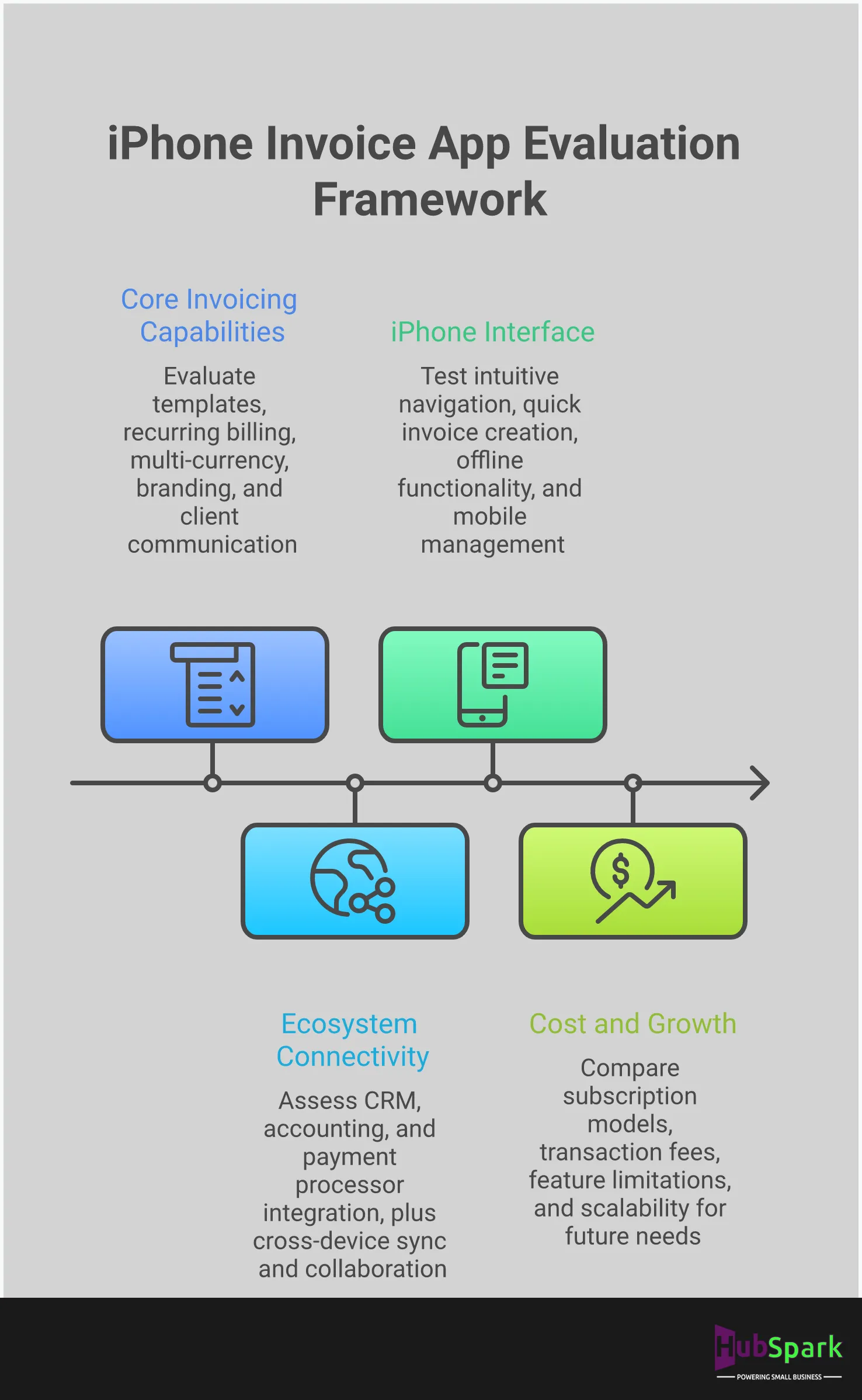
We will evaluate the top iPhone invoice apps based on their core strengths and ideal use cases. This analysis moves beyond feature lists to assess how each platform functions within a real-world business environment. We will examine their capacity for integration, scalability, and overall impact on your operational efficiency. Consider this your framework for choosing an app that supports your business growth instead of creating another administrative bottleneck. Each option presents a different approach to solving the invoicing puzzle, from standalone tools to fully integrated platforms.
HubSpark: Centralize Business Operations with Integrated Invoicing
HubSpark’s invoicing function is not a standalone feature; it is a core component of a complete business operating system. This design eliminates the disconnect between getting paid and managing your customer relationships. Invoices are generated directly from your CRM and appointment data, ensuring accuracy and speed. When a job is complete, an invoice can be sent instantly, without re-entering customer or service details.
This integrated approach provides a single source of truth for all client interactions. You can track an entire customer journey, from initial lead capture to final payment, within one dashboard. HubSpark’s payment solutions are built-in, simplifying reconciliation and giving you a clear view of your revenue. This system is built for service businesses that require efficiency and cannot afford the time lost switching between separate apps for CRM, scheduling, and billing.
Invoice2go: For Professional Templates and Payment Flexibility
Invoice2go is designed for speed and client convenience. Its primary strength lies in its ability to generate and send professional invoices in under a minute. For contractors and freelancers who need to bill on-site immediately after a job, this is a significant advantage. The platform offers a straightforward interface and a gallery of professional templates that you can customize to fit your brand.
The app also excels at payment processing, giving your clients multiple ways to pay, including all major credit cards, PayPal, and Apple Pay. This flexibility can reduce payment delays by meeting customer preferences. While it is an effective tool for creating estimates and invoices quickly, it operates primarily as a billing solution. Businesses requiring deep integration with CRM or marketing automation will need to connect it with other systems.
Zoho Invoice: For a Comprehensive Free-Tier Solution
Zoho Invoice offers a compelling entry point for new businesses with its free plan for users with five or fewer clients. This makes it a practical option for freelancers or small startups managing a limited customer base. The platform is accessible across iPhone, Android, and Windows devices, providing flexibility for owners who work on multiple systems.
However, the limitations of the free tier are important to consider. As your business grows beyond five clients, you will be required to upgrade to a paid plan. While the initial cost is zero, you must plan for this transition. Zoho Invoice is part of a larger ecosystem of business apps, but integrating them requires additional setup. It is a solid starting point, but not a long-term, all-in-one solution for a scaling service business.
FreshBooks: For Powerful Small Business Reporting
FreshBooks is built for the business owner who needs more than just invoicing; they need financial insight. Its standout feature is its robust reporting capability, which allows you to track profitability, analyze expenses, and monitor cash flow directly within the app. This makes it a strong contender for businesses that want to keep a close eye on their financial health without exporting data to separate accounting software.
The app also allows for significant invoice customization, including adding your company logo to maintain brand consistency. With strong customer service and custom pricing tiers, FreshBooks positions itself as a partner in your financial management. It is an excellent tool for generating invoices and understanding the numbers behind them, particularly for small businesses that prioritize detailed financial analytics.
QuickBooks: For Seamless Accounting Integration
For businesses already operating within the QuickBooks ecosystem, its mobile app is the logical choice for invoicing. The primary advantage is the seamless integration with QuickBooks Online, which ensures your accounting records are always accurate and up-to-date. This eliminates the need for manual data entry between your invoicing and accounting platforms, saving time and reducing errors.
The app leverages cloud storage for secure data access from anywhere and connects directly with your bank accounts for easy reconciliation. With multiple pricing plans, it can scale with businesses of various sizes. However, its strength is also its limitation. It functions best as part of the larger QuickBooks suite and does not offer the same all-in-one operational control over CRM, local SEO, or appointment management that a unified platform provides.
Wave Invoicing: For a Completely Free, Full-Featured Option
Wave’s primary appeal is its price tag: it is a completely free invoicing application. Unlike other platforms that limit features or clients on their free tiers, Wave provides unlimited invoicing without a monthly subscription fee. It also includes tools for tracking finances and supports invoicing in any currency, making it a viable option for businesses with international clients.
However, “free” does not mean without cost. Wave generates revenue through payment processing fees, which are comparable to other platforms. While the software itself is free, you will still incur costs to get paid via credit card or bank transfer. It is a powerful tool for businesses on a strict budget, but it remains a dedicated financial tool, requiring separate systems for managing other critical aspects of your business operations.
Bookipi: For a Simple Interface with a Limited Free Plan
Bookipi is designed for simplicity and speed, targeting freelancers and micro-businesses with minimal invoicing needs. Its interface allows users to create and send an invoice in less than a minute. The app offers a free plan, but its utility is severely restricted, allowing you to send a maximum of three invoices every 30 days.
This limitation makes Bookipi unsuitable for any business with a consistent flow of work. It is best viewed as a tool for occasional or side-project billing rather than a central component of your business operations. For any established service business, the free plan’s cap will be an immediate bottleneck. Upgrading to a paid plan is necessary for regular use, at which point you should evaluate its features against other paid competitors.
Non-Negotiable Features for Your iPhone Invoice App
Selecting an invoice app is not about finding the one with the most features; it’s about identifying the one with the right features. The wrong app creates more work, delays payments, and projects an unprofessional image. A superior app, however, functions as a command center for your revenue, streamlining how you bill, track, and collect payments. It centralizes a critical business function, transforming a tedious administrative task into a seamless part of your operation. The following features are not optional extras or nice-to-haves. They are the essential components required to accelerate your cash flow and eliminate administrative drag from your daily workflow. An app missing even one of these core functions is incomplete and will ultimately act as a bottleneck to your growth. Do not settle for a partial solution. Your business requires a tool that is as professional and efficient as you are. This section defines the baseline standard for any invoice app you consider.
Customizable Templates and Professional Branding
Your invoice is a direct reflection of your brand. A generic, poorly designed invoice undermines the professional quality of your work. The best invoice apps provide customizable templates that allow you to add your company logo, brand colors, and personalized messages. This ensures every invoice aligns with your business identity and reinforces brand recognition with your clients. A professional-looking invoice builds trust and signals that you are a serious, organized business. It’s a critical touchpoint in the customer experience, and it should look as polished as the service you provide.
Multiple Payment Processor Integrations
Getting paid quickly depends on making it easy for your clients to pay you. An invoice app that limits payment options creates unnecessary friction. Your clients should be able to pay using their preferred method, whether that’s a credit card like Visa or American Express, PayPal, or Apple Pay. A top-tier app integrates with multiple payment solutions, giving your customers the flexibility they expect. By removing payment barriers, you eliminate excuses for delays and significantly shorten the time it takes for money to hit your account. Don’t let a lack of payment options become a bottleneck in your cash flow.
Automated Invoicing and Smart Reminders
Manually tracking and following up on unpaid invoices is an inefficient use of your time. The core function of a modern invoice app is automation. You need a system that can send recurring invoices for ongoing work and dispatch automatic payment reminders for overdue bills. This ensures consistent follow-up without you having to personally track every due date. By automating these communications, you maintain professionalism, reduce uncomfortable collection conversations, and help your business get paid faster. This feature is fundamental for maintaining a healthy and predictable cash flow without adding to your administrative workload.
Real-Time Mobile Access and Cross-Platform Sync
As a business owner, you aren’t chained to a desk. You need to manage your operations from the field, a client’s office, or your truck. An essential feature is the ability to create, send, and manage invoices directly from your iPhone, with all data syncing instantly across every device you use, including an iPad or desktop computer. This real-time synchronization ensures you always have an accurate, up-to-the-minute view of your finances. It eliminates the risk of sending duplicate invoices or working with outdated information, giving you complete control over your billing from anywhere.
Integrated Expense and Receipt Tracking
An invoice app should provide a clear picture of your profitability, not just your revenue. To do that, it must include integrated expense and receipt tracking. This allows you to capture receipts with your iPhone’s camera and log business expenses directly within the app, often linking them to specific projects or clients. Keeping your income and expenses in one place simplifies financial management and prepares you for tax season. This integration transforms your invoice app from a simple billing tool into a powerful system for monitoring your business’s financial health and making smarter, data-driven decisions.
Analyze the True Cost: A Breakdown of Pricing Models
The advertised price of an invoice app is only the starting point of its total cost. An effective analysis must go beyond the monthly fee to uncover the hidden expenses that directly impact your bottom line. Seemingly “free” or low-cost options often conceal strict limitations and transaction fees that create operational bottlenecks and erode your profit margins. For a serious business owner, selecting an app based on its upfront cost is a strategic error. The real cost is measured in lost time, missed opportunities, and the eventual need to migrate to a more robust system once your business outgrows the initial platform.
To make a sound financial decision, you must dissect each pricing model. This requires scrutinizing the limitations of free plans, understanding which features are locked behind premium paywalls, and calculating the impact of payment processing fees on every transaction. A cheap app that forces you into manual follow-ups or restricts your ability to accept payments efficiently is not a bargain; it is a liability. A comprehensive platform that integrates invoicing with your core business functions provides a clearer return on investment by streamlining your entire cash flow cycle, from estimate to final payment.
Free Plans vs. Premium Feature Access
Free invoice apps are designed as an entry point, not a permanent solution for a growing business. Their function is to demonstrate a fraction of the software’s capability while imposing strict limitations that compel an upgrade. For instance, a free plan might cap you at three invoices per month, which is insufficient for any business focused on growth. Essential tools for professional operations, such as adding your company logo, sending automated payment reminders, or tracking expenses, are consistently reserved for paid tiers. Before committing, evaluate the free plan’s restrictions and determine the exact point at which they will force you to upgrade. This is not a free tool; it is a long-term trial.
Deconstructing Monthly Subscription Costs
When evaluating paid plans, look past the introductory price. Most invoice apps use a tiered subscription model, and the cheapest option is rarely the most effective. You must analyze the feature list for each tier to identify the one that aligns with your operational requirements. Ask critical questions: Does this plan support the number of clients I have? Can I add team members? Does it integrate with my accounting software? Choosing a plan that is too basic creates inefficiencies that cost you more in manual labor than you save on the subscription. The correct investment is a plan that supports your current workflow and provides a clear path for scaling without forcing a disruptive platform change later.
Understanding Transaction and Processing Fees
Transaction fees are the most significant hidden cost of any invoice app. Every time a client pays you via credit card, a percentage of that revenue is deducted before it ever reaches your bank account. These fees, typically around 2.9% plus a flat rate per transaction, are set by payment processors like Stripe or PayPal. Some invoice apps even add their own fee on top. This directly impacts your cash flow and profitability. It is critical to investigate the fee structure of any app you consider. A platform with transparent and competitive payment solutions eliminates guesswork and protects your margins on every single job.
Decoding User Reviews: What Business Owners Really Think
Marketing materials present an idealized version of an app. To understand how an invoicing tool performs under real-world pressure, you must analyze user reviews. This is not about finding a single five-star or one-star opinion; it is about identifying consistent patterns. Across hundreds of reviews, you will find the truth about an app’s reliability, customer support responsiveness, and hidden limitations.
Business owners are direct. Their feedback cuts through promotional language to reveal what truly impacts daily operations. They will tell you if an app saves them time or creates frustrating bottlenecks. They will expose unexpected fees, performance lags during critical moments, and whether the customer support team actually solves problems. Pay close attention to these recurring themes. They are the most accurate indicators of whether an app will support your business growth or hinder it. The following sections break down the most common points of praise and frustration found in user reviews.
The Most Praised Features Across Platforms
Across the board, business owners praise apps that deliver speed and simplicity. The core function of an invoicing app is to create and send a professional invoice as quickly as possible, and the best apps execute this flawlessly. Users consistently highlight the ability to generate an invoice in under a minute from their phone as a major advantage. This allows them to bill clients on-site immediately after a job is complete.
Another highly valued feature is the ability to track invoice statuses in real time. Knowing instantly when a client has viewed and paid an invoice removes uncertainty and improves cash flow management. Apps that offer multiple payment solutions for small businesses and make it easy for clients to pay directly from the invoice are also frequently commended for accelerating the payment cycle.
Common User Frustrations and App Limitations
The most significant complaints from business owners center on three areas: unresponsive customer support, escalating costs, and feature limitations. An app becomes a liability when you cannot get timely help for a critical issue, such as a payment processing error. Users frequently express frustration with a lack of phone support or slow email responses that fail to resolve their problems efficiently.
Sudden price increases for long-time users are another major point of contention, especially when the app’s feature set has not expanded to justify the new cost. This forces owners to re-evaluate if the tool still provides adequate value. Ultimately, these frustrations stem from using fragmented, single-purpose tools that don’t grow with your business, unlike an integrated platform that centralizes your operational data and support within a single CRM for business growth.
Evaluating Mobile Functionality and Performance
For a service-based business owner, the mobile app is the business. It must be fast, stable, and intuitive. User reviews are the best source for judging an app’s real-world mobile performance. Owners praise apps with clean interfaces that allow them to create invoices and manage payments without unnecessary taps or confusing menus. The app must perform reliably without crashing, especially when processing a payment in front of a client.
Any friction in the mobile experience is a direct hit to productivity. Slow load times, synchronization errors between devices, or a clunky design create operational drag. The goal is to spend less time managing administrative tasks and more time running your business. A superior mobile app feels like a natural extension of your workflow, integrating seamlessly with other essential tools like your business phone and unified messaging solutions.
Accelerate Your Cash Flow with Key App Functions
An invoice is a request for payment, not a guarantee of it. The time between sending an invoice and seeing cash in your account directly impacts your business’s health. A superior invoice app doesn’t just create documents; it actively shortens this payment cycle. The right functions eliminate friction for your clients and automate collections for you, turning outstanding receivables into reliable cash flow. Your app should be a tool that gets you paid faster, period. The following features are non-negotiable for any business owner serious about financial stability and growth.
Integrated Payment Gateway Options
Stop forcing clients into a single payment method. To accelerate payments, you must offer flexibility. The best invoice apps integrate with multiple payment gateways, allowing you to accept credit cards, debit cards, and digital wallets like Apple Pay or Google Pay directly through the invoice. Providing clients with their preferred way to pay removes hesitation and eliminates common excuses for delay. This isn’t just a convenience; it’s a core strategy for improving your cash flow. By making it effortless for customers to settle their bills, you ensure that your hard work translates to revenue without unnecessary waiting periods. HubSpark’s payment solutions centralize this process, giving your clients the options they expect.
Direct Payment Links and Mobile Processing
An invoice sent as a static PDF creates an extra step for your client. They have to leave the document, log into their bank, and manually initiate a payment. Each step is a potential point of failure or delay. Modern invoice apps solve this by embedding direct payment links into the invoice itself. Your client simply opens the invoice and clicks a “Pay Now” button to complete the transaction instantly. For service professionals in the field, the ability to process in-person contactless payments with a feature like Tap to Pay is critical. This immediate transaction capability transforms an end-of-job conversation into a closed, paid-out account, securing your revenue on the spot.
Automated Follow-Ups and Payment Reminders
Chasing down unpaid invoices consumes time you should be spending on billable work or business development. Manually tracking who has paid and who is overdue is inefficient and prone to error. An essential function of any serious invoice app is the ability to automate payment reminders. You should be able to set a schedule for polite, professional follow-ups to be sent automatically when an invoice becomes past-due. This system ensures consistent communication without manual effort. Furthermore, real-time alerts that notify you when a client has viewed or paid an invoice give you a clear picture of your cash flow at all times. Using a system with powerful text marketing capabilities makes these reminders even more effective.
Select the Right App for Your Business Type
The optimal invoice app is not a one-size-fits-all solution. Your business model dictates your operational needs. A home service contractor requires a different feature set than a freelance designer, and a multi-person team has complexities that a solopreneur does not. Selecting the right app requires a clear understanding of your specific workflow, from client acquisition to final payment. Stop searching for the “best” app and start identifying the right app for your business structure. This focused approach eliminates feature bloat and ensures you invest in a tool that directly accelerates your cash flow and streamlines your operations.
Service-Based and Home Service Contractors
For contractors in the field, an invoice app is a critical tool for project management and payment collection. Your work doesn’t happen behind a desk, and your invoicing software shouldn’t be confined to one. You need a mobile-first solution that allows you to generate detailed invoices on-site, track project-specific materials and labor, and secure payment immediately upon job completion. This eliminates administrative bottlenecks and ensures you get paid for your work without delay. The right app moves with you, transforming your iPhone into a command center for your entire billing process, from estimate to final receipt. An integrated system with appointment management solutions further centralizes your workflow.
Freelancers and Independent Professionals
As a freelancer, every client interaction shapes your professional brand. While free templates or manual invoices are an option, they introduce the risk of errors and project an amateur image. Your focus must be on software that generates clean, professional, and error-free invoices quickly. This builds client trust and reinforces your value. You require a system that is straightforward yet powerful enough to manage multiple clients and projects without creating administrative drag. As your business grows, this efficiency becomes non-negotiable. A dedicated app with integrated payment solutions ensures you look professional and get paid faster, solidifying your reputation for reliability.
Small Businesses with Multiple Users
When your business involves a team, your invoicing software must support collaboration and automation. The priority shifts from individual billing to creating a unified system that multiple users can access without friction. Look for features that automate recurring invoices for subscription or retainer clients, as this drastically reduces manual administrative work and prevents missed payments. Furthermore, your invoice is a key customer touchpoint. The software you choose must allow for brand consistency across all communications. Integrating your invoicing with your customer database provides significant CRM benefits and ensures every financial interaction reinforces your professional image.
Anticipate and Solve Common Invoice App Challenges
Selecting an invoice app is a critical step, but implementation reveals the true operational challenges. Even the most popular applications can introduce friction into your workflow if they aren’t designed to solve core business problems. To maintain efficiency, you must anticipate common complications related to payment processing, system integration, and mobile functionality. A proactive approach ensures your chosen app accelerates your business, rather than becoming another administrative burden. The right platform doesn’t just create invoices; it solves the underlying issues that hinder cash flow and consume valuable time.
Overcoming Payment Processing Complications
Payment processing remains a significant operational hurdle for small businesses. If your clients find it difficult to pay you, your cash flow suffers. Research shows that many business owners face ongoing payment management pain points, with a majority reporting challenges in how they send and receive payments. Your invoice app must directly address this by simplifying the transaction process. Look for integrated payment solutions that offer clients multiple ways to pay directly from the invoice, including credit card and ACH transfers. This eliminates the manual work of chasing payments and provides the professional, seamless experience customers expect, ensuring you get paid faster.
Resolving Integration and Sync Issues
Using a standalone invoice app that doesn’t communicate with your other business systems creates inefficiency and risk. When your invoicing software is disconnected from your CRM or scheduling tool, you are forced into time-consuming manual processing to reconcile data. This fragmentation leads to inaccurate invoices, delayed payments, and a disjointed view of your customer relationships. The solution is to operate from a single, unified platform where invoicing is an integral part of your workflow, not a separate task. HubSpark eliminates these integration problems by design, connecting your invoices directly to client records, appointments, and project data for flawless accuracy and control.
Addressing Feature Limitations on Mobile
An iPhone invoice app should be built for speed and clarity, not cluttered with unnecessary features. Business owners operating from the field need a tool that is fast, clean, and produces error-free totals without a steep learning curve. Your mobile app must also uphold your brand’s professionalism. This requires customizable templates that allow you to add your logo, brand colors, and personalized messages. If the mobile experience is limited or clunky, it defeats the purpose of managing your business on the go. A superior app provides a powerful, intuitive interface that allows you to create and send professional invoices in minutes, from anywhere.
Your Decision Framework: Critical Selection Factors
Choosing an invoice app is a strategic decision that directly impacts your operational efficiency and cash flow. A fragmented approach leads to wasted time and delayed payments. Use these factors to evaluate which app will function as a true asset for your business, not just another piece of software to manage.
User-Friendliness and Mobile Access
Your time is best spent serving customers, not fighting with software. A superior invoice app must be intuitive, allowing you to create and send professional invoices in minutes directly from your iPhone. The interface should be clean and the workflow logical, eliminating the time-consuming manual processes that hinder productivity. If an app requires a lengthy setup or a complicated process to perform basic tasks, it is a liability. Prioritize a seamless user experience that empowers you to manage billing from anywhere, whether you are in the office or on a job site. This ensures you can issue invoices immediately after completing work, accelerating your payment cycle.
Professional Customization and Branding
Every invoice is a brand touchpoint. Generic templates look unprofessional and can undermine the quality of your service in the client’s eyes. Your app must offer robust customization options that allow you to maintain brand consistency across all communications. This means you should be able to easily add your company logo, use your brand colors, and modify the layout to create a polished, professional document. A customized invoice reinforces your brand identity, builds client trust, and sets you apart from competitors who rely on standard, uninspired templates. Demand an app that lets you control your brand image.
Critical Integration Capabilities
A standalone invoice app creates data silos and forces you into inefficient, manual data entry. To truly streamline your operations, your invoicing software must integrate with your other essential business systems. The most critical connection is with your Customer Relationship Management (CRM) platform. When your invoicing is linked to your customer records, appointments, and project history, you eliminate errors and gain a unified view of every client interaction. This level of integration transforms your invoice app from a simple billing tool into a central component of your business management system, saving you time and providing valuable insights.
Automation and Time-Saving Features
Manually managing invoices is an administrative drain that pulls you away from core business activities. Automation is not a luxury; it is a necessity for efficient operations. Your app must be able to schedule and send recurring invoices for retainer clients or subscription services without manual intervention. It should also automate payment reminders, sending polite follow-ups for overdue accounts so you don’t have to. These automation features ensure consistent cash flow, reduce uncomfortable collection calls, and free up your time to focus on growing your business.
Payment Flexibility and Processing
The easier you make it for clients to pay, the faster you get paid. Limiting payment options creates friction and delays your revenue. Select an app that provides flexible payment solutions, allowing you to accept credit cards, ACH transfers, and other digital payments directly through the invoice. This convenience improves the customer experience and drastically shortens your payment cycle. Verify the app’s transaction fees and ensure the payment processing is reliable and secure. Seamless payment integration is non-negotiable for maintaining healthy cash flow in a modern service business.
Scalability for Future Growth
The invoicing solution you choose today must be able to support your business as it expands. An app with limited capacity will quickly become a bottleneck, forcing you to migrate systems and disrupt your workflow down the line. Evaluate an app’s ability to handle a growing volume of clients and invoices without a drop in performance. Consider whether it supports multiple users, offers advanced reporting, and can integrate with additional tools as your needs evolve. Choosing a scalable platform from the start is a strategic move that ensures your operational foundation remains solid during periods of growth.
Related Articles
Frequently Asked Questions
I’m just starting out. Is a free invoice app good enough? Free invoice apps are designed as temporary trials, not long-term business solutions. They impose strict limitations, such as a cap on the number of invoices or clients, that create immediate bottlenecks for any business focused on growth. The true cost is not the monthly fee you avoid, but the time you lose to manual workarounds and the unprofessional image projected by generic, unbranded documents. A serious business requires a tool built for professional operations from day one.
What’s the difference between a dedicated invoice app and an all-in-one platform like HubSpark? A dedicated invoice app performs one function: it creates a bill. An all-in-one platform like HubSpark integrates invoicing into your entire business operation. This eliminates the need for manual data entry between your customer list, appointment schedule, and billing system. With an integrated platform, an invoice is generated directly from client and job data, ensuring accuracy and speed while providing a complete view of every customer relationship in a single dashboard.
Besides sending the invoice, what features actually help me get paid faster? Three features are critical for accelerating your cash flow. First, integrated payment gateways give clients multiple ways to pay, such as by credit card or bank transfer, removing common delays. Second, direct payment links embedded in the invoice allow clients to pay instantly with a single click. Finally, automated payment reminders handle the persistent, professional follow-up on overdue accounts for you, ensuring you get paid without awkward collection calls.
How important is invoice customization for my service business? Invoice customization is non-negotiable. Every document you send a client is a reflection of your brand’s quality and professionalism. A generic, unbranded invoice suggests a lack of attention to detail and can undermine the client’s trust in your work. A superior app allows you to add your company logo, use your brand colors, and create a polished, consistent look that reinforces your professional identity and sets you apart from competitors.
My current app doesn’t connect to my other software. Is that really a problem? Yes, it is a significant operational problem. A standalone app creates data silos, forcing you to manually reconcile information between your invoicing tool and your customer database. This fragmented workflow is inefficient and a primary source of billing errors, which can damage client relationships and delay payments. A system where invoicing is disconnected from your core operations is not a streamlined solution; it is an administrative liability.

I am a serial entrepreneur with a 20+ year background in marketing & advertising, with a specific focus on SEO/online/digital marketing. I have a passion for helping owners of small & medium sized businesses grow rapidly through organic search engine optimization & digital marketing. I am blessed to lead a team of some of the most hard working, brilliant, and passionate team to help all of our clients reach their revenue goals!
 App Today!