
Your invoicing process is costing you money. Generic software fails to manage the complexities of project-based work, creating financial leaks from unbilled change orders, inaccurate job costing, and delayed payments. For contractors, an invoice is not just a bill; it is the final step in a complex operational chain that includes estimates, on-site work, and material expenses. Using a tool not built for this workflow means you are leaving profit on the table. This guide moves beyond surface-level comparisons to provide a decisive analysis of the market. We will identify the best invoicing software for construction by evaluating the core features you need to command your cash flow, eliminate administrative bottlenecks, and ensure you are paid accurately for every hour worked and every material used.
Key Takeaways
- Demand Construction-Specific Tools: Your software must manage progressive billing, change orders, and job costing. Generic platforms fail to handle these complexities, creating cash flow gaps and eroding project profitability.
- Prioritize a Superior Mobile Platform: Your team operates in the field, and your software must too. A powerful mobile app accelerates payments and eliminates administrative delays by enabling invoicing directly from the job site.
- Adopt a Unified Operating System: Stop juggling single-purpose apps. An integrated platform that combines invoicing, CRM, and payments eliminates data silos and provides a single source of truth to command your entire business.
What Defines Construction Invoicing Software?
Standard invoicing tools are not built for the complexities of the construction industry. A generic platform that simply generates a bill for a one-time service will fail a business that manages multi-stage projects, on-site teams, and fluctuating material costs. Construction invoicing software is specifically designed to handle these operational demands, providing the financial control required to maintain profitability on every job.
Effective software for contractors moves beyond simple billing. It becomes a central part of your financial operations, addressing the unique challenges of project-based work. These platforms are defined by their ability to manage complex billing cycles, operate seamlessly from the field, and integrate financial data directly with project management workflows. Without these core capabilities, you are leaving money on the table and creating unnecessary administrative bottlenecks.
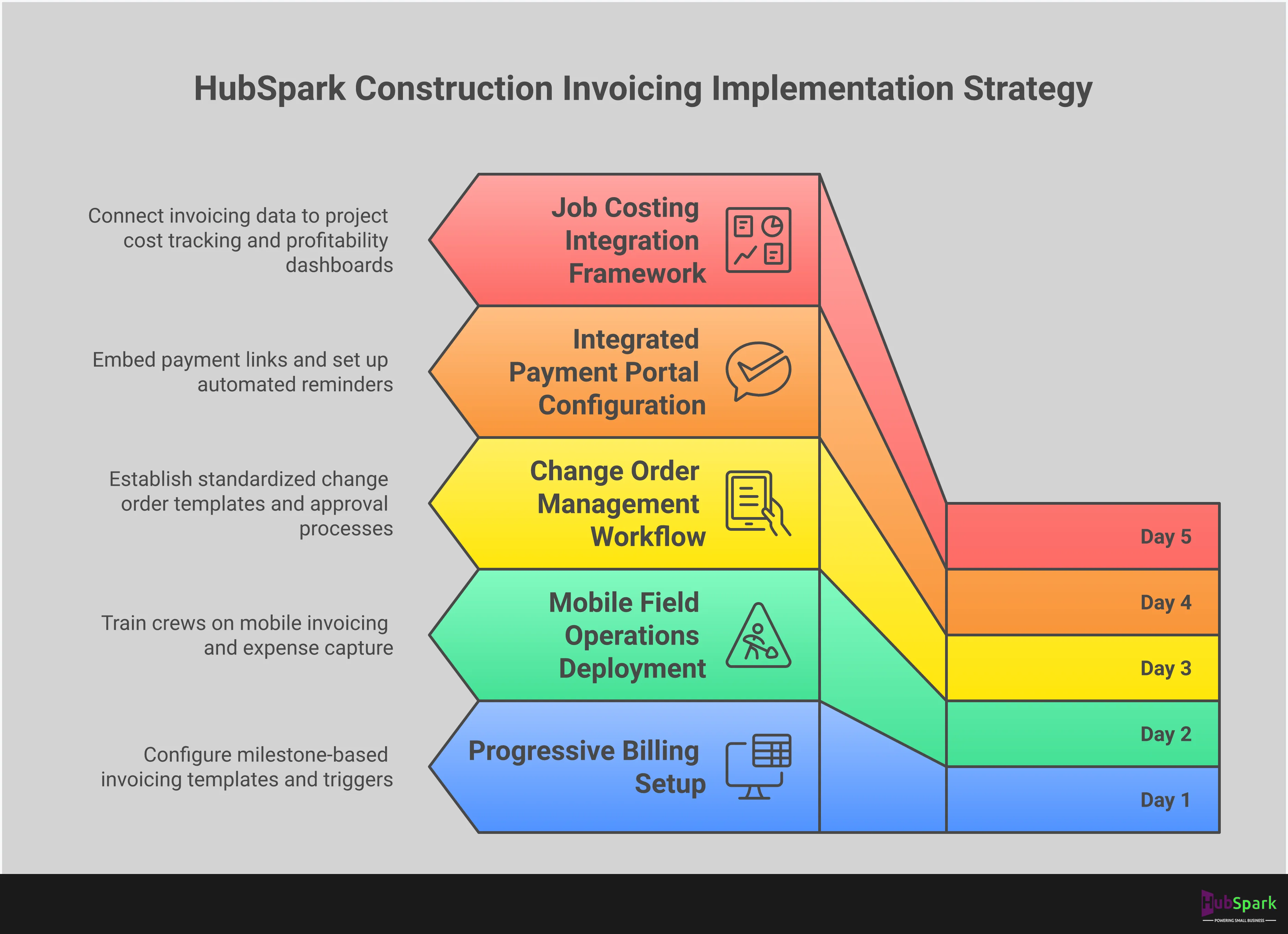
Progressive Billing and Milestone Payments
Progressive billing is the practice of invoicing clients at different stages of a project rather than sending a single bill upon completion. This is essential for maintaining healthy cash flow during long-term jobs. Your software must support this by allowing you to create invoices based on project milestones, a percentage of completion, or time and materials. This eliminates manual tracking errors and ensures you get paid accurately for the work you have finished. The right platform automates these complex billing structures, providing clear, professional invoices that detail project progress and justify each charge, which helps you get paid faster with fewer disputes.
Mobile Access for On-Site Teams
Construction work happens at the job site, not in an office. Your invoicing process cannot be chained to a desktop computer. Modern construction invoicing software provides full mobile functionality, allowing you and your team to create and send invoices, track expenses, and check payment statuses directly from a phone or tablet. This capability is not a luxury; it is a requirement for an efficient operation. Mobile access eliminates delays, reduces paperwork, and accelerates your entire billing cycle. When an invoice can be sent the moment a job stage is complete, you shorten the time it takes to get paid and improve your financial stability.
Integration with Project Management Tools
Invoicing does not exist in a silo. It is directly connected to job costing, scheduling, and client management. The most effective invoicing software integrates seamlessly with these other functions, often within a single platform. This integration provides a real-time, accurate view of each project’s financial health. You can see how actual costs are tracking against your estimates and make immediate adjustments. A platform with a built-in CRM for business ensures all client communication, project details, and financial data are centralized, eliminating the chaos of using multiple disconnected applications to run your business.
The Top Invoicing Software for Construction Contractors
Selecting the right invoicing software is not just about sending bills; it’s about optimizing your entire financial workflow. The right platform eliminates payment delays, provides clear financial oversight on every project, and integrates seamlessly with the other tools you use to run your business. A fragmented approach with multiple apps creates bottlenecks and wastes valuable time. The goal is to centralize your operations. We’ve evaluated the top contenders to help you identify the system that will accelerate your cash flow and give you complete control over your project financials.
HubSpark: The All-in-One Business Management Platform
HubSpark is engineered to be the central operating system for your contracting business. It moves beyond simple invoicing by integrating payment processing directly into a comprehensive business management suite. This platform combines invoicing with project management and a powerful customer relationship management (CRM), allowing you to manage the entire client lifecycle from a single dashboard. Instead of juggling separate apps for scheduling, communication, and billing, you can generate an invoice, track its status, and manage client communications all in one place. This unified approach eliminates data silos and streamlines your administrative tasks, freeing you to focus on project execution and business growth. It’s the definitive solution for contractors who demand efficiency and control.
Jobber: For Service Business Management
Jobber is a strong contender specifically for service-based contractors who need robust field management capabilities. Its platform excels at on-site operations, allowing your team to create quotes, track jobs, and generate invoices directly from the job site. With a highly-rated mobile app, Jobber is designed to keep your field and office teams perfectly in sync. The software focuses heavily on the day-to-day workflow of service businesses, from scheduling and dispatching to payment collection. While it offers solid invoicing features, its primary strength lies in managing the entire service job lifecycle, making it a practical choice for businesses that prioritize on-the-go efficiency and team coordination.
QuickBooks: The Comprehensive Accounting Solution
QuickBooks Online has established itself as the industry standard for comprehensive financial management. For construction businesses with dedicated accounting staff or complex financial tracking needs, it provides an unmatched level of detail. Its robust accounting engine can handle everything from payroll and expense tracking to detailed job costing and financial reporting. While its invoicing features are powerful, they are part of a much larger accounting ecosystem. This makes it an excellent choice for growing teams that require a sophisticated, all-encompassing financial tool and are prepared to manage a dedicated accounting platform. For businesses needing simple invoicing without the full accounting suite, it may be more than required.
BuildOps: A Construction-Focused Platform
BuildOps is a specialized platform built specifically for the demands of commercial construction contractors. It addresses the unique workflows of this sector, enabling teams to convert on-site estimates directly into invoices and manage complex scheduling. The software is designed to handle the entire operational lifecycle of a commercial project, from dispatch and work orders to invoicing and reporting. Its focus on a specific industry niche means its features are highly tailored to the challenges commercial contractors face, such as managing service agreements and large-scale projects. For businesses operating exclusively in the commercial contracting space, BuildOps provides a targeted solution that generalist platforms may not offer.
FreshBooks: For User-Friendly Time Tracking
FreshBooks is recognized for its exceptional user experience and straightforward approach to invoicing and accounting. It is particularly well-suited for service-based businesses that bill for their time, thanks to its intuitive time-tracking and project management features. The platform makes it simple to create professional invoices, track expenses, and accept online payments. While it may not have the construction-specific features of a platform like BuildOps, its strength lies in its simplicity and ease of use. Its targeted feature set and excellent support make it an appealing choice for contractors who value a clean interface and user-friendly design for managing their finances.
Square Invoices: The Free Plan Option
For independent contractors or small businesses just starting, Square Invoices presents a compelling entry point with its robust free plan. The platform allows you to send unlimited invoices and estimates without a monthly subscription fee, charging only a transaction fee when you get paid. It provides a straightforward way to create and send professional invoices from a desktop or mobile app, track payment status in real time, and send automated reminders. While it lacks the deep project management or comprehensive accounting features of other platforms, its value is in its accessibility. It’s an efficient, no-cost solution for streamlining your billing process and improving cash flow without initial investment.
Key Features Your Construction Invoicing Software Must Have
Selecting the right invoicing software requires more than a surface-level feature comparison. For construction contractors, the platform must function as a financial command center, built to handle the specific complexities of project-based work. Generic invoicing tools fail to address the realities of on-site operations, fluctuating project scopes, and long payment cycles. The right software eliminates administrative bottlenecks and provides a clear view of project profitability.
Your evaluation should focus on tools that are purpose-built to manage cash flow from the job site to the bank. These core features are not optional extras; they are essential components for maintaining financial control and driving business growth. Use this list as your standard for assessing any potential invoicing solution. If a platform lacks these capabilities, it is not equipped for the demands of the construction industry.
Mobile Invoicing from the Field
Your work doesn’t happen behind a desk, and your invoicing process shouldn’t be tethered to one either. The ability to create and send accurate invoices directly from the job site is a critical function. Mobile invoicing eliminates delays, prevents details from being lost between the field and the office, and accelerates your payment cycle. Instead of waiting until the end of the day or week to handle paperwork, your team can issue an invoice the moment a job is completed. This immediate action improves cash flow and streamlines your entire billing operation, allowing you to get paid faster with integrated payment solutions.
Expense Tracking and Receipt Capture
Profitability on any construction project depends on meticulous expense management. Your invoicing software must provide tools to track all job-related costs, from materials purchased at a supplier to fuel for your vehicles. The best platforms allow you to capture receipts with a simple photo, digitizing records and attaching them directly to the corresponding project. This feature ensures every reimbursable expense is accounted for and provides the accurate financial data needed for precise job costing. It eliminates shoeboxes full of faded receipts and gives you a real-time understanding of your project margins.
Progressive Billing and Change Order Management
Few construction projects are billed with a single invoice at the end. Progressive billing, or milestone billing, is essential for maintaining healthy cash flow during long-term jobs. Your software must facilitate this process, allowing you to invoice clients as you complete specific phases of the project. Equally important is a streamlined system for managing change orders. When a client requests work outside the original scope, your platform should make it simple to document the change, get approval, and add the cost to the next invoice. This prevents disputes and ensures you are compensated for all the work you perform.
Job Costing and Project Tracking
An invoice tells you what you’ve billed, but it doesn’t tell you if the job was profitable. True construction invoicing software integrates job costing, connecting all labor hours, material costs, and subcontractor fees to a specific project. This gives you a comprehensive view of your expenses versus your revenue for every job. With this data, you can identify which types of projects are most profitable and create more accurate estimates for future work. This level of insight is fundamental to scaling your business and is a core benefit of a robust customer relationship management (CRM) system.
Automated Payment Reminders
Chasing down late payments consumes valuable time and creates awkward client interactions. An essential software feature is the ability to send automated payment reminders for outstanding invoices. You can set up a sequence of professional, polite notifications to be sent via email or text message when an invoice is approaching its due date or becomes overdue. This simple automation professionalizes your collections process, reduces the number of past-due accounts, and significantly improves your cash flow without requiring manual follow-up from your team.
Customizable, Professional Invoice Templates
Your invoice is a direct reflection of your brand. A generic, poorly designed invoice can undermine your company’s professional image. Your software must offer customizable templates that allow you to add your company logo, brand colors, and specific payment terms. A professional invoice not only looks better but also reduces client confusion by clearly itemizing work completed and outlining how and when to pay. This clarity builds trust and reinforces the quality and reliability of your services, ensuring every client communication meets a high standard.
Breaking Down Invoicing Software Pricing Models
Evaluating invoicing software requires looking beyond the monthly price. The wrong pricing model can restrict growth and create unexpected expenses. Understanding the common structures ensures you select a platform that supports your business goals, not one that hinders them.
Free vs. Paid Plan Trade-Offs
Free plans are for solo contractors, not growing businesses. They impose strict limits on invoices and clients, creating a bottleneck as you scale. These plans lack essential tools like team collaboration, dedicated support, and robust customer history. A paid plan is an investment in efficiency, providing integrated CRM benefits that connect invoicing to client management. This streamlines your workflow and eliminates manual work.
Per-User Pricing Structures
Per-user pricing appears affordable but becomes costly as your team expands. Your monthly bill increases with every new user, penalizing growth. Before committing, calculate the total cost based on your entire team and future hires. A superior model provides comprehensive access for your whole team under a single, predictable plan. This is critical for tools like integrated phone and calling features, where team access is essential.
Feature-Based Tiers
With feature-based tiers, the feature list is more important than minor price differences. Basic tiers often omit tools critical for construction, like progressive billing or change order management. Do not choose a plan on price alone. Scrutinize each tier to confirm it includes the non-negotiable functions your business requires. Select a platform that provides all necessary payment solutions without forcing an expensive upgrade for one key feature.
Transaction Fees and Other Hidden Costs
The monthly subscription is only part of the cost. Hidden transaction fees for credit card and ACH payments directly reduce your profit on every job. Some platforms also charge for instant payouts or withhold premium support from lower-tier plans, creating unexpected expenses. These fees accumulate quickly. Demand complete transparency in all costs, especially payment processing rates. An integrated system presents these costs clearly, protecting your bottom line from surprises and protecting your profit.
A Head-to-Head Comparison: Pros and Cons
Choosing an invoicing platform requires a clear-eyed assessment of its strengths and, more importantly, its limitations. A tool that excels in one area may create bottlenecks in another. This comparison cuts through the marketing to reveal how each platform functions within the larger context of your business operations. The goal is not just to find an invoicing tool, but to implement a system that accelerates growth, rather than fragmenting your workflow across multiple, disconnected apps. A truly effective solution centralizes your operations, providing a single command center to manage every aspect of your business, from the initial customer contact to the final payment. Anything less introduces complexity and inefficiency that you cannot afford.
HubSpark: Advantages and Limitations
The primary advantage of HubSpark is its integrated design. It is not merely an invoicing tool; it is a complete business operating system. Invoicing is seamlessly connected to your CRM benefits, appointment scheduling, and customer communications, eliminating redundant data entry and providing a single source of truth for every job. This centralized model streamlines everything from lead capture to final payment. The limitation is for businesses that refuse to think beyond single-task software. If you are committed to juggling separate apps for every function, a comprehensive platform may seem too robust. For owners focused on scalable, efficient growth, however, this consolidation is the definitive advantage.
Jobber: Strengths and Weaknesses
Jobber is highly regarded for its service management and on-site invoicing capabilities, earning strong ratings for its mobile app that helps manage jobs and payments in the field. It provides a solid balance of specialized features for contractors and is generally easy to use. Its weakness, however, lies in its scope. While effective for job management and invoicing, it remains a point solution. Your business will still require separate systems for comprehensive lead management, reputation management, and local SEO. This forces you to manage multiple subscriptions and attempt to sync data across platforms, reintroducing the very inefficiencies you seek to eliminate.
QuickBooks: Benefits and Drawbacks
QuickBooks Online is the industry standard for financial tracking and accounting. Its invoicing features are part of a powerful system designed for robust bookkeeping, sales tax management, and customizable reporting. This is its core strength. The drawback is that it is an accounting platform first and a field service tool second. For contractors, its interface can be cumbersome for on-the-go job management. It lacks the integrated appointment management solutions and customer communication tools essential for service businesses, forcing you to operate your finances in a silo separate from your daily operations.
BuildOps, FreshBooks, and Square Invoices: A Comparative Look
This group represents specialized solutions targeting different market segments. BuildOps is built for commercial contractors, allowing for on-site estimate-to-invoice conversion. FreshBooks offers an excellent user experience for service-based businesses that need strong time tracking. Square Invoices provides a robust free plan ideal for new or small providers. Their shared limitation is their niche focus. While each solves a specific problem well, they do not provide a holistic solution for business management. Relying on them means you still need to find, pay for, and manage separate tools for every other critical business function, from marketing to customer reviews.
Which Platform Delivers the Best Mobile Experience?
For construction contractors, the office is often the driver’s seat of a truck or a dusty job site. Your invoicing software cannot be chained to a desktop. A powerful mobile experience is non-negotiable; it is the core of an efficient field operation. The right platform allows your team to manage every financial aspect of a project directly from their phones, from creating invoices to capturing expenses. This capability eliminates administrative delays, accelerates payment cycles, and provides real-time visibility into project profitability. True mobile functionality goes beyond a downsized app; it requires specific features built for the demands of working on-site. A platform that fails on mobile fails your business where it matters most: in the field, where work gets done and revenue is generated. It creates bottlenecks, delays cash flow, and forces your team to handle critical administrative tasks back at the office, long after the work is done. The best mobile platforms centralize communication, documentation, and financial management into a single, field-ready tool that empowers your team to operate with maximum efficiency.
Field-Ready Interfaces
Your team in the field needs an interface designed for action, not deep analysis. A field-ready mobile app must allow users to create and send professional invoices, update job statuses, and process payments with just a few taps. The design should be clean and intuitive, with large touch targets that are easy to use on a phone screen, even with gloves on. This ensures that invoicing happens the moment a job is completed, not days later. An integrated system like HubSpark provides a single, streamlined mobile interface where your team can manage every customer interaction, from initial lead to final payment, without switching between apps. This centralizes control and ensures data consistency across your entire operation.
Offline Functionality
Construction sites are notorious for unreliable cell service and non-existent Wi-Fi. Your workflow cannot afford to stop when the internet connection drops. Superior invoicing software offers robust offline functionality, allowing your team to continue working without interruption. Contractors must be able to create invoices, log hours, and capture expenses even when they are offline. The application should then automatically sync all the data once a connection is re-established. This feature is critical for maintaining productivity and ensuring that no billable hours or material costs are lost due to poor connectivity. It guarantees that your records remain accurate and up-to-date, regardless of your location.
On-the-Go Photo and Document Capture
Documentation is your best defense against disputes and a critical component of professional invoicing. The best mobile platforms integrate photo and document capture directly into the workflow. This allows your crew to use their smartphone camera to attach photographic proof of completed work, document pre-existing conditions, or upload receipts for materials purchased on the job. These images can be linked directly to the relevant project file or invoice, creating an indisputable record. Centralizing this documentation within your CRM eliminates disorganized photo libraries and ensures all project-related files are stored in one secure, accessible location.
Real-Time Data Synchronization
The gap between field operations and office administration is where profits are lost. Real-time data synchronization closes that gap. When a technician in the field updates a job status, logs an expense, or sends an invoice, that information must be instantly available to the back office. This immediate visibility is essential for accurate job costing, effective project management, and maintaining a clear financial picture of your business. A unified platform ensures that every part of your business operates from a single source of truth. This level of integration connects every action in the field to your bottom line, allowing you to make decisive, data-driven decisions that accelerate growth.
How Each Platform Solves Unique Construction Billing Challenges
Standard invoicing software fails construction businesses because it cannot handle the industry’s unique billing complexities. Your operations require more than a simple invoice generator; you need a system built to manage multi-stage projects, client-held funds, and mid-project scope changes. Using a generic tool for a specialized job creates cash flow gaps, invites client disputes, and erodes your profit margins with every project. The right software transforms these challenges from potential profit leaks into streamlined, trackable processes. It provides the financial controls necessary to maintain cash flow and project profitability from start to finish. This isn’t just about sending a bill; it’s about commanding the financial lifecycle of every project. When your invoicing tool understands progress billing, retainage, and change orders, you eliminate guesswork and accelerate payments. This control is fundamental to scaling your business effectively. It centralizes your financial data, giving you a clear, real-time view of job costing and profitability without needing to cross-reference spreadsheets or multiple applications.
Managing Progress Billing
Progress billing, or invoicing based on project milestones, is standard in construction but a major hurdle for generic software. You need a tool that can create multiple invoices tied to a single job, tracking the percentage of completion. Platforms like QuickBooks Premier: Contractor Edition are designed for this, facilitating complex billing formats. However, an integrated platform like HubSpark simplifies this by linking project milestones directly to invoicing within its CRM. This allows you to automate invoice creation as stages are completed, ensuring you bill accurately and on time without juggling separate project management and accounting tools. This direct link provides a clear financial overview of every job in real time.
Handling Retainage
Retainage, the practice of withholding a portion of the payment until a project is fully completed, is a critical aspect of construction finance that demands meticulous tracking. Losing track of these funds directly impacts your cash flow and final profit margin. Specialized software like BuildOps has built-in features specifically for managing retainage. For businesses seeking a more centralized solution, HubSpark’s robust CRM capabilities allow you to create custom fields to track retainage for each job. By keeping this critical financial data connected to the client and project record, you ensure final payment is never overlooked, turning a potential liability into a predictable part of your revenue cycle.
Processing Change Orders
Change orders are inevitable, but they don’t have to disrupt your workflow or create billing disputes. The key is to document and approve scope changes instantly. Software that links financial data to project milestones provides the necessary real-time visibility. Jobber and FreshBooks allow you to create and send change orders for client approval. HubSpark excels by integrating this process into a single platform. You can generate a change order, get digital sign-off from the client via text or email, and automatically update the total project invoice in one seamless workflow. This eliminates manual data entry, reduces errors, and creates an indisputable digital paper trail for all project modifications.
Offering a Client Payment Portal
Waiting for checks to arrive slows down your entire operation. A client payment portal is the most effective way to accelerate your cash flow. Tools like Square Invoices and FreshBooks offer simple portals for online payments. HubSpark’s integrated payment solutions provide a superior experience by embedding a payment link directly into the invoice you send. Clients can pay instantly via credit card or ACH transfer from their phone or computer. The payment is automatically recorded against their invoice and synced with their customer profile, centralizing your financial records and eliminating the need to manually reconcile payments from third-party processors.
How to Select the Right Invoicing Software for Your Business
Choosing your invoicing software is a critical operational decision, not just a line item in your budget. The right platform streamlines your cash flow and eliminates administrative bottlenecks, while the wrong one creates friction, delays payments, and costs you valuable time. Many business owners default to the cheapest or most well-known option without considering if it truly fits their workflow. This is a significant mistake that can lead to inaccurate job costing and frustrated clients. For a construction business, where projects involve progressive billing, change orders, and on-site expense tracking, a generic tool is a recipe for inefficiency and lost revenue. To make the correct choice, you must move beyond simple price comparisons and analyze how a platform will function within the unique demands of your business. A systematic evaluation of your specific needs, the implementation and training process, and integration capabilities will ensure you select a tool that accelerates growth, not hinders it. This process isn’t just about finding software; it’s about building a more efficient, profitable operation from the ground up.
Evaluate Your Specific Business Needs
Standard invoicing software is not built for the construction industry. Your business requires a system designed to handle complex billing cycles, not just one-off sales. Before you review any platform, document your essential invoicing functions. This includes the need for progressive billing for long-term projects, detailed job costing, and on-the-go expense tracking. Your software must accommodate industry-specific formats and provide the security and scalability to grow with your company. Focusing on these core requirements ensures you choose a solution that directly addresses your operational pain points. A robust payment solution is the foundation of a healthy cash flow, so prioritize functionality over flashy features you will never use.
Consider the Implementation and Training Process
A powerful tool is useless if your team cannot operate it efficiently. The implementation and training process should be minimal. Your crew is on job sites, not in software training seminars. Look for a platform with an intuitive interface that allows a new employee to become proficient with a brief introduction. A complicated system creates a significant operational drag, costing you billable hours and creating frustration. The goal is immediate adoption. Your invoicing software should simplify work from day one, providing a clear and user-friendly experience that requires little to no downtime for your team to learn. Anything less is a liability.
Ensure Integration with Your Existing Workflows
A standalone invoicing tool creates data silos and forces you into time-consuming manual data entry. This is an inefficient model that leads to errors and slows down your entire operation. Your invoicing software must integrate seamlessly with the other systems you rely on, especially your accounting software and your customer relationship management (CRM) platform. An integrated system centralizes your financial and customer data, providing a single source of truth for every project. This eliminates the chaos of managing multiple disconnected applications and gives you a clear view of your business’s financial health. True operational efficiency comes from a unified platform where invoicing, payments, and customer management work together.
Related Articles
Frequently Asked Questions
Why can’t I just use a free invoicing tool for my construction business? Free invoicing tools are designed for simple, one-time transactions, not for the complexities of project-based work. They lack essential functions like progressive billing, change order management, and integrated job costing. Relying on a free tool forces you to manage critical financial data manually, which leads to billing errors, cash flow delays, and an unprofessional client experience. A dedicated platform is an investment in operational control and profitability.
What’s the main advantage of an all-in-one platform like HubSpark over a dedicated accounting tool like QuickBooks? The primary advantage is integration. While QuickBooks is a powerful accounting engine, it operates separately from your daily field operations, client communications, and project management. An all-in-one platform like HubSpark centralizes these functions. This means your invoicing is directly connected to your customer records, scheduling, and payment processing, eliminating the need to sync data between multiple disconnected applications and providing a single, accurate view of your business.
How exactly does this type of software help me get paid faster? This software accelerates your cash flow in several ways. First, mobile invoicing allows you to send a bill the moment work is completed, starting the payment clock immediately. Second, automated payment reminders follow up on outstanding invoices without requiring manual effort from your team. Finally, integrated client payment portals allow customers to pay instantly online with a credit card or bank transfer, removing the delay of waiting for a check in the mail.
My team works in the field. How difficult is it to use this software on a mobile device? The best platforms are designed for the field, not the office. They feature intuitive mobile interfaces that allow your team to create invoices, capture expenses, and process payments with just a few taps. A system with a strong mobile experience requires minimal training and allows your crew to manage financial tasks on-site without interrupting their workflow. This ensures immediate adoption and eliminates administrative work back at the office.
What is the most important feature to look for if I handle long-term projects? For long-term projects, the most critical feature is progressive billing, also known as milestone billing. This allows you to invoice clients at different stages of a project rather than waiting until the very end. This capability is essential for maintaining healthy cash flow during jobs that span weeks or months. The software must allow you to easily create and track multiple invoices against a single project, ensuring you are paid accurately for completed work.

I am a serial entrepreneur with a 20+ year background in marketing & advertising, with a specific focus on SEO/online/digital marketing. I have a passion for helping owners of small & medium sized businesses grow rapidly through organic search engine optimization & digital marketing. I am blessed to lead a team of some of the most hard working, brilliant, and passionate team to help all of our clients reach their revenue goals!
 App Today!