
Your business runs on information scattered across spreadsheets, email inboxes, and text messages. You know you need a CRM to centralize control, but the market is flooded with options. The temptation is to find a “cheap crm for small business” to simply get organized. This approach trades one form of chaos for another. A limited, standalone CRM just becomes another login to manage—a digital filing cabinet that does little to automate your workflow or generate revenue. The goal is not to find a cheaper way to store contacts. The goal is to implement a system that actively manages leads, schedules appointments, and simplifies communication without creating more work for your team.
Key Takeaways
- Focus on ROI, Not the Price Tag: A truly affordable CRM is measured by the operational efficiency it creates, not its monthly fee. Calculate the total cost of ownership, including the price of missing features and future data migration.
- Demand a Unified Operating System: A standalone CRM is a liability that creates data silos. Your business requires a single, integrated platform that centralizes every critical function, from lead management and scheduling to payments and marketing.
- Select a Platform That Scales With You: Avoid free plans and per-user pricing models that create growth ceilings. Choose a system designed to support your expansion from day one to eliminate the inevitable costs and disruptions of a future platform switch.
What Defines an “Affordable” CRM?
The term “affordable” is frequently misunderstood as “cheap.” For a small business owner, the sticker price of a Customer Relationship Management (CRM) system is a distraction. The real cost of a CRM is not what you pay upfront; it’s the total investment required to make it a functional part of your operations. A truly affordable CRM is one that delivers a significant return by streamlining your business, not one that simply has the lowest monthly fee.
To accurately assess affordability, you must evaluate the total cost of ownership. This includes the initial price plus the hidden expenses of implementation, data migration, employee training, and ongoing maintenance. Many low-cost CRMs come with limited customer support, leaving your team to solve problems on their own. As research from HubSpot shows, these factors can quickly inflate the true cost far beyond the initial subscription fee. An affordable system provides the resources you need to get it running efficiently without unexpected expenses.
Functionality is the next critical factor. A cheap CRM that lacks essential features like automation, robust reporting, or the ability to integrate with other tools will create operational bottlenecks. The goal of a CRM is to centralize customer data and accelerate business growth, but a limited system forces you to buy more software to fill the gaps. Furthermore, a system that cannot scale with your business is not affordable—it’s a temporary fix that will require a costly and disruptive replacement down the line.
Finally, consider user adoption. If your team finds the CRM difficult or confusing, they won’t use it. A low-cost system with a poor user experience becomes shelfware—a wasted expense. The most affordable CRM is the one your team actually uses to close leads, manage appointments, and communicate with customers. True affordability is measured by efficiency and ROI, not the price tag.
The Non-Negotiable CRM Features for Small Businesses
When evaluating a CRM, the price tag is a distraction. The true measure of a system’s value is its functionality. A cheap CRM that fails to perform core business functions is not a bargain; it’s a liability. Before you consider the cost, you must verify that the platform includes the essential, non-negotiable features required to run and scale a modern business. Without these capabilities, you are simply buying a glorified spreadsheet that will create more work, not less.
Your CRM is the central nervous system of your business. It must be powerful, accessible, and intelligent. Anything less is a compromise your business cannot afford. The following features are not optional add-ons; they are the absolute baseline for any CRM you consider. If a platform lacks even one of these, walk away. It will become a bottleneck to your growth.
Intuitive Interface and Mobile Access
Your business doesn’t stop when you leave the office, and your CRM can’t either. For service-based businesses, work happens on-site, in a truck, and between appointments. A CRM that isn’t fully functional and easy to use on a mobile device is obsolete. Your team doesn’t have time for a steep learning curve or a clunky interface. The system must be intuitive from day one, allowing you to manage leads, update job statuses, and communicate with clients from anywhere. This isn’t a luxury; it’s a fundamental requirement for operational efficiency and maintaining control over your appointment management from the field.
Seamless Integration Capabilities
A CRM that operates in a vacuum is useless. It must serve as the central hub that connects every other part of your business. This means seamless integration with your marketing tools, payment processors, and communication channels. Without it, you are left with manual data entry, which is a direct path to errors, wasted time, and a fragmented view of your customer. The goal is to create a single source of truth. A powerful CRM eliminates data silos, ensuring that your unified messaging solutions and customer history are always in sync, providing a complete picture of every interaction.
Actionable Reporting and Analytics
Data is only valuable if it leads to smarter decisions. A proper CRM does more than just store information; it provides clear, actionable insights into your business performance. You need robust reporting that shows you exactly where your best leads come from, which services are most profitable, and where customers are dropping out of your sales funnel. These analytics are critical for optimizing your operations and marketing spend. Vague dashboards are insufficient. Demand a system that delivers the intelligence you need to accelerate growth and maximize the benefits of a CRM investment.
Workflow Customization
Your business has a unique process for attracting, converting, and retaining customers. Your CRM must adapt to that process, not the other way around. A one-size-fits-all system will force you into inefficient workflows that don’t match your operational reality. You need the ability to customize sales pipelines, data fields, and automated communications to mirror your exact business model. Whether you’re managing a multi-step consultation process or a quick service call, the CRM should be flexible enough to support and streamline your specific approach to website lead management and customer follow-up.
HubSpark: The All-in-One Operating System for Growth
A cheap CRM is not a growth strategy. It’s a temporary fix that creates long-term problems, from fragmented data to operational bottlenecks. The alternative isn’t a complex, enterprise-level system that drains your budget. The solution is a true operating system for your business—a single platform designed to manage every critical function without the complexity. HubSpark was built to be that system.
Instead of patching together a dozen different apps for scheduling, payments, marketing, and customer management, you get one unified dashboard. This isn’t just about convenience; it’s about control. When your tools work together, you gain a clear, accurate view of your entire business, allowing you to make decisive, data-driven moves. We provide the integrated framework your business needs to stop reacting and start accelerating growth.
Centralize Operations with a Single Platform
Managing a business with multiple disconnected apps is inefficient. You lose time switching between tabs, manually transferring data, and trying to piece together a complete picture of your customer interactions. HubSpark eliminates this chaos by consolidating all your essential tools into a single, intuitive platform. Our system integrates everything from appointment management to customer communications and reputation management. This centralized approach gives you a single source of truth for your business, streamlining your workflow and freeing your team to focus on high-value tasks instead of administrative busywork. Stop managing software and start managing your business.
Get Pricing That Scales With Your Business
Many CRMs penalize growth with rigid, per-user pricing and expensive tiers loaded with features you don’t need. This model forces small businesses to pay for enterprise-level complexity long before they need it. HubSpark offers a different approach. Our pricing is designed to scale with you, ensuring you only pay for the functionality that actively contributes to your growth. As your business expands, our platform adapts to your needs without forcing you into costly, unnecessary upgrades. This gives you access to powerful tools like integrated payment solutions, all within a predictable and manageable budget.
Eliminate Extra Tools with Seamless Integration
Small businesses operate with limited resources, and every dollar and minute counts. Subscribing to separate tools for lead capture, reviews, and marketing isn’t just expensive—it’s a drain on your team’s efficiency. HubSpark is engineered to be the only platform you need. By integrating core functions like SMS text marketing and local SEO directly into our system, we eliminate the need for extra software subscriptions. This seamless integration means your data flows effortlessly between tools, your workflows are automated, and your team operates from a single, unified command center. Consolidate your tech stack and reinvest your resources where they matter most: serving your customers.
How Top CRM Alternatives Compare
Evaluating standalone CRM tools is a necessary step, but it often highlights the core problem: you are still just solving for one piece of the operational puzzle. While many platforms offer a low-cost entry point, they are designed to function as a single tool, not a complete business operating system. This approach inevitably leads to fragmented data, workflow inefficiencies, and the need to purchase additional software for tasks like reputation management or payment processing. As you review these popular alternatives, analyze them not just for what they include, but for what they intentionally leave out. Consider how each one fits into your entire operational picture and whether it simplifies your workflow or just adds another login to manage.
HubSpot CRM
HubSpot is a major player in the CRM space, known for its robust free plan. This entry-level tier supports up to two users and 1,000 contacts, making it a common starting point for new businesses. The platform includes useful tools like email templates, meeting scheduling, an AI content writer, and call tracking capabilities. While these features provide initial value for managing customer interactions, the limitations become apparent as your business scales. The contact and user caps force you into paid plans quickly, and you will still need separate systems for critical functions like payment processing and local SEO, creating the exact operational silos a unified platform is meant to eliminate.
Zoho CRM
Zoho CRM offers a free plan designed for small teams of up to three people. It provides a generous starting capacity, handling up to 5,000 records and including one sales pipeline to track deals. The platform also incorporates more advanced features not always found in free tiers, such as lead scoring and sales forecasting, which can help prioritize your sales efforts. However, like other standalone CRMs, its focus is narrow. It manages customer data effectively but does not integrate natively with business-critical functions like appointment scheduling or listings management. This forces you to either find compatible third-party apps or manage those processes manually, defeating the purpose of a streamlined system.
Pipedrive
Pipedrive is built around the concept of a visual sales pipeline, designed to help businesses close deals more efficiently. It uses AI to suggest next steps and automations, connects with a wide range of other platforms, and simplifies report creation. Its strength lies in its focused, sales-centric approach. However, this specialization is also its primary limitation for a service-based business. While it excels at deal tracking, it offers no native solutions for managing online reviews, optimizing website lead capture, or handling customer payments. Relying on Pipedrive means you are committing to a multi-app ecosystem and the integration headaches that come with it.
Bigin by Zoho
As a simplified version of its larger counterpart, Bigin by Zoho is tailored for individual business owners and freelancers. The free plan is extremely limited, supporting only 500 records and a single sales pipeline. It offers a clean, straightforward interface for those who find full-featured CRMs overwhelming. While its simplicity is appealing at first, it also represents a hard ceiling for growth. A business with any ambition to expand its customer base or team will outgrow Bigin almost immediately. It functions as a digital contact list but lacks the comprehensive tools needed to manage and accelerate a growing service business.
Freshsales
Freshsales (part of the Freshworks suite) provides a free plan that accommodates up to three users, complete with contact management and a sales pipeline. Its most notable feature at the free level is the 24/5 customer support available via phone, chat, and email—a rare offering for a no-cost plan. This level of support can be valuable for teams learning a new system. The challenge, however, is that Freshsales is just one part of the larger Freshworks ecosystem. To get a truly integrated experience for marketing, support, and other functions, you must adopt and pay for their other products, re-creating the same costly and complex software stack you sought to avoid.
Less Annoying CRM
True to its name, Less Annoying CRM focuses on simplicity and ease of use. It offers a single, low-cost pricing plan with no complicated tiers. The platform is easy to set up, works across devices, allows for unlimited contacts, and automatically logs communications like emails and meetings. It delivers on its promise of being straightforward. However, this simplicity comes at the cost of functionality. It is a solid contact manager but lacks the powerful, integrated tools that drive growth, such as text marketing automation, online review requests, and integrated payment processing. It keeps your contacts organized but does little to help you acquire or retain more of them.
Decode CRM Pricing Structures
Choosing a CRM is not just a software decision; it’s a financial commitment that dictates your operational capacity. The market is saturated with pricing models designed to look appealing upfront but often conceal long-term costs that penalize growth. A low sticker price can easily become a significant operational expense through user-based fees, tiered features, and hidden charges. To make an intelligent investment, you must look beyond the initial quote and analyze how a CRM’s pricing structure aligns with your business’s trajectory. A truly affordable CRM supports your expansion, while a poorly chosen one will create financial and operational friction at every stage of growth.
Free vs. Paid: Understand the Trade-Offs
Free CRMs are tempting, but they are never without cost. The primary issue is that they lack the critical functionality and support necessary for a service-based business to operate efficiently. While a free plan might handle basic contact storage, it will almost certainly lack the automation, robust reporting, and integration capabilities you need to manage leads, appointments, and customer communications effectively. The Small Business Administration notes that CRM adoption is challenging for small businesses due to complexity and cost. Free tools amplify this complexity by forcing you to seek external solutions for essential tasks, defeating the purpose of a centralized system. The real trade-off isn’t just about features; it’s about your time and the operational bottlenecks you create from day one.
The Per-User Pricing Trap
Per-user, per-month pricing is the most common model, and it is fundamentally designed to penalize growing businesses. It seems affordable when you have a small team, but the costs escalate with every new hire. As you add technicians, sales staff, or administrative support, your CRM bill inflates, turning your growth into a liability. This model forces you to make difficult decisions about who gets access to a critical business tool, creating information silos and inefficiencies. A scalable business requires a system where every team member can access the information they need. Don’t let a pricing model dictate your hiring strategy; demand a platform that provides comprehensive CRM benefits without charging you for every seat.
How Feature-Gating Limits Your Growth
Feature-gating is a strategy where CRM providers lock essential tools behind more expensive subscription tiers. You might start on a basic plan that covers contact management, only to discover that functions like SMS marketing, appointment scheduling, or payment processing require a costly upgrade. This forces you into a reactive cycle of paying more every time your business needs to improve a process. A correctly implemented CRM should be a tool for proactive growth, not a barrier. When core operational functions are treated as premium add-ons, your ability to streamline and scale is held hostage. An effective operating system provides all necessary tools in one unified platform, eliminating the need for constant, expensive upgrades.
The Realities of Budget CRM Tools
Choosing a CRM is a critical operational decision, not just a software purchase. While the term “budget CRM” often raises red flags, affordability doesn’t automatically equate to poor quality. The right entry-level CRM can provide a foundational structure for managing customer relationships, moving your business beyond disorganized spreadsheets and sticky notes. However, the wrong choice introduces friction, creates data silos, and ultimately costs more in lost time and opportunities than a premium platform. It becomes another task to manage instead of a tool that manages tasks for you.
The key is to distinguish between a tool that is merely inexpensive and one that delivers genuine value. A valuable CRM, regardless of price, streamlines your processes and provides a clear return on investment. Many small business owners hesitate to adopt a CRM because they perceive them as overly complex or expensive, but this mindset can stall growth. A strategic, affordable system can be the catalyst for organizing your sales pipeline, improving customer follow-up, and centralizing vital information. The challenge lies in identifying the tool that supports your current needs without creating future roadblocks.
Strategic Advantages of an Affordable CRM
The most obvious advantage of an affordable CRM is its accessibility. It lowers the barrier to entry for small businesses ready to professionalize their customer management without a significant upfront investment. For a service-based business moving from manual tracking methods, a simple CRM introduces essential organization. It creates a single source of truth for client contact information, service history, and communication logs. This initial step toward centralization is one of the core benefits of a CRM for business and can immediately improve team coordination and customer service. A well-selected budget CRM provides the fundamental tools to build better habits and processes from the ground up.
Common Limitations to Anticipate
Affordable CRMs achieve their low price point by imposing strict limitations. Expect constraints on the number of contacts, users, and automated workflows. Crucially, many budget tools lack robust integration capabilities, forcing you to manually transfer data between your CRM and other essential systems like your scheduling or invoicing software. This creates the exact inefficiency you are trying to eliminate. Limited resources—including time and staff—are a major challenge for small businesses. A CRM that requires constant workarounds and manual data entry becomes a liability, not an asset. Before committing, verify that the tool can connect with your existing payment solutions and other critical applications.
Expose the Hidden Costs of “Cheap” CRMs
The sticker price of a “cheap” CRM is misleading. The true cost emerges in the operational friction and lost opportunities it creates. When your team spends hours manually inputting data or creating workarounds for missing features, you are paying a steep price in wasted payroll. Furthermore, a cheap system’s inability to automate lead follow-up or segment customers means potential revenue is left on the table. The most significant hidden cost is the inevitable data migration. As your business grows, you will be forced to move to a more capable system, a process that carries a high risk of data corruption and significant downtime. A CRM that cannot scale with you is not a tool; it’s a temporary fix with expensive long-term consequences.
The Truth About Free CRMs
The word “free” is tempting, but in business, it almost always comes with a hidden price tag. Free CRMs are marketed as a risk-free entry point for small businesses, but they often create significant operational drag down the line. While they can serve a very limited purpose, viewing them as a long-term solution is a strategic error. The reality is that these platforms are designed for you to outgrow them, forcing a difficult and costly transition once your business gains momentum.
The core issue is that a free CRM operates as a standalone, limited tool, while your business needs an integrated operating system. It separates your customer data from your marketing, your scheduling, and your payments, creating information silos that cost you time and efficiency. A truly effective CRM is the central hub of your business, not just a digital address book. Understanding the limitations of free tools from the start is critical to building a scalable foundation for your company.
When a Free CRM Makes Sense
Let’s be direct: a free CRM is only appropriate for a business in its infancy. If you are a solo operator just starting out and your primary goal is to move your contacts from a spreadsheet into a slightly more organized format, a free tool can be a temporary placeholder. It allows you to learn the basic principles of customer relationship management without a financial investment. However, as the SBA notes, small businesses often struggle with CRM implementation, and starting with a tool you’re guaranteed to outgrow is a common misstep. Treat a free CRM as a short-term learning tool, not a permanent business asset.
The Growth Ceilings You Will Face
Every successful business will eventually hit the limitations of a free CRM. These platforms impose ceilings on your growth, including restrictive contact limits, minimal data storage, and a lack of critical features. As your customer base expands, the system will slow down, leading to performance issues and system crashes that disrupt your daily operations. You will find yourself unable to integrate with other essential tools, forcing you to manage your payment solutions or marketing campaigns in separate, disconnected applications. This fragmentation is the opposite of efficiency and directly hinders your ability to scale.
The Inevitable Challenge of Data Migration
The most significant hidden cost of starting with a free CRM is the eventual data migration. When you inevitably upgrade to a more robust system, you face the complex and risky task of transferring your entire customer history. This process is fraught with challenges, including the high risk of losing or corrupting critical data during the transfer. You could lose years of customer notes, contact history, and sales data, setting your business back significantly. Planning your exit from a free CRM from day one is essential, but a better strategy is to start with a platform built to grow with you, providing the CRM benefits your business needs from the outset.
How to Choose the Right Affordable CRM
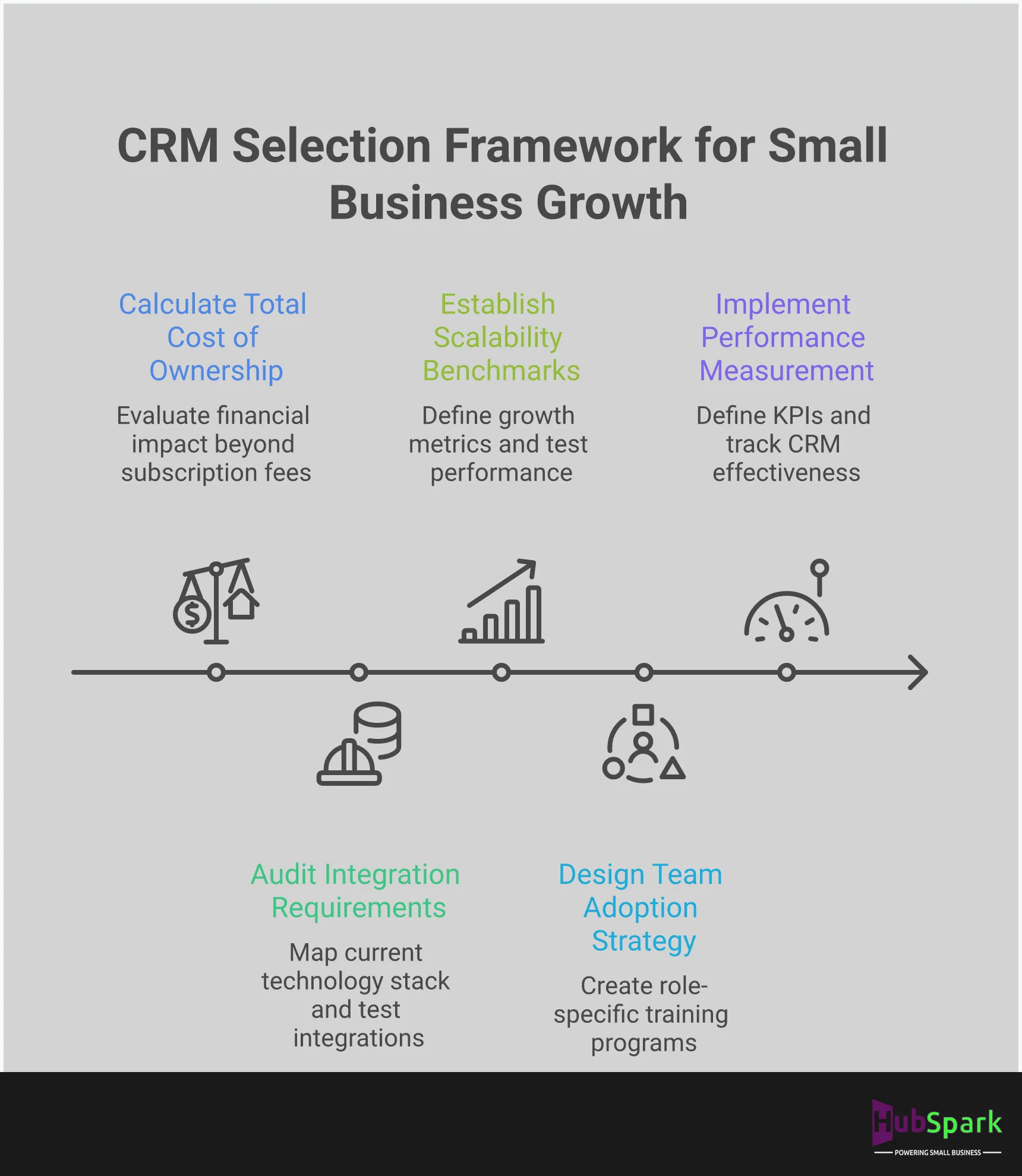
Selecting the right CRM is a strategic decision, not an IT purchase. A misstep here leads to wasted money, frustrated teams, and stalled growth. The goal is to find a platform that functions as a true operating system for your business, not just another piece of software to manage. To make the correct choice, you must systematically evaluate your options against the operational realities of your business. This process requires a clear-eyed assessment of your needs, your existing technology, your growth trajectory, and your team’s capacity for adoption. Follow this framework to select a CRM that accelerates your business instead of becoming another operational bottleneck.
Define Your Core Business Needs
Before you look at any CRM, you must define what you need it to accomplish. Implementing a system without clear business goals is the most common and costly mistake. What specific problems are you trying to solve? Are you losing leads because of slow follow-up? Is customer communication scattered across multiple inboxes and phones? Do you need a better way to manage appointments and dispatch technicians? Write down your top three to five operational pain points. This list is your scorecard. An effective CRM must directly address these challenges. A system that offers dozens of features you don’t need is not a solution; it’s a distraction that complicates your workflow and drains your budget.
Evaluate Integration Requirements
Your business already uses a set of tools to operate. A new CRM must either replace those tools or integrate with them seamlessly. For most small businesses, managing complex, custom integrations is not a viable option. It requires technical resources you don’t have and creates points of failure that disrupt your operations. Demand a CRM that connects effortlessly with your essential systems, such as your payment processor or accounting software. Better yet, find a platform that has these critical functions already built-in. A truly unified system like HubSpark eliminates the integration problem entirely by providing payment solutions and other core services within a single dashboard, creating a more reliable and efficient operating environment.
Plan for Future Growth
The CRM that fits your business today might be incapable of supporting it tomorrow. A system designed for a two-person team will crumble under the pressure of increased lead volume, a larger customer database, and more complex service demands. Do not choose a CRM based solely on your current size. Instead, select a platform built to scale. Ask potential vendors how their system supports a growing business. How does the pricing change as you add users or contacts? Can it handle more advanced local SEO and marketing campaigns as you expand? Choosing a scalable partner from the start prevents the expensive and disruptive process of migrating to a new system down the road.
Ensure Successful Team Adoption
A CRM is worthless if your team refuses to use it. Staff resistance is a primary cause of implementation failure, and the root cause is almost always complexity. Systems designed for large enterprises are often overwhelming for small business teams, leading them to revert to old, inefficient methods. To guarantee adoption, choose a CRM with a clean, intuitive interface designed specifically for the small business workflow. The platform should make your team’s job easier from day one. Look for a system that offers a unified messaging inbox, simplifying communication and ensuring every customer interaction is tracked without extra effort. A straightforward user experience is not a luxury; it is a requirement for success.
Execute Your Switch to a Smarter CRM
Transitioning to a new CRM is a critical operational upgrade, not just a software swap. The success of this move hinges entirely on execution. A poorly managed switch creates workflow chaos and wasted resources, while a strategic one accelerates growth and streamlines every customer interaction. Many small businesses hesitate to adopt a CRM, viewing it as a complex and costly system. This perception arises from choosing the wrong tool—one that isn’t built for the specific demands of a service-based business. The right platform, implemented correctly, becomes the central nervous system of your company. A successful transition requires a clear, three-part strategy: precise implementation to align the tool with your business goals, comprehensive team training to ensure full adoption and efficiency, and consistent measurement to validate your return on investment. Neglecting any of these steps undermines the entire project, turning a powerful asset into an expensive liability.
Implement for Maximum Impact
A CRM’s value is realized only when it is correctly integrated into your daily operations. The primary reason many CRMs fail is a mismatch between the software’s capabilities and the business’s actual needs. To ensure maximum impact, your implementation must be deliberate. This process starts with clean data migration and establishing workflows that mirror how your team actually works. A system that forces you to change your proven processes is the wrong system. Instead, choose a platform designed to simplify your existing operations, from customer relationship management to payment processing. The goal is to make the technology adapt to your business, not the other way around.
Train Your Team for Peak Efficiency
Your CRM is only as effective as the people who use it. Staff resistance is a common roadblock, but it’s almost always a symptom of inadequate training or a tool that is too complicated. Overcome this by demonstrating exactly how the new system makes each person’s job easier and more productive. Your training should be role-specific, showing technicians how to update job statuses from the field and office staff how to manage appointments with a single click. When your team understands that the CRM eliminates tedious tasks and helps them perform better, adoption follows naturally. A platform with unified messaging solutions centralizes communication, providing an immediate and obvious benefit that encourages quick adoption.
Measure Your CRM’s ROI
A CRM is an investment, and you must measure its return. To justify the cost and confirm you made the right choice, you need to track key performance indicators (KPIs). Monitor metrics that directly impact your bottom line: lead conversion rates, customer lifetime value, average job ticket size, and operational efficiency. Are you booking more appointments? Are you closing leads faster? Is your team spending less time on administrative tasks? The answers should be in the data. A powerful CRM provides the analytics to prove its worth, turning abstract benefits into concrete financial gains and showing you exactly how to optimize website lead management for higher returns.
Related Articles
- Why Small Businesses Should Use HubSpark as Their CRM
- Benefits of a Customer Relationship Management (CRM) Software for Business Growth
- CRM for Small Business: Boost Customer Relationships
Frequently Asked Questions
How should I calculate the real cost of a CRM beyond the monthly price? The monthly subscription fee is the least important number. A CRM’s true cost is the sum of its price plus the operational drag it creates. You must account for the hours your team will spend on training, the cost of migrating your data, and any fees for essential integrations. A system that requires you to buy additional software for payments or marketing isn’t affordable; it’s a down payment on a more expensive, fragmented tech stack. The most accurate measure of cost is its return on investment—a system that saves your team hours and closes more leads pays for itself.
What is the single biggest risk of starting my business on a free CRM? The greatest risk is the inevitable and painful data migration you will be forced to execute when you outgrow the system. Free platforms are built with low ceilings on contacts, features, and performance. When you hit that ceiling, you must move your entire customer history to a new platform. This process is not only time-consuming but also carries a high risk of data corruption or loss. Starting with a scalable system from day one eliminates this future crisis and protects your most valuable asset: your customer data.
My team is busy. How do I ensure they’ll actually use a new CRM? Team adoption is not optional, and it fails when the tool is too complex. You guarantee adoption by choosing a system with an intuitive interface that makes their jobs easier, not harder. The platform should not require a steep learning curve. Instead, it must provide immediate value, like a unified inbox that consolidates all customer messages into one place. When your team sees that the CRM eliminates administrative work and helps them perform more efficiently, they will use it without resistance.
Why do I need an all-in-one system if my business only needs basic contact management right now? Choosing a CRM based on your current needs is a short-sighted strategy that creates future bottlenecks. While you may only need contact management today, you will soon need integrated scheduling, payment processing, and marketing automation. An all-in-one system provides this foundation from the start. This prevents the operational chaos of patching together multiple disconnected apps down the road and ensures your data remains centralized and clean as your business scales.
I’ve chosen a CRM. What’s the most critical first step to ensure a successful transition? Your first step is to define exactly what you need the CRM to accomplish. Before you import a single contact, you must clearly outline the specific business processes you intend to streamline, whether it’s lead follow-up, appointment management, or customer communication. Implementing a CRM without clear, measurable goals is the primary reason these projects fail. Map your workflows first, then configure the software to support them. This ensures the technology serves your business strategy, not the other way around.

I am a serial entrepreneur with a 20+ year background in marketing & advertising, with a specific focus on SEO/online/digital marketing. I have a passion for helping owners of small & medium sized businesses grow rapidly through organic search engine optimization & digital marketing. I am blessed to lead a team of some of the most hard working, brilliant, and passionate team to help all of our clients reach their revenue goals!
 App Today!