Stop patching together systems that were never designed to work in unison. Your business requires a single, authoritative source of truth, not a collection of disparate tools that create more work than they save. A dedicated project management app, a separate CRM, and a standalone invoicing tool create operational friction and prevent you from having a clear view of your business’s health. The definitive solution is a fully integrated platform. The best general contractor software for small business centralizes every aspect of your operation, from lead management and scheduling to payments and reputation management, all within one dashboard. This is your framework for making that choice.
Key Takeaways
- Demand a unified operating system: A collection of single-purpose apps creates operational drag and data silos. The only path to true efficiency is a centralized platform that integrates every function—from lead management to final payment—into a single dashboard.
- Choose pricing that supports growth, not penalizes it: A per-user pricing model becomes a tax on expansion. A flat-rate structure is a strategic investment that allows you to scale your team without incurring escalating software costs, protecting your long-term profitability.
- Execute a disciplined evaluation to ensure ROI: Prevent a poor investment by following a strict process. First, define your core operational requirements. Second, test your shortlist against real-world job scenarios. Third, select the solution that provides the most comprehensive value, not just the lowest price.
What Are the Must-Have Features in General Contractor Software?
The right software is more than a tool; it’s the central operating system for your business. It should save you more money than it costs by eliminating inefficiencies and consolidating your workflow. The best platform for your company depends on your size, project types, and team structure, but several non-negotiable features form the foundation of any effective solution. Your goal is to find a system that integrates these functions seamlessly, removing the need to juggle multiple disconnected apps. A fragmented approach creates bottlenecks and costs you time—your most valuable asset. A unified platform centralizes control, giving you a clear view of your entire operation from a single dashboard.
Manage Projects and Schedules
Your software must provide absolute control over your projects and team schedules. This means a centralized dashboard for creating jobs, assigning technicians, and tracking progress from start to finish. Look for a system that offers a clear calendar view, automated reminders, and real-time status updates. An effective appointment management feature eliminates double-bookings and miscommunications, ensuring your team is always in the right place at the right time. This level of organization is critical for keeping projects on schedule and maintaining profitability. It transforms scheduling from a daily headache into a streamlined, automated process.
Streamline Financials and Invoicing
Slow payments and disorganized financials are major bottlenecks for growth. Your software must streamline the entire financial workflow, from creating professional estimates to sending invoices and processing payments. The ability to generate an invoice on-site and accept immediate payment transforms your cash flow. Top-tier platforms also integrate with accounting software like QuickBooks to automate expense tracking and budget management. By consolidating these tasks, you reduce administrative overhead and gain a precise, real-time view of your company’s financial health with integrated payments solutions.
Centralize Customer Communication and CRM
Scattered client information leads to lost opportunities. A powerful Customer Relationship Management (CRM) system is essential for centralizing every interaction. Your software should act as a single source of truth, housing client contact details, job history, notes, and communications in one accessible profile. This allows you to track leads from initial contact to a signed contract and beyond. A robust CRM for business ensures no lead is forgotten and empowers you to build lasting customer relationships through personalized and timely communication.
Organize Documents and Photos
General contractors deal with a mountain of paperwork, from contracts and permits to blueprints and change orders. Your software must include secure, cloud-based storage to organize all project-related documents and photos. This feature ensures that every team member, whether in the office or on-site, can access the most current versions of critical files. Centralizing your documents eliminates the risk of working from outdated plans, reduces disputes, and creates a comprehensive digital record for every job. It simplifies sharing information with clients, subcontractors, and your own team.
Ensure Mobile and On-Site Access
Your business operates in the field, not behind a desk. Any software you choose must be fully functional on mobile devices like phones and tablets. Your team needs the ability to update job statuses, upload site photos, communicate with clients, and create invoices directly from the job site. Real-time mobile access connects your field operations to your back office, eliminating delays and ensuring information is always current. This isn’t a luxury; it’s a fundamental requirement for any modern contracting business that wants to operate with maximum efficiency.
A Breakdown of Top General Contractor Software
Choosing the right software requires a clear understanding of what each platform truly offers. While many tools focus on a single aspect of your business, like project management or design, a truly effective solution centralizes your entire operation. The right platform eliminates the need to juggle multiple apps, saving you time and preventing critical details from falling through the cracks. Stop patching together disconnected systems that create operational bottlenecks. A unified platform is not a luxury; it is a requirement for efficient growth. Below, we analyze five leading software options, breaking down their core strengths and ideal user profiles so you can make a decisive choice for your business.
HubSpark: The All-in-One Business Operations Platform
HubSpark is engineered to be the central operating system for your service business. It moves beyond simple project management to provide a fully integrated suite of tools that manage every aspect of your workflow. From initial lead capture to final payment, the entire customer lifecycle is managed in one dashboard. This includes robust CRM capabilities to track client interactions, automated appointment scheduling, and streamlined invoicing. By consolidating critical functions like reputation management and text marketing, HubSpark eliminates the operational inefficiencies caused by disconnected systems. It’s the definitive choice for contractors who need to centralize operations, not just manage projects.
Contractor Foreman: Budget-Friendly Project Management
For contractors whose primary concern is affordability, Contractor Foreman presents itself as a cost-effective solution for project management. With plans starting at a low monthly price, it offers an accessible entry point for small businesses focused on organizing construction-specific tasks. The platform includes features for managing projects, financials, and scheduling. While it is marketed as one of the most affordable options, its scope is centered on project execution. Businesses looking for a more comprehensive tool to manage marketing, lead generation, and customer communication will find they need to supplement it with other applications.
Buildertrend: Comprehensive Construction Management
Buildertrend is a well-established and comprehensive platform designed specifically for residential and light commercial construction. It provides a powerful set of tools for managing complex projects, tracking financials, and facilitating client communication. Its robust features make it a popular choice among builders who need detailed control over every stage of the construction process. As a specialized construction management software, it excels in its niche. However, for service-based contractors in trades like HVAC or plumbing, its extensive construction-focused features may be more than what is required for day-to-day operations.
Jobber: Field Service and Job Management
Jobber is highly regarded for its strengths in field service management. The software is built to streamline on-the-go operations, with strong features for job scheduling, dispatching, invoicing, and client communication. It helps contractors organize their mobile workforce and improve customer interactions through automated updates and reminders. Jobber is effective at managing the daily logistics of a field team. However, its core focus is on job management, and it does not offer the same depth in other essential business areas like local SEO or online listings management, which are critical for attracting new customers.
Houzz Pro: Design-Focused Business Tools
Houzz Pro is tailored for contractors in the residential remodeling and design-build space. Its standout features include 3D design tools, mood boards, and client collaboration portals that enhance the visual aspects of a project. This makes it an excellent choice for businesses where design and client visualization are central to the sales process. In addition to its design capabilities, it includes project management and CRM features. While it is a powerful tool for its target market, the emphasis on design makes it a niche solution. General contractors or service businesses without a heavy design focus will find its specialized tools unnecessary for their operational needs.
How to Analyze Software Pricing Models
The sticker price of a general contractor software is only the starting point. A comprehensive analysis of pricing models is essential to protect your bottom line and ensure your investment supports, rather than hinders, your growth. Many platforms hide costs behind complex tiers, per-user fees, and add-on charges that accumulate quickly. Your objective is to uncover the true total cost of ownership before you commit.
This requires moving beyond a simple price comparison. You must dissect how each platform structures its fees and determine which model aligns with your business operations and growth trajectory. A low monthly fee can be deceptive if it scales poorly, while a higher flat rate might offer superior long-term value. The following steps provide a clear framework for evaluating software pricing to make a financially sound decision. This isn’t just about saving money; it’s about investing in a predictable, scalable operational backbone for your business.
Compare Monthly vs. Annual Subscription Costs
The first decision point is often the payment term: monthly or annual. Monthly subscriptions offer lower upfront costs and greater flexibility, allowing you to cancel without a long-term commitment. This can be advantageous if your cash flow is tight or if you are uncertain about the software’s long-term fit. However, this flexibility comes at a premium, with monthly rates being consistently higher over a 12-month period.
Annual subscriptions demand a larger initial investment but almost always include a substantial discount, effectively lowering the total yearly cost. To make an informed choice, calculate the total cost for both options over a one-year period. For example, a plan at $199 per month costs $2,388 annually, while an annual plan might be offered at $1,999, saving you nearly $400. Choose the option that best balances your immediate budget with your long-term financial strategy.
Analyze Per-User vs. Flat-Rate Pricing
Understanding the difference between per-user and flat-rate models is critical for any business planning to grow. Per-user pricing charges a set fee for each team member who needs access to the software. While this may seem cost-effective for a small crew, the expense escalates directly with every new hire, potentially penalizing your expansion. You must project your hiring plans to see how these costs will multiply.
In contrast, a flat-rate model provides access for an unlimited or large number of users for a single, predictable price. This structure supports scalability, allowing you to grow your team without incurring additional software costs. For businesses focused on expansion, a flat-rate plan eliminates financial friction and simplifies budgeting. A robust customer relationship management (CRM) system, for instance, is most effective when your entire team can access it without cost constraints.
Identify Available Discounts and Promotions
Before finalizing any purchase, actively search for available discounts. Software providers frequently offer promotions to attract new customers, especially for those willing to commit to an annual plan. Check the company’s official website for introductory offers or seasonal sales. Third-party software review sites and marketplaces also feature exclusive deals that can significantly reduce your initial investment.
However, a discount should never be the primary reason for choosing a platform. A 30% discount on the wrong software is a wasted investment. Your evaluation must prioritize the features and functionality that solve your core business problems. Once you have a shortlist of platforms that meet your operational requirements, then you can compare them based on available promotions. A good deal is a bonus, not the deciding factor.
Calculate the Total Cost of Ownership
The subscription fee is just one component of the software’s total cost of ownership (TCO). To get a complete financial picture, you must account for all potential expenses associated with the platform. This includes one-time setup or implementation fees, data migration costs, charges for essential third-party integrations, and fees for premium customer support. Some platforms also charge extra for exceeding data storage limits or for advanced features that are not included in your base plan.
Demand a transparent breakdown of all potential costs from any vendor you consider. A reliable partner will be upfront about their pricing structure. Consolidating your operations with an all-in-one platform like HubSpark centralizes these expenses, providing a clear and predictable cost for everything from payment solutions to marketing automation.
Weighing the Pros and Cons of Leading Solutions
Selecting the right software is a critical operational decision, not just a line item on your expense report. The platform you choose will dictate your team’s efficiency, your ability to manage customer relationships, and your capacity for growth. A fragmented system creates bottlenecks and drains resources, while a unified platform acts as a force multiplier for your entire operation. To make a sound decision, you must move beyond marketing claims and evaluate each solution against three core business requirements: usability, integration, and scalability.
This framework will help you dissect the leading software options and identify the one built to support your business objectives. The goal is not to find a temporary fix but to implement a long-term operational backbone. A tool that is easy to use but lacks critical features will limit you, while a complex system with poor integration will create more work than it saves. Your evaluation must be rigorous and focused on how the software will perform under the real-world pressures of a growing contracting business.
Balance User-Friendliness with Advanced Features
Your software must be intuitive enough for your entire team to adopt without extensive training, yet powerful enough to handle complex operational demands. This balance is where many platforms fall short. For instance, Contractor Foreman is often recognized for its affordability and ease of use, which is ideal for managing projects and finances without a steep learning curve. Similarly, niche platforms like Houzz Pro offer intuitive 3D design tools that are perfect for residential remodelers. However, you must determine if a user-friendly interface comes at the cost of the advanced CRM, marketing, and payment features your business requires to compete effectively.
Evaluate Integration Capabilities
A standalone tool, no matter how effective, creates data silos. True operational efficiency comes from a system where every component communicates seamlessly. Your project management software must connect with your accounting, your CRM must sync with your scheduling, and your invoicing must integrate with your payment processing. While platforms like Buildertrend are known as comprehensive solutions that integrate with other applications, managing these connections still requires oversight. Even software like Contractor Foreman that connects with popular business tools still positions you as the manager of a fragmented tech stack. Demand a platform that centralizes operations, not one that simply connects disparate systems.
Assess Scalability for Business Growth
The software you choose today must support the business you plan to run tomorrow. Assess whether a platform is built to handle increased project volume, a larger team, and more complex customer interactions. Some solutions are designed specifically for smaller contractors and may not scale effectively. For example, while Procore offers robust project management features suitable for large firms, its complexity and pricing may be prohibitive for a growing business. Conversely, a tool designed only for small teams may lack the infrastructure to support your expansion. Your ideal software provides a clear growth path without forcing you into a premature and costly upgrade.
How to Prepare for Common Implementation Hurdles
Switching to new software is a critical operational upgrade, not a simple task. Anticipating implementation challenges is the difference between a seamless transition and a costly disruption. The most common hurdles are not technical glitches but failures in planning around your people, your data, and your long-term strategy. A structured approach eliminates these risks and ensures your new system delivers value from day one. By addressing team adoption, data migration, and support needs head-on, you establish a clear path to success.
Plan for Team Adoption and Training
Resistance to new technology is inevitable. Your team is accustomed to existing workflows, and any change can feel like a disruption. The solution is not to hope for the best but to lead the transition decisively. Mandate comprehensive training sessions that focus on how the new software directly benefits each role, making daily tasks more efficient. Communicate the operational advantages clearly and consistently. When your crew understands that the software eliminates tedious work, adoption accelerates. Use a unified messaging system to keep everyone informed and engaged throughout the process, turning potential resistance into active participation.
Execute a Smooth Data Migration
Your business runs on data—customer histories, project files, and financial records. A flawed data migration from legacy systems creates immediate operational chaos. Before you begin, you must verify that your new software is fully compatible with your existing data formats. The objective is a clean, complete transfer without loss or corruption. This requires a meticulous plan for exporting, cleaning, and importing information. Conduct thorough testing with sample data sets to validate the process before committing to a full migration. A successful transfer ensures your customer relationship management and project histories remain intact, providing a seamless starting point in the new system.
Define Your Long-Term Support Needs
Implementing software is not a one-time event; it is the beginning of a long-term partnership. A primary pitfall is failing to define clear objectives for how the software will support your business as it evolves. Before you commit, establish precise goals for ongoing support and scalability. How will the platform adapt to more projects, more employees, and more complex operational demands? Your software must be able to grow with you. Ensure your chosen provider offers a clear support structure and a roadmap for future development that aligns with your business’s growth trajectory. This foresight guarantees the system remains an asset, not a liability.
Which Software Is Built for Your Trade?
Not all general contractor software is built for the same purpose. A roofer managing a multi-week project has different daily needs than a plumber responding to emergency calls. While many platforms offer core features, some are engineered with specific trades in mind. Choosing the right one requires you to look past the general marketing and identify the tools that solve your unique operational challenges.
Specialized software can excel at one thing, like bidding or dispatching, but this often leads to a fragmented system. You end up with one tool for scheduling, another for invoicing, and a third for customer communication. This creates data silos, wastes time, and complicates your workflow. The superior approach is to find a platform that adapts to your trade’s demands while centralizing every aspect of your business. Your software shouldn’t just manage jobs; it should be the operating system for your entire business, from attracting new leads with local SEO to collecting final payment.
Solutions for HVAC and Plumbing Contractors
HVAC and plumbing businesses operate at a rapid pace. Your success depends on efficient dispatching, clear communication with technicians in the field, and the ability to generate invoices on-site. Software like FieldPulse is designed for this high-volume service model, offering features tailored to streamline these specific operations. However, true operational control comes from integrating these field service tools with your customer database and marketing efforts. A platform that combines appointment management with a robust CRM allows you to not only schedule a job but also access the customer’s entire service history, send automated reminders, and request a review immediately after the work is complete.
Tools for Roofing and Exterior Contractors
Roofing and exterior contracting jobs are typically high-value, long-term projects that require meticulous management of bids, materials, and contracts. Platforms like Contractor Foreman are built to handle this complexity, centralizing the bidding process to help you win more profitable jobs. For these businesses, the sales cycle is longer and more involved. Your software must support this process by tracking leads from initial inquiry to signed contract. Integrating your project management with tools for website lead management ensures no opportunity is lost and provides a seamless experience for clients, reinforcing the professionalism of your operation from start to finish.
Platforms for General Home Service Businesses
General home service contractors need flexibility. One day you might be managing a small repair, and the next you could be coordinating a multi-stage renovation. Software like Thryv provides a broad toolset to help you win and manage jobs, send estimates, and process payments. For businesses juggling this variety, an all-in-one platform is not just an advantage—it’s a requirement for sustainable growth. A unified system like HubSpark eliminates the need to patch together multiple apps. It centralizes every function, from scheduling and invoicing to text marketing and reputation management, giving you a single dashboard to run your entire business efficiently.
Your Framework for Choosing the Right Software
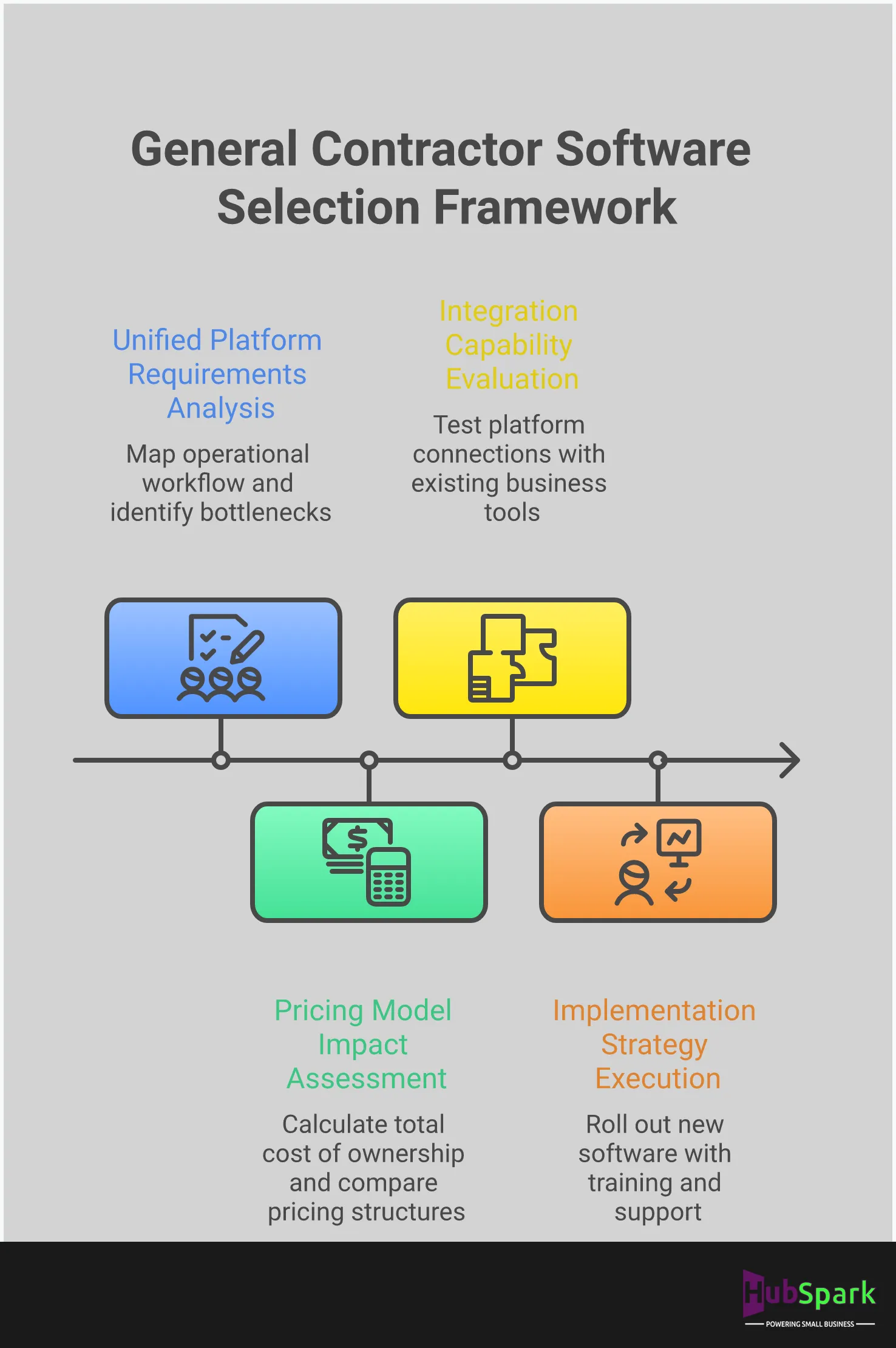
Selecting the right software is a strategic decision, not a tactical one. A haphazard choice creates operational drag and fragments your data, while the correct platform acts as a force multiplier for your entire business. This is not the time for guesswork. A disciplined evaluation process ensures you invest in a tool that simplifies operations, consolidates your tech stack, and delivers a clear return. Too many contractors get distracted by flashy features and end up with a patchwork of apps that don’t communicate, creating more work instead of less. The real objective is to centralize control and gain total visibility over your operations—from the first client call to the final invoice. This framework cuts through the noise of the software market. It forces you to define what you actually need before you start looking, test your options against real-world demands, and make a final decision based on value, not just price. Use these three steps to make a decisive, informed choice that aligns with your growth objectives and eliminates the chaos of managing multiple, disconnected applications. The goal is to find a singular solution that streamlines every facet of your business, from lead capture to final payment.
Define Your Core Business Requirements
Before you evaluate any software, you must define your operational workflow. Map out your current processes for project management, invoicing, and customer communication. Identify the bottlenecks and manual tasks that consume the most time. Do not purchase a platform loaded with features you will never use; instead, find a tool that fits your established process. Your core requirements should include robust customer relationship management (CRM) to track client interactions, streamlined scheduling, and an efficient system to optimize website lead management. Document these needs to create a clear checklist for your software evaluation.
Make an Informed Final Decision
The right software should save you more money than it costs. Your final decision must be based on a clear understanding of the total value, not just the monthly subscription fee. The best platform for your business depends on your company’s size, project complexity, and your team’s comfort with technology. Evaluate whether the software can scale with you as you take on more projects and expand your crew. The ultimate goal is to centralize your operations. An integrated solution that handles everything from payments to reputation management will always outperform a collection of single-purpose apps.
Related Articles
- 8 Best Construction Invoicing Software Tools of 2026
- 7 Best Small Business Management Software of 2026
Frequently Asked Questions
Why should I use an all-in-one platform instead of separate apps for scheduling and invoicing? Using separate apps creates operational drag. When your scheduler doesn’t communicate with your invoicing tool or your customer database, you are forced to do the manual work of connecting them. This leads to double-entry, lost information, and wasted time. A single, unified platform eliminates these data silos, ensuring that every part of your business—from the first lead to the final payment—operates from one source of truth. This centralizes control and gives you a complete view of your business in real time.
Is comprehensive contractor software overkill for a very small business? No. In fact, a small business has the most to gain from operational efficiency. As a small team, your time is your most valuable asset. A comprehensive platform automates the administrative tasks that consume your day, allowing you to focus on billable work and business growth. It establishes a scalable foundation from the start, so as you hire more technicians and take on more jobs, your systems are already in place to support that expansion without chaos.
How difficult is it to move my existing customer and job data into a new system? The difficulty of data migration depends entirely on the quality of the software and the support provided. A well-designed platform should make this process straightforward. Before committing, you must verify that the new system can import your existing data formats cleanly. A reputable provider will offer clear guidance and support to ensure a smooth transition, allowing you to transfer your complete customer history, job files, and financial records without loss or corruption.
Beyond storing contact information, what should I look for in a CRM for my business? A powerful CRM for a contractor does more than just store names and numbers. It should serve as the central hub for every customer interaction, tracking job history, communications, estimates, and invoices in one profile. The most critical function is its integration with your other business tools. Your CRM should connect seamlessly with your scheduling calendar, payment processing, and marketing efforts, giving you a complete picture of every client relationship from start to finish.
Can this type of software actually help me get more customers? Yes, but only if it’s a true all-in-one business platform, not just a project management tool. Software that integrates marketing features is designed for growth. Look for a system that includes tools for reputation management to collect positive reviews, local SEO features to improve your visibility in search results, and text marketing capabilities to re-engage past clients. This transforms your software from a simple organizational tool into an active engine for customer acquisition.

I am a serial entrepreneur with a 20+ year background in marketing & advertising, with a specific focus on SEO/online/digital marketing. I have a passion for helping owners of small & medium sized businesses grow rapidly through organic search engine optimization & digital marketing. I am blessed to lead a team of some of the most hard working, brilliant, and passionate team to help all of our clients reach their revenue goals!
 App Today!