

The final document you send a client is your invoice, and it speaks volumes about your business. After delivering high-quality work, a disorganized or unprofessional bill can undermine your credibility and create unnecessary payment delays. A professional invoice is more than a request for money; it is the final handshake of a project, reinforcing your brand’s reliability and attention to detail. This article will show you exactly how to create an invoice for contract work that builds client trust and prompts immediate action. We will cover the essential components, formatting, and delivery methods that transform your invoice from a simple bill into a powerful business asset.
Key Takeaways
- Construct invoices with absolute precision: A professional invoice must include itemized service descriptions, accurate client data, a unique invoice number, and clear branding to eliminate client disputes and accelerate the payment cycle.
- Define non-negotiable payment terms: Control your cash flow by clearly stating your payment rules, including due dates, late fee policies, and accepted payment methods, on every invoice to set firm expectations.
- Centralize your workflow to eliminate errors: Use a single platform like HubSpark to connect invoicing directly with your CRM and payment processing, which automates the entire process and removes the risk of manual mistakes.
What Is a Contract Work Invoice?
A contract work invoice is a formal request for payment that details the services a contractor has provided to a client. This document is the primary tool for ensuring you are compensated accurately and on time. It serves as a professional record of the transaction, outlining exactly what work was completed, the agreed-upon rates, and the total amount due. Think of it as the official summary of your fulfilled agreement, designed to eliminate ambiguity and accelerate the payment cycle.
This is more than a simple bill. A proper contract invoice contains specific, non-negotiable elements: your business information, the client’s contact details, a unique invoice number for tracking, and the date of issue. It must also provide a clear, itemized breakdown of services rendered. For small business owners, mastering the contract invoice is a fundamental step toward stabilizing cash flow and establishing professional credibility. Using integrated payment solutions further streamlines this process, connecting your invoice directly to your financial accounts and eliminating manual reconciliation. A well-structured invoice protects both you and your client by creating a transparent and indisputable record of your work.
Key Distinctions from Standard Invoices
A contract work invoice demands a higher level of detail than a standard retail or product invoice. While a simple invoice might list a product and a price, a contractor’s invoice must justify the cost through a granular breakdown of labor and deliverables. For hourly work, this means itemizing the date, the specific task performed, the hours logged, and the hourly rate. For fixed-price projects, you must list the completed milestones that trigger the payment. This specificity is critical. It prevents client disputes, clarifies the value you delivered, and removes friction from the approval process, ensuring you get paid faster. Your invoice should also reflect your business’s brand to reinforce professionalism and keep your company top-of-mind.
Meeting Legal Invoicing Requirements
Your invoices are official business records and must meet legal and tax compliance standards. Failure to include required information can lead to payment delays and record-keeping issues during tax season. Every invoice you issue must contain several key pieces of information to be considered valid. This includes your full business name and contact details, your client’s name and contact information, a unique invoice number, and the invoice date. You must also provide a clear description of the services, the dates the work was performed, and any applicable taxes. Finally, state the total amount due, the payment due date, and the terms for late payments. These elements are not optional; they are essential for maintaining financial integrity and operational discipline.
Anatomy of a Professional Contract Invoice
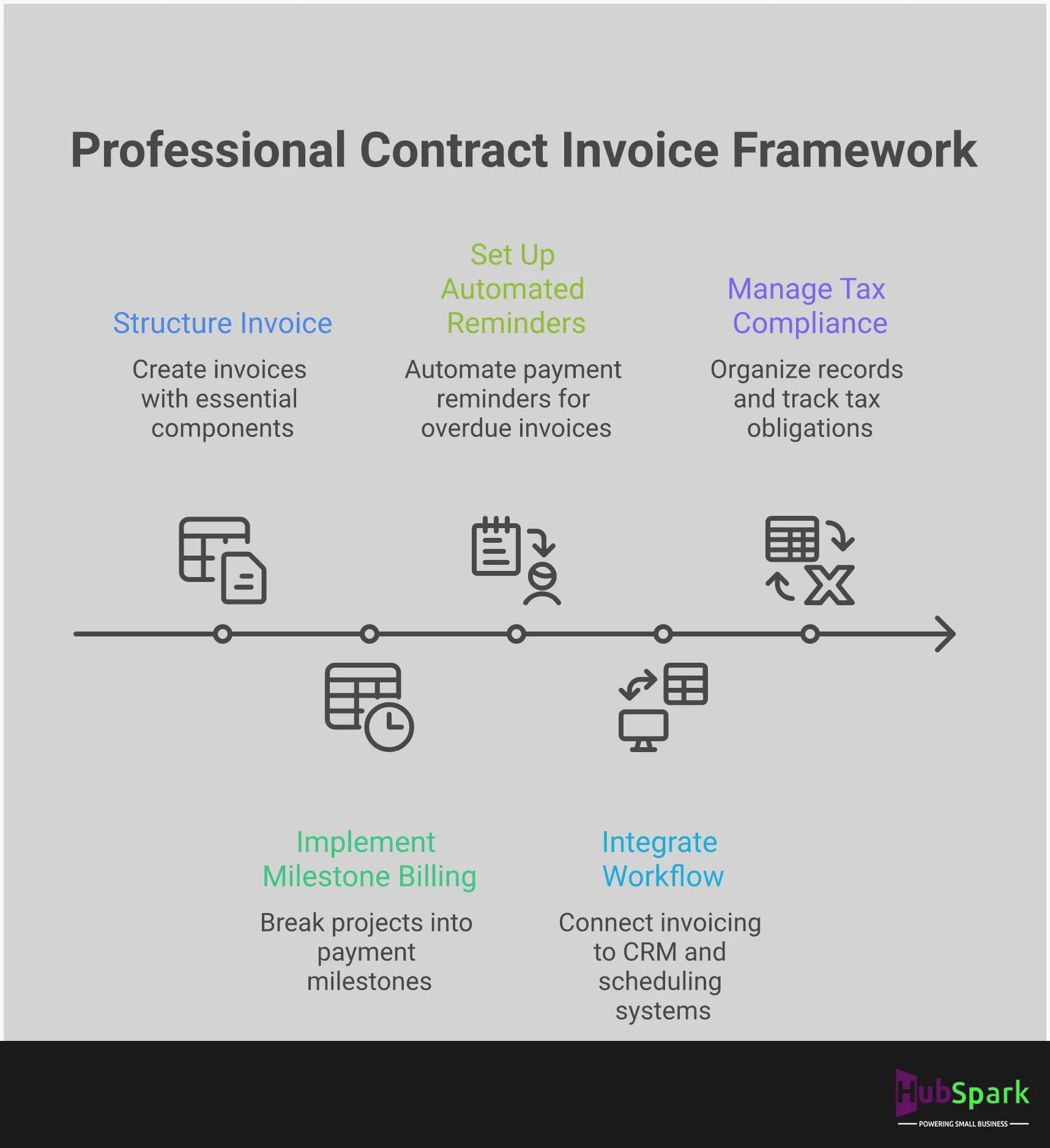
A professional invoice is a critical tool for getting paid on time. It serves as a clear record of work completed and eliminates the confusion that leads to payment delays. Each component, from contact information to payment terms, must be precise. Structuring your invoices correctly reflects your operational efficiency and provides a legally sound document for both you and your client. This anatomy ensures every invoice you send is built to accelerate your cash flow.
Business and Client Information
Every invoice must clearly identify both parties. Display your business name, address, and contact details at the top. Below, include your client’s full name and contact information to ensure the invoice reaches the right person. Maintaining accurate client data is fundamental; a robust CRM system centralizes this information, allowing you to populate invoices correctly. This foundational step prevents miscommunication and sets a professional tone.
Invoice Numbering and Dates
Disorganized records create financial risk. Implement a sequential numbering system to give each invoice a unique identifier for tracking. A simple chronological or project-based system works well. Always include the date the invoice was issued and the specific payment due date. These dates establish a clear timeline for payment and serve as a critical reference point for both your records and your client’s accounts payable department. This structure eliminates guesswork.
Itemized Service Descriptions
Ambiguity delays payment. Your invoice must contain a detailed, itemized breakdown of all services. For each line item, specify the work performed, the quantity (such as hours), the rate, and the subtotal. Instead of “Repair Work,” write “Replaced faulty compressor and recharged AC unit (2.5 hours at $120/hr).” This transparency justifies the total amount due, builds client trust, and minimizes the chance of a payment dispute.
Payment Terms and Due Dates
Define your payment expectations upfront to get paid faster. Your invoice must explicitly state the payment terms, such as “Due on Receipt” or “Net 30,” and specify all accepted payment methods. Integrating modern payment solutions that allow for credit card or bank transfers can accelerate payment. You should also include a professional note about any penalties for late payments. Setting these expectations clearly eliminates confusion and reinforces your agreement.
Format Your Invoice for Professional Impact
An invoice is more than a request for payment; it is a direct reflection of your business’s professionalism and attention to detail. A poorly formatted document can create confusion, delay payments, and damage your brand’s credibility. It communicates disorganization, which is the last impression you want to leave after completing a job. When a client has to search for the due date or question a line item, you introduce friction into the payment process. Conversely, a clear, professional invoice builds client trust and reinforces the quality of your work. It acts as the final, professional handshake of a project, closing the loop on a positive customer experience. To ensure your invoices command respect and prompt payment, focus on three core elements: a clean layout, consistent branding, and the use of standardized templates. Mastering these components will streamline your billing process and solidify your professional image with every client interaction.
Implement a Clean Layout
A cluttered invoice is an immediate obstacle to getting paid. Your client should be able to identify the total amount due, the payment deadline, and the services rendered within seconds. Eliminate ambiguity by adopting a clean, organized layout. Use ample white space to guide the eye, select a legible font, and establish a clear visual hierarchy. Place the most critical information, like the final balance and due date, in a prominent position. A logical structure not only looks professional but also reduces client questions and disputes, accelerating your payment cycle. This clarity is a fundamental part of effective payment solutions that keep your cash flow healthy.
Integrate Consistent Branding
Every document you send a client is an opportunity to reinforce your brand identity. Your invoice is no exception. Integrating your company’s branding elements, such as your logo and brand colors, transforms a simple bill into a professional statement. This consistency builds trust and legitimacy, assuring clients they are dealing with an established business. A branded invoice is more memorable and stands out in a crowded inbox, distinguishing your company from competitors who use generic templates. This simple step is a crucial part of managing the client lifecycle and strengthening the customer relationship, a core principle of any effective CRM strategy.
Leverage Professional Templates
Recreating an invoice from scratch for every job is inefficient and introduces the risk of error. Professional templates are essential for maintaining accuracy and consistency. A well-designed template ensures all necessary legal and financial information is included every time, from invoice numbers to payment terms. This standardization not only saves you valuable time but also presents a uniform, professional image to all your clients. Systems like HubSpark provide customizable invoice templates within a unified platform, allowing you to generate and send accurate, branded invoices in minutes. By leveraging templates, you eliminate guesswork and create a reliable, repeatable billing process that supports your business operations.
Select the Right Tools to Streamline Invoicing
Your invoicing process directly impacts your cash flow. Relying on manual methods or disjointed tools creates bottlenecks, delays payments, and consumes time that should be spent on billable work. The right tool doesn’t just generate a document; it builds an efficient system for getting paid. Many business owners start with spreadsheets or basic templates, believing they are saving money. In reality, this approach costs them dearly in lost time, delayed revenue, and unprofessional presentation. Every hour spent manually creating an invoice, cross-referencing job details, and chasing a payment is an hour you aren’t spending on growth.
To streamline invoicing, you must move beyond these elementary tools and standalone software. The goal is to integrate invoicing into a single, automated workflow that manages the entire customer lifecycle, from lead capture to final payment. This isn’t just about administration; it’s about operational control and accelerating revenue. A professional, reliable invoicing system reinforces your brand’s credibility and ensures you get paid on time, every time. Choosing the right tools means eliminating the friction that costs you money, whether through late payments, administrative overhead, or customer disputes over unclear bills. It’s a foundational decision that separates amateur operations from professional, scalable businesses.
Centralize Invoicing with HubSpark
Stop wasting time with fragmented systems. A truly efficient invoicing process is integrated with your core business operations. HubSpark consolidates invoicing into its all-in-one platform, connecting it directly to your customer data and appointment history. When a job is complete, an accurate, professional invoice is generated automatically using pre-filled client and service details from your CRM. This eliminates manual data entry and reduces costly errors.
Furthermore, HubSpark’s integrated payment solutions allow clients to pay you directly from the invoice with a single click. This accelerates your payment cycle and improves the customer experience. By centralizing your workflow, you transform invoicing from a tedious administrative task into a seamless part of your business operations.
Evaluating Standalone Software
Using standalone accounting software is a step up from spreadsheets, but it fails to solve the core problem of operational disconnect. While these tools can create customized invoices and manage payment records, they operate in a silo, separate from your CRM, scheduling, and communication tools. This separation forces you to manually transfer customer and job information between platforms, creating opportunities for error and wasting valuable time.
Managing another subscription, another login, and another set of data adds complexity to your workflow. This approach treats invoicing as an isolated function rather than a critical component of the customer journey. True efficiency comes from a unified system, not from patching together multiple single-purpose applications.
Using Basic Invoice Templates
Free invoice templates in Word or Excel are a functional starting point, but they are not a scalable solution for a professional business. This manual method is incredibly time-consuming and prone to human error. You are responsible for tracking invoice numbers, manually entering every line item, and remembering to follow up on unpaid bills. A simple mistake, like a typo in the amount due or a forgotten follow-up email, can directly delay your payment.
While a clear layout helps prevent client confusion, these templates lack the automation and professional polish that build trust. Relying on basic templates signals an immature operational process, which can undermine your credibility. To grow, you need a system that automates and professionalizes your entire workflow, starting with a robust CRM for your business.
Establish Payment Terms to Get Paid Faster
Ambiguous payment terms are a direct threat to your cash flow. To get paid faster and maintain professional client relationships, you must establish clear, non-negotiable terms from the outset. This is not about being demanding; it is about implementing a standard operational procedure that protects your business. When clients know exactly when and how to pay, and the consequences of paying late, you eliminate friction and reduce the time spent chasing payments. This discipline signals that you run a serious operation and expect to be treated accordingly.
Your invoice is the primary tool for communicating and enforcing these terms. It must reinforce the agreement you established in your initial contract, leaving no room for interpretation. Integrating a system like HubSpark’s payment solutions centralizes this process, allowing you to set default terms, automate reminders, and offer clients simple ways to pay you on time. By treating payment terms with the seriousness they deserve, you command respect and ensure the financial health of your business.
Define Net Payment Periods
Set clear expectations for payment to maintain cash flow. The most direct way to do this is by defining your net payment period on every invoice. Terms like “Net 15” or “Net 30” specify that the full payment is due within 15 or 30 days of the invoice date. Choose a period that aligns with your own financial obligations and operational costs. For many contractors, Net 15 is a strong choice that supports consistent cash flow without being overly aggressive.
Whatever you decide, state it clearly and consistently. This term should be included in your initial service agreement and prominently displayed on the invoice itself. This simple act removes guesswork for the client and provides a firm, professional deadline, making it clear that timely payment is a required part of your business agreement.
Enforce Late Payment Penalties
Late payments are not just an inconvenience; they are a cost to your business. Enforcing late payment penalties is a standard and necessary practice to protect your revenue and incentivize clients to pay on time. Be very clear about how and when clients should pay, and what happens if they pay late. This transparency actually builds trust by showing you operate a professional, well-managed business.
State your late fee policy directly on your invoice and in your contract. A typical penalty is a percentage of the outstanding balance, but be sure to check your local regulations on maximum allowable fees. This is not about punishing clients; it is about establishing professional boundaries and being compensated for the additional administrative work and financial strain caused by overdue accounts.
Clarify Accepted Payment Methods
To get paid quickly, you must make it easy for clients to pay you. Ambiguity around payment methods creates unnecessary delays. Your invoice should explicitly list all accepted payment methods, such as credit card, ACH bank transfer, or check. Providing a variety of options removes friction and accommodates different client preferences, which accelerates the payment process.
The most efficient way to manage this is with an integrated system. HubSpark’s payment solutions allow you to send invoices with a simple, clickable payment link. Clients can instantly pay using their preferred method, and the payment is automatically recorded in your system. This eliminates manual tracking and streamlines the entire transaction, from invoice delivery to reconciliation.
Implement Milestone-Based Billing
For longer projects, waiting until completion to send a single invoice is a significant cash flow risk. Instead, implement milestone-based billing to secure payment at different stages of the work. This approach breaks a large project into smaller, billable phases. For example, you could invoice for a deposit upfront, another portion upon completing a major phase, and the final amount upon project delivery.
This strategy not only stabilizes your cash flow but also reduces the risk of a large default at the end of a project. It keeps clients financially engaged and provides them with tangible progress markers. Define these milestones and their corresponding payment schedules in your initial contract so the client understands the billing structure from the beginning. This method turns a long-term project into a series of manageable, predictable payments.
Avoid These Common Invoicing Mistakes
An invoice is more than a request for payment; it is a critical business document that impacts your cash flow, client relationships, and operational efficiency. Errors on an invoice create friction, delay payments, and consume valuable time that should be spent on revenue-generating work. Treating invoicing as an afterthought is a direct threat to your financial stability.
To accelerate payments and maintain professionalism, you must eliminate common invoicing errors from your workflow. These mistakes are not minor administrative slips; they are operational bottlenecks that can be systematically removed. By standardizing your process and leveraging the right tools, you can ensure every invoice is accurate, clear, and effective. This transforms invoicing from a reactive chore into a proactive component of your financial strategy, securing the revenue you have earned without unnecessary delays or disputes.
Incomplete or Missing Information
An invoice with missing details is an immediate roadblock to payment. Clients will not pay for what they cannot verify. Your invoice must include all necessary information to eliminate any potential for confusion or dispute. This includes your full business name and contact details, the client’s full name and contact details, a unique invoice number, the issue date, and a clear breakdown of charges leading to the final amount due. Leaving out any of these elements forces the client to do extra work, which guarantees a delay. A complete invoice is a professional standard that facilitates prompt payment solutions and prevents unnecessary back-and-forth communication.
Vague Service Descriptions
Ambiguity is the enemy of prompt payment. Describing a service as “Repair Work” or “Consulting” is insufficient and invites questions. You must clearly itemize every service performed and product provided. For example, instead of “Plumbing Services,” specify “Replaced leaking P-trap under kitchen sink, installed new PVC pipe, and tested for leaks (1.5 hours labor).” This level of detail justifies the cost, demonstrates the value of your work, and minimizes the risk of a payment dispute. Detailed descriptions reinforce your professionalism and build client trust, making them more likely to pay quickly. Tracking these details is one of the core benefits of a CRM that integrates with your invoicing.
Incorrect Timing and Delivery
When you complete a job, the invoice should be sent immediately. Delaying the invoice signals that payment is not a priority and allows the client to forget the value you just delivered. For long-term projects, implement milestone billing by invoicing at predefined stages of completion. This approach improves your cash flow and makes the total cost more manageable for your client. Your invoicing schedule should be a non-negotiable part of your project workflow. Timely delivery is a fundamental component of effective accounts receivable management. Do not let completed work sit unbilled; turn your services into revenue as quickly as possible.
Ineffective Follow-Up Process
Expecting payment without a follow-up system is a passive approach that will cost you money. If an invoice becomes overdue, you must have a process in place to address it. A polite but firm reminder is the first step. However, manual follow-up is inefficient and prone to error. Automate your payment reminders to ensure consistency and professionalism. An automated system can send an initial reminder when an invoice is due and escalate notifications if it becomes delinquent. Using tools like automated text marketing for reminders can cut through email clutter and prompt immediate action. Take control of your receivables; do not leave your cash flow to chance.
Deliver Invoices for Prompt Payment
A professional invoice loses its impact if it’s delivered poorly. The final step in the invoicing process, delivery, is what determines how quickly you get paid. An effective delivery strategy is systematic and professional, making it simple for your client to process the payment and for you to manage your cash flow. It eliminates confusion and reinforces the value of your work, ensuring the entire transaction concludes smoothly. This process requires clear communication, smart automation, and diligent follow-up.
Use Professional Email Communication
Your invoice email is a formal request for payment and must be treated as such. Structure your communication for immediate clarity to prevent it from being overlooked or misinterpreted. The subject line is your first opportunity to be direct. Use a standardized format that includes the invoice number, project name, and due date, for example: “Invoice #1054 for HVAC Installation – Due October 31.” The body of the email should be brief and professional. State that the invoice is attached for their review and payment. The invoice itself, attached as a PDF, contains all the necessary details. This approach streamlines communication and provides a clear, professional record for both you and your client.
Automate Invoice Delivery
Sending invoices manually is an inefficient use of your time and introduces the risk of human error. Automate the process to ensure consistency, accuracy, and speed. Using an integrated platform eliminates repetitive data entry and guarantees your invoices are sent on schedule, whether immediately after a job is completed or on a recurring basis. HubSpark’s Payments Solutions for Small Businesses centralize this entire workflow. You can create, customize, and schedule invoices from the same dashboard you use to manage your business, creating a seamless operational flow that saves time and accelerates payment cycles. This is the standard for any serious business owner.
Track Payments and Send Reminders
Sending an invoice is the start of the payment process, not the end. You must actively track the status of every invoice you issue. A centralized system gives you a clear view of what’s paid, pending, and overdue, so nothing falls through the cracks. Implement automated reminders for upcoming and past-due payments. These system-generated notifications are professional, consistent, and remove the awkwardness of manual follow-ups. This proactive approach is a core part of managing the financial side of your client relationships and is essential for maintaining healthy cash flow. Effective customer relationship management extends to ensuring timely payments.
Offer Flexible Payment Options
Remove every obstacle between your invoice and your bank account. The single most effective way to do this is by offering multiple, convenient payment options. Forcing a client to mail a check or use a method they find cumbersome only creates unnecessary delays. Modernize your payment acceptance by providing options like credit and debit cards, ACH bank transfers, and secure online payment portals. An integrated system like HubSpark’s Payments Solutions for Small Businesses allows you to accept various payment types through a single, secure platform. When you make it easy for clients to pay you, they will pay you faster.
Manage Invoice Records for Tax Compliance
Properly managing your invoice records is not just about getting paid; it is a fundamental component of your business’s financial health and legal compliance. Failing to maintain accurate records creates significant problems during tax season, obscures your cash flow, and can lead to costly errors. A systematic approach to record-keeping ensures you are always prepared for tax obligations and have a clear view of your business’s performance. This process protects your business and positions it for sustainable growth.
Maintain an Organized Filing System
A disorganized invoicing process is a direct threat to your revenue. To operate efficiently, you must establish a clear and organized system for every invoice you create, send, and receive. Your invoices must look professional and align with your brand, as this reinforces client trust and encourages prompt payment. Implement a logical digital filing system where every invoice is stored and easily searchable. A consistent naming convention, such as ClientName_InvoiceNumber_Date, eliminates confusion and saves critical time. Centralizing this process within a single platform prevents documents from getting lost across different devices and ensures you have one source of truth for your income records.
Prepare Required Tax Documentation
As an independent contractor, you are solely responsible for managing your tax obligations. Unlike traditional employees, taxes are not withheld from your payments. Most clients will issue a Form 1099 if they pay you above the annual threshold, and your invoice records must precisely match the income they report. It is your responsibility to track all payments and prepare the necessary documentation. The most effective strategy is to set aside a percentage of every payment specifically for taxes. This proactive approach prevents a massive, unexpected tax bill at the end of the year. Consult the IRS Self-Employed Individuals Tax Center to ensure you meet all federal requirements.
Centralize Your Contract Invoicing Workflow
Managing invoices effectively requires more than just a template. It demands a systematic approach that connects billing to your core business operations. Using separate applications for scheduling, client management, invoicing, and payment processing creates operational drag and increases the risk of costly errors. A fragmented process where you manually transfer data between systems is inefficient and unprofessional. The only way to scale your business and maintain accuracy is to stop treating invoicing as a standalone task.
A centralized workflow is the definitive solution. Integrating your invoicing directly into a comprehensive business management platform eliminates redundant data entry and provides a clear view of your revenue cycle. When your invoicing tool pulls data directly from your appointment management software and customer relationship management (CRM) system, you generate accurate, professional invoices in seconds. This ensures every bill reflects the correct services, materials, and client information without manual cross-referencing.
Furthermore, a unified system streamlines the most critical part of the process: getting paid. By integrating payment solutions into your workflow, you can accept payments directly from the digital invoice. This simplifies the experience for your clients and accelerates your cash flow. HubSpark consolidates these functions into a single, intuitive dashboard, transforming your invoicing from a tedious administrative chore into a seamless component of your business operations.
Related Articles
Frequently Asked Questions
What should I do if a client disputes an invoice? If a client questions an invoice, your first step is to refer to your documentation. A professional invoice with a detailed, itemized breakdown of services is your best defense. Calmly walk the client through each line item, connecting it to the work completed and the terms agreed upon in your initial contract. This situation highlights why vague descriptions are a liability; precision eliminates ambiguity and provides a factual basis for the charges, protecting your revenue.
How soon after completing a job should I send the invoice? You should send the invoice immediately upon completion of the work. Delaying the invoice suggests that payment is not a priority and allows the client to forget the immediate value you provided. Sending it right away starts the payment clock sooner, reinforces your professionalism, and capitalizes on the client’s satisfaction with a freshly completed job. This simple discipline is critical for maintaining healthy cash flow.
Are late payment fees actually effective and legally enforceable? Yes, late payment penalties are an effective and standard business practice for encouraging timely payments. To be enforceable, your late fee policy must be clearly stated in your initial service agreement and reiterated on every invoice. These terms are not about punishing a client; they are about establishing professional boundaries and compensating your business for the financial and administrative costs of overdue accounts. Always verify your local and state regulations to ensure your fees comply with any legal limits.
Why is using a system like HubSpark better than just a professional-looking template? A template is a static document that still requires manual data entry, tracking, and follow-up, leaving it prone to costly human error. A system like HubSpark provides an integrated workflow. It automatically pulls client and job details directly from your CRM to create accurate invoices, sends them on schedule, tracks their payment status, and automates reminders. This eliminates administrative work and connects your billing directly to your business operations, ensuring you get paid faster.
For a long project, is it better to send one big invoice at the end or several smaller ones? For any project that spans more than a few weeks, you should use milestone-based billing instead of sending a single invoice at the end. Invoicing at key project stages, such as 25% completion or after finishing a specific phase, stabilizes your cash flow and makes payments more manageable for your client. This approach also reduces your financial risk by ensuring you are compensated progressively for your work rather than waiting for one large, high-stakes payment.

I am a serial entrepreneur with a 20+ year background in marketing & advertising, with a specific focus on SEO/online/digital marketing. I have a passion for helping owners of small & medium sized businesses grow rapidly through organic search engine optimization & digital marketing. I am blessed to lead a team of some of the most hard working, brilliant, and passionate team to help all of our clients reach their revenue goals!
 App Today!