

Managing leads from different sources—email, phone calls, and a standalone form builder—creates operational chaos. This fragmented approach leads to manual data entry, lost information, and delayed follow-ups, costing your business valuable opportunities. A high-performing business requires a centralized system, and it starts with an integrated lead capture form template. When your form is built directly into your core operational software, it eliminates these bottlenecks. Every submission instantly becomes a structured lead in your CRM, ready for immediate action. This article explains how to select and implement a template that doesn’t just collect data, but streamlines your entire lead management process from the very first click.

Key Takeaways
- Prioritize function over friction: Maximize submissions by requesting only essential contact information, framing the form with a clear value proposition, and using a decisive call-to-action. Your goal is to initiate contact, not conduct an interview.
- Centralize your data flow: A standalone form is an operational bottleneck. Ensure every submission feeds directly into your CRM to automate follow-up, eliminate manual errors, and guarantee no lead is ever lost.
- Treat optimization as a core business function: A form is never finished. Continuously track performance metrics like conversion rates and use A/B testing to make data-driven improvements that turn your website into a predictable lead generation engine.
What Is a Lead Capture Form Template?
A lead capture form is a digital tool designed to collect contact information from potential customers visiting your website. Think of it as the digital handshake that converts an anonymous visitor into a qualified lead. Its primary function is to gather essential data, such as names, email addresses, and phone numbers, in exchange for something of value, like a free quote, a consultation, or a special offer. Using a template accelerates this process, providing a pre-structured framework that eliminates guesswork and ensures you ask the right questions from the start.
These forms are the engine of your sales funnel. They systematically capture interest and channel it directly into your customer relationship management system. Without an effective lead capture strategy, your website traffic remains just that: traffic. A well-designed form transforms passive browsing into active engagement, giving your business the necessary information to initiate contact, nurture relationships, and ultimately, secure new customers. It is the critical first step in a structured and scalable growth plan.
How Lead Capture Forms Function
A lead capture form operates on a simple principle of exchange. Your business presents an offer, and the website visitor provides their contact details to claim it. Once a user fills out the fields and clicks the submission button, their information is automatically routed into your database. This action introduces a new prospect into your sales pipeline, transforming an unknown visitor into a tangible lead that your team can contact.
This process is the gateway to effective customer relationship management. Instead of manually tracking inquiries from emails or phone calls, the form automates data collection and organization. This allows for immediate and targeted follow-up, ensuring no potential customer falls through the cracks. The form’s function is to create a seamless transition from initial interest to direct communication, setting the stage for a successful sales conversation.
Common Lead Capture Form Types
Lead capture forms are not one-size-fits-all. The format you choose should align with your specific goal and the context of the webpage. Using a platform with versatile templates allows you to optimize website lead management by deploying the right tool for the job. Common types include:
- Embedded Forms: These are integrated directly into a page, such as your contact or service pages. They are a standard, reliable method for capturing inquiries.
- Pop-up Forms: These forms appear over the webpage content, triggered by user actions like time on page or an attempt to exit. They are effective for grabbing attention for high-value offers.
- Multi-step Forms: By breaking down questions into several smaller steps, these forms reduce friction and can increase completion rates for more detailed information requests.
Core Features of an Effective Lead Form Template
A lead form template is more than a set of fields. It is a critical business asset engineered to convert interest into action. An effective template is not defined by flashy design but by its core functionality. The right architecture ensures a form performs reliably across all platforms, integrates flawlessly with your operational software, and builds the trust necessary for a prospect to submit their information. These features are non-negotiable for any business serious about growth.
Brand Customization
Your lead form is a direct reflection of your business. A generic, unstyled form communicates a lack of professionalism and attention to detail, eroding trust before a relationship even begins. Effective templates allow for complete brand customization. This means incorporating your company logo and adjusting colors and fonts to match your website and marketing materials perfectly. This consistency creates a cohesive and trustworthy user experience, reinforcing your brand identity at a critical point in the customer journey. A professionally branded form assures potential clients they are in the right place and dealing with a credible service provider, which is essential to optimize website lead management.
Seamless Integration
A lead capture form that operates in isolation is an operational failure. Manually transferring contact information from form submissions into a separate database is an inefficient use of time and a major source of data entry errors. Your lead form must integrate directly with your core business systems. The most critical connection is to your Customer Relationship Management (CRM) software. A seamless integration ensures every new lead is automatically logged, categorized, and assigned for follow-up without manual intervention. This eliminates lost leads and creates a single, accurate source of truth for all customer interactions, which is one of the primary benefits of a CRM for business.
Mobile Responsiveness
The majority of your prospects will find your business on a smartphone. If your lead form is difficult to read, navigate, or complete on a mobile device, you are actively turning away customers. Mobile responsiveness is not a feature; it is a fundamental requirement. An effective template automatically adapts its layout to fit any screen size, from a desktop monitor to a phone or tablet. This guarantees a frictionless experience for every user, regardless of how they access your site. For service businesses that rely on local customers, a flawless mobile experience is directly tied to your ability to capture leads from local SEO efforts.
Security and Trust Signals
Prospects will not share their personal information if they do not trust your business to protect it. Your lead form must be built on a foundation of security and transparency. This starts with clearly stating how you will use their data and providing a link to your privacy policy. Including trust signals, such as security badges or customer testimonials, can further reduce submission anxiety. Modern form templates also include built-in consent checkboxes to help you comply with data privacy regulations like GDPR and CCPA. Demonstrating respect for customer privacy is a powerful way to build the reputation management that underpins long-term success.
What Drives Lead Form Conversions?
A lead capture form has one job: to convert a visitor’s interest into actionable data for your business. This conversion is not a matter of chance; it is the direct result of intentional design and strategic implementation. An effective form eliminates friction and makes it simple for a potential customer to request your services. When a form fails, it is almost always because it asks for too much, offers too little, or is difficult to find.
To build a form that consistently generates qualified leads, you must focus on four critical drivers: the information you request, the action you command, the value you promise, and the placement you choose. Mastering these elements transforms your website from a passive brochure into an active lead generation engine. Each component works together to build trust and guide the user toward a single, desired outcome: becoming a customer. We will examine how to execute each of these drivers to maximize your form’s performance.
Strategic Field Selection
Every field you add to a lead form increases the effort required from a potential customer and creates another opportunity for them to abandon the process. Your objective is to capture only the essential information needed to initiate contact. For most service businesses, this means a name, phone number, and email address. You might also include a dropdown menu for the specific service they are interested in.
Lead forms should only ask for necessary information. Anything beyond the basics can be gathered during your follow-up call or initial consultation. The goal is to open the door for a conversation, not to complete a full client intake. By keeping your forms concise, you respect the user’s time and significantly increase the likelihood of submission. This initial data is the starting point that your customer relationship management system will build upon.
A Compelling Call-to-Action
The button on your form is not just a submission tool; it is the final command you give to a potential lead. Vague labels like “Submit” or “Send” are ineffective because they fail to communicate what happens next. Your call-to-action (CTA) must be clear, direct, and aligned with the value the user expects to receive. It should tell people exactly what to do.
For a service business, strong CTAs are action-oriented and specific. Use phrases like “Get My Free Quote,” “Schedule My Appointment,” or “Request a Consultation.” This language reinforces the benefit of completing the form and sets a clear expectation for the next step. The CTA is the final push that converts a visitor into a lead, so make it decisive and compelling.
A Clear Value Proposition
A potential customer will not give you their personal information without understanding what they get in return. Your form must be framed with a clear value proposition that answers the question, “What’s in it for me?” When your form feels like a checklist of demands, prospects will become wary and hesitant to proceed. The headline and any text surrounding your form should immediately communicate a tangible benefit.
Instead of a generic “Contact Us,” use a powerful headline like, “Get a Fast, No-Obligation Estimate for Your Project.” This statement instantly clarifies the value, reduces anxiety, and encourages action. You are making a promise: a small amount of their time and information in exchange for a valuable solution to their problem. This is a core principle of how you optimize website lead management.
Optimal Placement and Timing
Even the most perfectly designed form will fail if no one can find it. Many businesses make their forms difficult to locate, burying them on a single contact page or at the bottom of a long wall of text. To maximize conversions, you must ensure your forms are easily accessible at the exact moment a visitor decides they need your services. This means placing them in high-visibility locations across your website.
Your lead capture form should appear “above the fold” (visible without scrolling) on all of your primary service pages. It should also be the central focus of your contact page and featured prominently on your local business pages. By making your form a consistent and accessible feature, you eliminate the friction of searching and empower customers to take action immediately.
How to Select the Right Lead Capture Form Template
Selecting a lead capture form template is a strategic decision that directly impacts your sales pipeline, not just a design choice. To make the right choice, you must evaluate three core areas: your specific business goals, your technical and integration needs, and your budget. The right template streamlines your operations, while the wrong one creates friction for customers and operational bottlenecks for your team. A poorly chosen form can actively cost you business by failing to capture leads or integrating poorly with your existing systems. This section provides a clear framework for making a decision that supports business growth and eliminates operational drag.
Define Your Lead Generation Goals
A lead form without a clear objective will fail. Before you consider design or placement, you must define exactly what you want the form to accomplish. Is your goal to grow an email newsletter list? A simple name and email field is sufficient. Are you trying to schedule consultations for your HVAC business? You will need fields for a phone number, service address, and preferred contact times. Each goal requires a different set of information. Good forms are strategic tools designed to gather specific prospect information and introduce them into your sales funnel. By defining your goal first, you ensure the form asks for exactly what you need, nothing more and nothing less, which respects the user’s time and increases completion rates.
Confirm Technical and Integration Requirements
A lead form is useless if it doesn’t integrate with your core business systems. Using a standalone or unreliable form builder creates data silos and requires manual data entry, a direct path to lost leads and operational inefficiency. Your form template must connect seamlessly with your CRM, scheduling software, and communication tools. When a lead submits their information, the data should automatically populate their customer profile, trigger a follow-up sequence, and notify your team. This level of automation is non-negotiable for a high-performing business. Ensure your forms are not only functional but also easily accessible on your website. A form that is difficult to locate or fails to feed directly into your workflow is a liability, not an asset.
Align with Your Budget
When evaluating cost, look beyond the monthly price of a form builder. The true cost of a lead capture tool is measured by its return on investment. A “free” form that fails to convert visitors or requires hours of manual follow-up is far more expensive than an integrated solution that automates your entire lead management process. Your budget should account for the entire lead lifecycle. Capturing a lead is only the first step; the real value comes from a system that enables immediate and automated follow-up. An integrated platform connects your forms directly to your text marketing and email campaigns, ensuring no lead goes cold. This eliminates the hidden costs associated with missed opportunities and inefficient workflows.
Critical Lead Capture Form Mistakes to Avoid
A high-performing lead capture form is a critical asset. A poorly designed one is a liability that actively loses you business. Many companies leak potential revenue through simple, avoidable errors in their form strategy. These aren’t just minor design flaws; they are operational bottlenecks that create friction, deter qualified leads, and ultimately inhibit growth. Eliminating these mistakes is not optional for a business focused on efficient expansion.
The most common errors stem from a failure to prioritize the user’s experience and a lack of a clear post-submission strategy. From asking for too much information upfront to neglecting the massive volume of mobile traffic, these missteps guarantee a lower conversion rate. A lead capture form is the digital handshake between you and a potential customer. If it’s clumsy, demanding, or broken, that first impression is a negative one. A broken form tells a prospect that your business operations might be just as disorganized. Below, we will dissect the four most damaging mistakes and provide clear directives to correct them, ensuring your forms function as efficient engines for customer acquisition rather than barriers to entry.
Overloading Forms with Too Many Fields
Every field you add to a form increases friction and gives a potential lead a reason to abandon it. The goal is to capture a qualified lead, not to conduct a full-scale interview. One of the most frequent errors is asking for too much information too soon. While detailed data is valuable, demanding a phone number, company size, and budget on the initial contact is premature and intimidating. Stick to the absolute essentials required to qualify and contact the lead, such as a name and an email address. You can always gather more information later in the sales process through a robust customer relationship management (CRM) system.
Neglecting Mobile Optimization
Your website visitors are overwhelmingly accessing your site on their phones. If your lead capture form is not designed for a mobile-first experience, you are forfeiting a significant portion of your potential leads. A form that requires users to pinch, zoom, and scroll horizontally to fill out fields is a broken form. It must be fully responsive, with large, easy-to-tap buttons and a clean, single-column layout. Many businesses make their forms difficult to locate or use on mobile devices, which directly harms conversion rates. Ensure your forms are not just functional but effortless to complete on any screen size to effectively optimize website lead management.
Lacking a Follow-Up Strategy
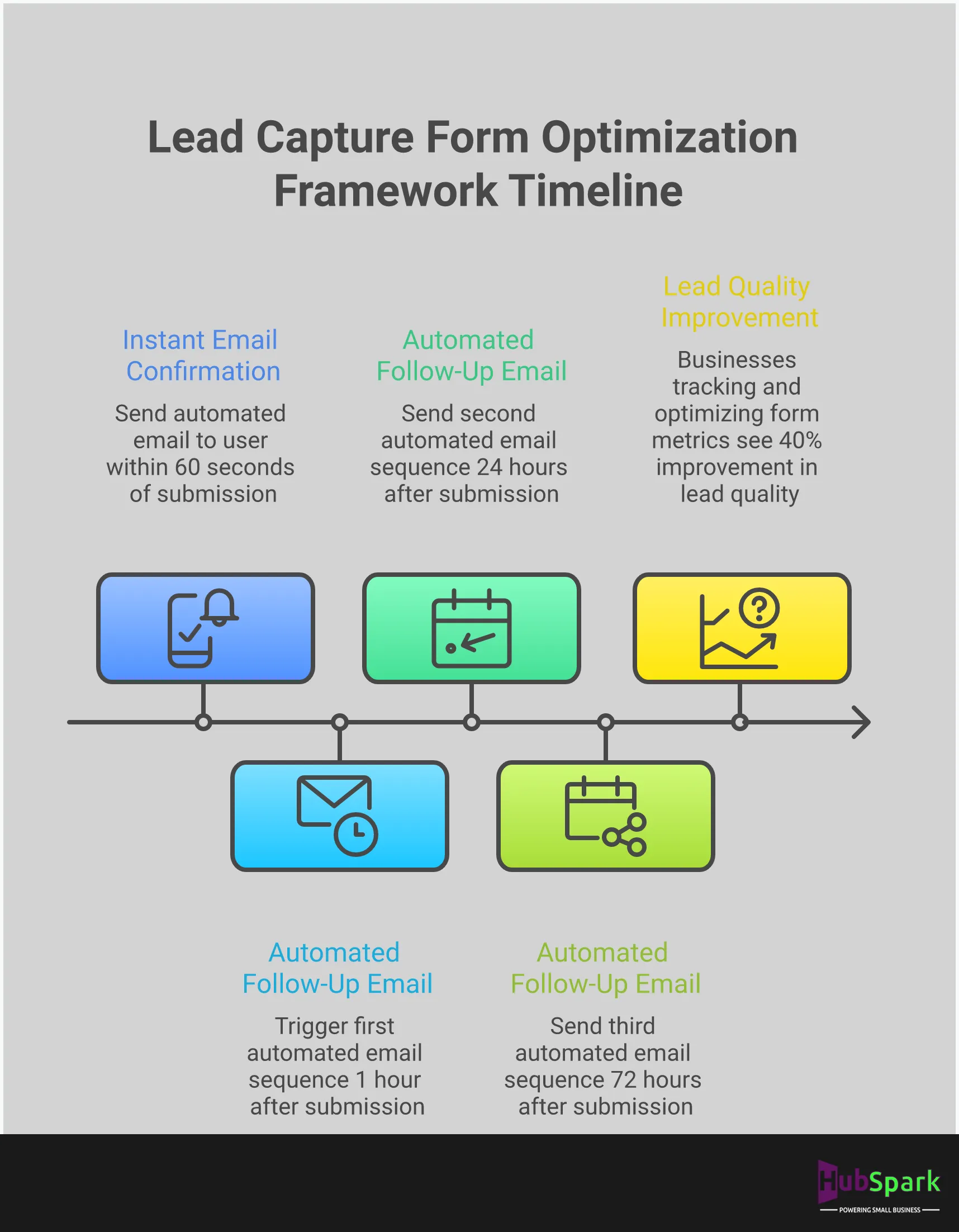
Capturing a lead is pointless if you have no plan for what comes next. A lead that sits untouched in a spreadsheet quickly goes cold. The absence of an immediate and automated follow-up sequence is a massive missed opportunity. You must have a system in place to instantly engage new leads, whether it’s through an automated welcome email, a confirmation text message, or a notification for your sales team to reach out. A solid follow-up strategy is essential for converting leads into customers. Integrating your forms with automated text marketing and email nurturing campaigns transforms a simple contact submission into the start of a customer relationship.
Skipping Form Testing and Optimization
Deploying a form and assuming it works perfectly is a critical error. Broken forms, confusing field labels, or a malfunctioning submit button will kill your conversion rates. Many businesses lose leads simply because their forms are clunky or non-functional on certain browsers or devices. You must regularly test your forms from the user’s perspective to ensure they are working correctly. Beyond basic functionality, you should also analyze performance data to identify opportunities for improvement. Continuous testing and optimization are not one-time tasks; they are crucial processes for maintaining a high-performing lead generation engine.
Best Practices for Form Design and Placement
A high-converting lead form is not an accident. It is the result of intentional design and strategic placement. Where your form lives on your website and how it is structured are just as important as the offer it presents. A poorly designed or hidden form creates unnecessary friction, causing potential customers to abandon the process before you ever get their information. The goal is to make the submission process feel intuitive and effortless, guiding the user directly to the point of conversion without distraction or confusion.
Effective form design is about removing barriers. Every field you add, every confusing label, and every moment a user spends searching for your form is a potential lost lead. By focusing on a few core principles, you can transform your forms from a passive data collection tool into an active lead generation engine. These practices include refining form length, implementing strategic placement across your site, creating a clear visual flow, and using advanced techniques like progressive profiling to gather intelligence over time. Mastering these elements will directly impact your ability to optimize website lead management and turn website traffic into tangible business opportunities.
Optimize Form Length
The most common mistake businesses make is asking for too much information upfront. Your lead form is not a customer interrogation. Every additional field you require a user to fill out increases the chance they will abandon the form entirely. A prospect’s time and personal information are valuable, and a long, demanding form signals a high-cost transaction. To maximize conversions, you must reduce this friction.
Audit your forms and eliminate every field that is not absolutely essential for the initial follow-up. For most businesses, this means asking only for a name, email address, and phone number. You can always gather more detailed information later in the sales process. A shorter form appears less intimidating, requires less effort, and respects the user’s time, which dramatically improves completion rates.
Implement Strategic Website Placement
Your lead capture form must be impossible to miss. Many businesses bury their forms deep within their site, forcing interested prospects to hunt for a way to get in touch. This is a critical error. Make it easy for customers to give you their business by placing forms in high-traffic, high-intent locations.
Ensure your forms are prominently displayed above the fold on your homepage and service pages. Create dedicated location pages with clear contact forms for users searching for local services. Consider placing a concise form or a clear call-to-action in your website’s header or footer, making it accessible from any page. Strategic placement ensures that when a potential customer decides to act, the path to conversion is immediate and obvious.
Establish a Clear Visual Hierarchy
A well-designed form guides the user’s eye from one field to the next, creating a seamless and logical flow. When a form feels like a “checklist of demands,” it creates cognitive friction and makes the user feel wary. A clear visual hierarchy makes the form appear simple and approachable, encouraging completion.
Use single-column layouts, as they are easier to scan on both desktop and mobile devices. Group related fields together, use clear and concise labels placed directly above each input box, and ensure there is enough white space to prevent a cramped appearance. Finally, make your call-to-action button stand out with a contrasting color that draws immediate attention. The design should communicate efficiency and professionalism, building trust from the first glance.
Use Progressive Profiling
Progressive profiling is a sophisticated strategy for gathering detailed lead information over time without overwhelming the user in a single interaction. Instead of presenting a long form with ten fields, you start by asking for only the most critical information, such as a name and email. Once that lead returns to your site, the form recognizes them and presents a few new questions, like company size or specific service interest.
This approach allows you to build a comprehensive customer profile incrementally. It respects the user’s initial reluctance to share extensive personal data while still enabling you to qualify leads effectively. By integrating this method, you can leverage the full benefits of a CRM by enriching contact records with each interaction, turning a simple contact into a well-understood sales opportunity.
Key Metrics for Measuring Lead Form Success
Creating a lead form is only the first step. To generate a consistent flow of high-quality leads that actually convert into paying customers, you must measure its performance. Without data, you are operating blind, unable to identify what works and what drives potential customers away. This isn’t just a missed opportunity; it’s a waste of the time, money, and effort you invested to get that visitor to your site in the first place. Tracking the right metrics transforms your lead capture process from a guessing game into a predictable system for business growth.
These key performance indicators (KPIs) are not just numbers on a dashboard. They are direct feedback from your audience, revealing the health of your lead generation efforts and providing the exact insights needed to make strategic improvements. Stop wasting resources on tactics that don’t deliver results. Instead, focus on these four core metrics to gain complete control over your form’s effectiveness, optimize your marketing spend, and maximize your return on investment. This data-driven approach is the difference between a stagnant contact list and a powerful, automated engine for business expansion. It’s how you move from hoping for leads to engineering a reliable pipeline of new business.
Conversion Rate
The conversion rate is the ultimate measure of your form’s success. It is the percentage of visitors who see your form and complete it successfully. A high conversion rate indicates that your offer, form design, and call-to-action are all aligned and compelling to your audience. To calculate it, divide the number of form submissions by the total number of form visitors, then multiply by 100. Tracking this metric is non-negotiable for assessing the effectiveness of your form’s design and content. With an integrated system like HubSpark, you can optimize website lead management by monitoring conversion rates directly within your dashboard, allowing for rapid adjustments.
Form Abandonment Rate
The form abandonment rate is the inverse of your conversion rate and highlights friction in your lead capture process. It measures the percentage of users who start filling out your form but fail to submit it. A high abandonment rate is a clear signal that something is wrong. Perhaps the form is too long, asks for sensitive information too early, or has technical glitches on certain devices. Understanding this metric helps you identify and eliminate these barriers. Pinpointing where users drop off allows you to refine your form fields and instructions, turning a point of friction into a seamless user experience and recovering potentially lost leads.
Lead Quality Score
Not all leads are created equal. The lead quality score helps you distinguish high-potential prospects from casual browsers. This metric assesses the value of each lead based on criteria you define, such as their industry, company size, or the specific information they provide. By scoring leads, you can prioritize your sales team’s follow-up efforts, ensuring they focus on the opportunities most likely to close. This approach reveals how effective your follow-up is and helps you spot opportunities to accelerate the sales cycle. Integrating your forms with a powerful system that offers CRM benefits is essential for implementing lead scoring and nurturing prospects effectively, turning raw data into revenue.
Cost Per Lead (CPL)
Your marketing efforts are an investment, and Cost Per Lead (CPL) measures the return. This metric calculates the total cost to acquire a single lead through your form. To find your CPL, divide your total marketing campaign cost by the number of leads generated from that campaign. A low CPL indicates an efficient and profitable lead generation strategy. Monitoring your CPL provides direct insight into your marketing spend and helps you allocate your budget to the most effective channels. By consolidating your tools with a platform like HubSpark, you can reduce software overhead and streamline campaigns, directly lowering your CPL and improving your bottom line.
How to Optimize Your Lead Capture Forms
Deploying a lead capture form is not the final step; it is the starting point. To transform your website from a simple online brochure into a powerful lead generation engine, you must actively optimize your forms. Optimization is the process of systematically refining your forms based on user data to maximize the number of qualified leads you receive. It is a non-negotiable discipline for any business serious about growth. Without it, you are leaving potential customers and revenue on the table.
Effective optimization is built on a continuous cycle of testing, analysis, and refinement. It requires you to move beyond assumptions and let performance data guide your decisions. By focusing on a few key strategies, you can methodically improve your form’s conversion rates and ensure you are capturing every possible opportunity. This means looking critically at every element, from the number of fields you require to the color of your submission button. It’s about understanding the psychology of your user and removing every point of friction that might cause them to abandon the process. The goal is to make submitting their information feel effortless and valuable. The following practices are essential for turning your lead forms into consistently high-performing assets for your business.
Implement A/B Testing
A/B testing is the process of comparing two versions of your lead form to determine which one performs better. This data-driven approach eliminates guesswork and allows you to make informed decisions that directly impact your conversion rates. You can test nearly any element of your form, including the headline, the call-to-action (CTA) button text and color, the number of fields, and the form’s placement on the page. By isolating one variable at a time and showing each version to a segment of your audience, you can identify exactly what encourages more users to complete the form. This systematic A/B testing is the foundation of successful form optimization.
Commit to Continuous Improvement
Your lead capture form is not a “set it and forget it” tool. Markets change, customer expectations evolve, and your business grows. Your lead generation strategy must adapt accordingly. Treat optimization as an ongoing business process, not a one-time project. Use the insights from your A/B tests to make incremental improvements, then test again. This cycle of testing, analyzing, and refining creates a powerful feedback loop that drives sustained growth. Small, consistent enhancements compound over time, leading to significant increases in lead volume and quality. This commitment to continuous improvement separates high-growth businesses from stagnant ones.
Monitor Performance with Analytics
You cannot improve what you do not measure. Monitoring your form’s performance with analytics is critical to understanding user behavior and identifying areas for improvement. Track key metrics to get a complete picture of your form’s effectiveness. The conversion rate tells you what percentage of visitors who see the form actually complete it. The form abandonment rate shows how many users start filling it out but fail to submit it. Other important form analytics include the average time to complete and the drop-off rate for each specific field. Analyzing this data reveals friction points in the user experience, allowing you to make targeted changes that will have the greatest impact.
Related Articles
- How Does HubSpark Help Business Owners with Lead Generation?
- Lead Generation Solutions for Business Owners | HubSpark
Frequently Asked Questions
How many fields should my lead form actually have? Your form should only ask for the absolute minimum information required to initiate a conversation. For most service businesses, this means a name, email address, and phone number. Every additional field creates friction and gives a potential customer a reason to leave. The form’s job is to open the door; you can gather more detailed information during your follow-up call.
What’s the most important place on my website to put a lead form? Your form must be impossible to miss. Place it “above the fold” (visible without scrolling) on your homepage and, most importantly, on every one of your service pages. A potential customer should never have to search for a way to contact you. Make it easy for them to take action the moment they decide they need your services.
How is a strategic lead capture form different from a standard ‘Contact Us’ page? A standard contact page is a passive destination. A strategic lead capture form is an active conversion tool. It is placed in high-intent locations across your site, is often tied to a specific offer like a free quote, and is designed to convert a visitor into a qualified lead for a particular service, not just a general inquiry.
Why is it so important for my form to connect directly to my CRM? A form that operates in isolation creates manual work and a high risk of losing valuable leads. When your form is integrated with your CRM, every submission automatically creates a customer profile, logs the inquiry, and can trigger an immediate follow-up sequence. This automation eliminates data entry errors and ensures you respond instantly, which is critical for turning a new lead into a customer.
How do I know if my form is actually working well? The single most important metric is your conversion rate, which tells you the percentage of visitors who successfully complete the form. If that number is low, look at your form abandonment rate to see how many people start filling it out but fail to submit it. These two numbers provide a clear picture of your form’s performance and show you exactly where improvements are needed.

I am a serial entrepreneur with a 20+ year background in marketing & advertising, with a specific focus on SEO/online/digital marketing. I have a passion for helping owners of small & medium sized businesses grow rapidly through organic search engine optimization & digital marketing. I am blessed to lead a team of some of the most hard working, brilliant, and passionate team to help all of our clients reach their revenue goals!
 App Today!