Growth isn’t accidental. It’s the result of a disciplined, repeatable system for acquiring and retaining customers. If your current process for managing leads and clients relies on memory and manual follow-ups, you don’t have a system—you have a liability. A powerful CRM is the engine that drives predictable growth. It automates your sales pipeline, ensures no lead falls through the cracks, and provides the data you need to make strategic decisions. It transforms your business from a reactive service provider into a proactive, growth-oriented machine. We will examine the critical features that turn a CRM into a revenue-generating asset and evaluate the leading small business crm solutions designed to help you dominate your market.
Key Takeaways
- Choose an Operating System, Not Just a CRM: A simple contact list is insufficient for a service business. Select an all-in-one platform that integrates scheduling, payments, and communication to eliminate operational drag and centralize command over your entire business.
- Select for Service-Specific Functionality: Generic software creates friction and slows you down. Your CRM must have built-in tools for appointment management, mobile field access, and integrated invoicing to streamline your workflow from the initial call to the final payment.
- Drive Adoption to Guarantee ROI: A CRM is only valuable if your team uses it effectively. Execute a clear implementation plan that includes clean data migration and role-specific training to ensure the platform becomes an indispensable asset for daily operations.
What Defines a Winning CRM for Small Businesses?
A Customer Relationship Management (CRM) system is the operational backbone of your service business. It’s more than a digital address book; it’s a central command center for every client interaction, from the initial lead to the final payment and follow-up review. The right CRM eliminates the chaos of scattered spreadsheets, missed calls, and lost notes by centralizing client data, automating routine tasks, and providing the insights you need to make decisive, growth-oriented decisions. For a small business, a winning CRM isn’t the one with the most features—it’s the one with the right features, seamlessly integrated to streamline your workflow.
The objective is to consolidate your operations, not add another layer of complexity. Stop juggling a dozen disconnected apps for scheduling, invoicing, and communicating. A truly effective CRM replaces that fragmented toolkit with a single, powerful system that manages your entire customer lifecycle. This consolidation is what separates a functional tool from a transformational business asset. It provides a unified view of your business, allowing you to identify bottlenecks, capitalize on opportunities, and deliver a consistently professional customer experience that builds loyalty and drives repeat business.
Non-Negotiable Features for Growth
A modern CRM must do more than just store contact information. To drive real growth, it needs to actively manage the entire customer journey. This starts with robust lead management to capture and track every potential job from your website, phone calls, and online listings, ensuring no opportunity falls through the cracks. It must also include automation capabilities to handle marketing campaigns, appointment reminders, and follow-up sequences without manual effort. Finally, a mobile app is not a luxury; it’s a requirement for managing your business from the field. These core functions—lead capture, automation, and mobile access—are the pillars of an effective CRM strategy that scales with your business.
Essential Integration Capabilities
Your CRM does not operate in a vacuum. It must communicate flawlessly with the other tools you rely on, such as your phone system, payment processor, and scheduling software. A disconnected CRM creates data silos and forces your team into inefficient, manual data entry. The most effective solution is a platform where these capabilities are already built-in. When your CRM includes integrated payment solutions, scheduling, and messaging, you create a single source of truth for every customer interaction. This eliminates friction, reduces errors, and gives your team a complete, 360-degree view of the client, empowering them to provide superior service at every touchpoint.
Ease of Use vs. The Learning Curve
The most powerful software is useless if your team finds it too complicated to use. A steep learning curve leads to poor adoption, inconsistent data, and a wasted investment. A winning CRM for a small business must be intuitive from the start, requiring minimal training for your team to become proficient. Look for a clean, uncluttered interface and a logical workflow that mirrors your actual business processes. The system should simplify daily tasks, not complicate them. Your team’s time is your most valuable resource; it is better spent serving customers and closing deals than fighting with software. Prioritize a platform that is simple to set up and even simpler to use every day.
A Breakdown of Top Small Business CRMs
The CRM market is saturated with options, but only a few are engineered to meet the specific demands of a service-based business. Your goal isn’t to find a CRM; it’s to find an operational partner that centralizes client data, streamlines your sales process, and eliminates administrative bottlenecks. The right platform moves beyond a simple contact database and becomes the command center for your entire business.
We’ve analyzed the top contenders to show you how they stack up. This breakdown moves past marketing claims to evaluate each platform on its core function and suitability for a growing service business. We will cover everything from all-in-one operating systems designed to run your entire company to specialized tools focused exclusively on sales pipelines. The following comparison is designed to give you a clear, decisive path toward selecting the system that will not just manage your contacts, but accelerate your growth.
HubSpark: The All-in-One Business OS
HubSpark is not just a CRM; it is a complete business operating system. While other platforms require you to patch together multiple tools for scheduling, payments, and marketing, HubSpark integrates these functions into a single, unified dashboard. This eliminates data silos and operational friction. You can manage your entire client lifecycle—from initial lead capture and appointment management to invoicing and reputation management—without ever leaving the platform. For service businesses, this means less time spent on administrative tasks and more time focused on delivering excellent work. It’s the definitive solution for owners who demand efficiency and control over their entire operation.
HubSpot CRM: A Free Foundation with Paid Add-Ons
HubSpot is a dominant player in the CRM space, largely because of its robust free offering. As one review notes, “HubSpot CRM is highly rated for its comprehensive free plan, making it ideal for startups needing contact management, email marketing, and AI tools without upfront costs.” It provides a solid entry point for businesses focused heavily on inbound marketing and email campaigns. However, the model is built on a foundation of paid add-ons. As your business needs expand to include more advanced sales, service, or operational tools, the costs can accumulate quickly, turning a free tool into a significant monthly expense.
Zoho CRM: The Comprehensive Suite
Zoho CRM is recognized as a powerful and highly customizable platform for scaling businesses. According to Forbes, “Zoho CRM is a top choice for growing businesses, offering affordable, all-in-one solutions with advanced features.” Its strength lies in its extensive suite of interconnected apps, allowing you to build a tailored solution. The trade-off for this flexibility is complexity. For a small business owner who needs an intuitive, out-of-the-box system, the steep learning curve and extensive setup required for Zoho can become a significant resource drain, pulling focus away from core business activities.
Pipedrive: A Sales-First Approach
If your primary focus is on managing a deal-centric sales process, Pipedrive is a strong contender. It is designed with a singular purpose: to help you visualize and manage your sales pipeline. PCMag highlights that “Pipedrive is highly recommended for sales-driven teams, focusing on pipeline management and easy tracking of deals.” This specialization makes it highly effective for sales-heavy organizations. However, for a service business, sales are just one piece of the puzzle. Pipedrive lacks the integrated tools for appointment scheduling, reputation management, and payment processing that are critical for day-to-day operations.
Salesforce Starter: Enterprise Power, Scaled Down
Salesforce is the undisputed leader in the enterprise CRM market, and its Starter plan aims to bring that power to small businesses. This option provides a solid entry point for companies that need robust analytics and plan for massive scaling. As one analysis points out, “Salesforce Starter provides a powerful entry point for small businesses wanting AI-powered insights, extensive third-party integrations, and scalability.” While powerful, it can be overly complex and expensive for many small service businesses. The enterprise-level architecture often means a steeper learning curve and features that, while impressive, may not be relevant to your immediate operational needs.
Less Annoying CRM: Simple and Straightforward
As its name suggests, Less Annoying CRM prioritizes simplicity and ease of use above all else. It’s built for small teams that need a no-frills solution for contact and pipeline management. Zapier notes that “Less Annoying CRM is known for its simplicity and a flat-fee, ‘no-nonsense’ approach that is easy for small teams to adopt.” This straightforwardness is its greatest strength and its primary limitation. While it excels at basic CRM functions, it does not offer the integrated marketing, scheduling, or payment tools necessary to run an entire service business from a single platform, forcing you to rely on other applications.
What is the Real Cost of a CRM?
Calculating the cost of a CRM goes beyond the monthly subscription fee. The true investment includes implementation time, training, and potential add-on features. A cheap or “free” plan becomes expensive if it fails to centralize your operations, forcing you to rely on other disconnected tools. The goal is not to find the cheapest option, but the one that delivers the highest return by streamlining your entire business, from lead capture to payment processing. A comprehensive platform eliminates the hidden costs of managing multiple software subscriptions and the inefficiencies they create.
The Limits of “Free” CRM
“Free” is a powerful marketing tool, but it rarely provides a complete business solution. Platforms may offer a free CRM that seems generous, allowing for a certain number of users and contacts without requiring a credit card. However, these plans are designed as entry points. They function as a digital contact list but lack the robust automation, integration, and communication tools necessary for a service business to operate efficiently. The real cost emerges when you hit the inevitable ceiling on contacts, features, or users, forcing a disruptive and often expensive upgrade. A free CRM is a temporary fix, not a scalable foundation for growth.
Standard vs. Premium: What’s the Difference?
The distinction between standard and premium CRM tiers is functionality. Standard plans typically cover basic contact management and sales tracking. Premium plans introduce the tools that drive real efficiency: marketing automation, integrated payment solutions, and advanced analytics. When evaluating options, scrutinize how pricing scales with contact list size and which features are locked behind higher tiers. A provider that bundles critical operational tools into its core offering provides more long-term value than one that forces you to pay for essential features as expensive “add-ons.” The right choice provides a clear path to scale without financial surprises.
Identify Premium Features That Pay for Themselves
Certain premium CRM features are not expenses; they are investments with a clear return. Tools that automate your sales and marketing processes directly impact your bottom line by saving labor hours and preventing leads from falling through the cracks. For service businesses, features like automated appointment reminders, integrated invoicing, and a unified messaging inbox are non-negotiable. These capabilities reduce no-shows, accelerate cash flow, and ensure a professional customer experience. When a feature eliminates a manual task or closes a revenue gap, it quickly pays for its own subscription cost and becomes a profit center for your business.
Watch Out for These Hidden Costs
The sticker price of a CRM is only the beginning. Hidden costs can quickly accumulate, turning an affordable tool into a financial burden. Be wary of initial setup fees, data migration charges, and mandatory paid training sessions. The most significant hidden cost is often the need for third-party integrations to make a basic CRM functional, which adds complexity and monthly fees. A fragmented system where your CRM, scheduling, and payment tools don’t communicate creates operational drag and wastes valuable time. An all-in-one platform like HubSpark eliminates these variables by providing one system, one invoice, and one source of truth for your business.
Why a CRM is a Non-Negotiable Asset
A Customer Relationship Management (CRM) system is the operational core of a modern service business. It is not an optional upgrade or a complex tool reserved for large corporations. Operating without a CRM means you are actively leaving money on the table and creating inefficiencies that limit your growth. Relying on spreadsheets, sticky notes, and mental reminders to manage customer interactions is a direct path to lost leads, poor service, and a stagnant sales pipeline. A CRM centralizes every piece of client data, from the first point of contact to the final payment and follow-up review. It transforms disorganized information into an actionable asset, providing the structure required to scale your operations efficiently. For any business owner serious about growth, implementing a CRM is not a question of if, but when. The sooner you establish this central system, the faster you can accelerate your business.
Go Beyond a Simple Contact List
A spreadsheet is a static list of names and numbers. A CRM is a dynamic record of your entire relationship with a customer. It moves far beyond basic contact information to track every call, email, appointment, and transaction. This complete historical view allows you to understand customer needs, anticipate future opportunities, and personalize every interaction. Instead of just storing data, a powerful CRM helps you leverage it to improve the customer experience and automate internal processes. The benefits of a CRM are clear: it turns your client list from a passive directory into an active tool for building loyalty and driving revenue.
Automate Your Sales Pipeline
Leads fall through the cracks when your follow-up process is manual and inconsistent. A CRM eliminates this risk by automating your sales pipeline. It tracks every interaction with a potential customer, ensuring you know exactly where each lead stands in the sales cycle. You can automatically assign tasks, send follow-up emails, and set reminders so your team can focus on building relationships and closing deals instead of administrative work. This system is critical for managing long sales cycles common in service industries. By automating routine tasks, you create a reliable process that converts more prospects into paying customers and ensures no opportunity is ever missed.
Deliver Superior Customer Service
Excellent service turns one-time customers into lifelong clients who leave positive reviews. A CRM is your primary tool for achieving this. When a customer calls, your team can instantly access their entire history—past appointments, previous issues, and communication logs. This allows them to solve problems faster and provide informed, personal support without asking the client to repeat themselves. This level of service builds trust and demonstrates professionalism. A CRM provides the insights you need to make informed decisions, improve your service delivery, and actively manage your business’s reputation. This is how you build a strong base of repeat customers and generate powerful word-of-mouth referrals.
Unify Your Marketing Efforts
Your marketing fails when it isn’t targeted. A CRM centralizes customer data, giving you a clear picture of who your clients are and what they care about. This allows you to segment your audience and create highly effective marketing campaigns that speak directly to their needs. You can track campaign performance, identify your most profitable customer segments, and refine your strategy based on real data. With an integrated system, you can manage everything from email campaigns to text marketing from a single platform. This eliminates the chaos of using multiple disconnected apps and ensures your marketing efforts are coordinated, efficient, and drive measurable results.
Should Your Startup Begin with a Free CRM?
The allure of a “free” CRM is undeniable, especially when every dollar counts. For a new business establishing its processes, a free plan can seem like the most logical starting point. However, this decision is less about initial cost and more about long-term operational strategy. A free CRM can serve as a functional entry point, allowing you to organize contacts and track initial leads without a financial commitment. It’s a step up from spreadsheets and sticky notes, providing a basic framework for customer management.
The critical question is not if you should start with a free CRM, but for how long. These platforms are designed as on-ramps, not final destinations. They introduce you to the core concepts of customer relationship management but come with inherent limitations on users, contacts, and features. Think of a free CRM as training wheels. It helps you get moving and build foundational habits, but you must have a clear plan for when to remove them. Your goal is to recognize the precise moment when the limitations of a free tool begin to create operational drag, signaling that it’s time to invest in a system built for growth.
The Case for Starting with a Free Plan
For a startup or solo operation, a free CRM provides an essential function: organized data collection. It allows you to centralize customer information, track interactions, and manage your sales pipeline from day one. Many free or low-cost options offer enough functionality to get your business off the ground, often including space for hundreds of contacts and basic deal tracking. This approach eliminates the initial financial barrier and provides a low-risk environment to understand what you truly need from a CRM. By using a free tool first, you can define your workflows and identify which features are critical before committing to a paid platform. It’s a practical way to build discipline around data management without impacting your budget.
Know When to Upgrade
The moment you start creating workarounds, it’s time to upgrade. Are you exporting data to another app for invoicing? Manually sending appointment reminders? Juggling a separate tool for text marketing? These are clear signals that your free CRM is creating bottlenecks instead of eliminating them. Growth demands more than a digital contact list; it requires an integrated system. A scalable CRM should handle an increasing volume of customers, data, and team members without friction. The primary benefits of a CRM for business are realized when it automates tasks, unifies communication, and provides a single source of truth. When your “free” tool costs you valuable time, you’ve outgrown it.
Key CRM Features for Service-Based Businesses
A generic CRM is not built for the unique demands of a service-based operation. Your business isn’t run from a desk; it operates on the road, in customers’ homes, and on job sites. Using a CRM designed for office-based sales teams is a critical error that creates operational friction and stunts growth. You require a system engineered to manage the entire service lifecycle: from the initial customer inquiry and dispatching a technician to completing the job and collecting payment. These are not optional add-ons; they are the core components of a system designed to eliminate the chaos that costs you time and money.
The right platform centralizes every function, providing a single source of truth for your entire team. Without it, you’re left juggling multiple apps, spreadsheets, and paper invoices—a recipe for missed appointments, lost leads, and frustrated customers. A CRM lacking these specific, service-oriented features is not a tool; it’s a bottleneck that prevents you from scaling. Your platform must provide a direct, unbroken line from a new lead to a paid invoice, all within one controllable dashboard. This transforms your business from a collection of disjointed tasks into a streamlined, professional operation ready for predictable growth. The following features are non-negotiable for any service business serious about dominating its local market.
Seamless Appointment Scheduling
Stop wasting time with back-and-forth phone calls and manual calendar entries. An effective CRM integrates appointment management directly into your workflow, allowing clients to book services online based on your real-time availability. This eliminates double-bookings and frees up your team to focus on billable work instead of administrative tasks. Your system should automatically send confirmations and reminders to reduce no-shows and ensure your technicians’ schedules are always full. This isn’t just about convenience; it’s about maximizing your revenue potential for every available time slot.
Effective Lead Management and Tracking
Every missed call or unread email is a lost revenue opportunity. Your CRM must capture every inquiry from your website, phone, and social media, organizing them into a single, actionable pipeline. A powerful system helps you find, qualify, and track leads so your team spends less time on paperwork and more time closing deals. The objective is to optimize your lead management process, ensuring no potential customer ever falls through the cracks. This transforms your CRM from a simple contact list into a predictable engine for generating new business.
Centralized Client Communication
Scattered client conversations across personal cell phones, email inboxes, and sticky notes create confusion and deliver poor service. A superior CRM provides unified messaging solutions, consolidating all texts, emails, and phone call logs into one client record. Having all customer information in a single place allows any team member to access a complete interaction history and provide fast, informed service. This builds client trust and professionalizes your entire operation, ensuring a consistent customer experience regardless of who answers the phone.
Integrated Payment Processing
Chasing down unpaid invoices is an inefficient use of your resources. A modern CRM for service businesses must include integrated payment solutions that allow you to create and send invoices and collect payments directly from the platform. This accelerates your cash flow by making it easy for clients to pay on the spot via text or email link as soon as a job is complete. By connecting your payment processing with your client management, you streamline your entire revenue cycle, reduce outstanding balances, and gain a clearer picture of your company’s financial health.
Debunking Common CRM Myths
Misconceptions about Customer Relationship Management (CRM) software stop too many business owners from adopting a tool that is essential for growth. These outdated ideas often stem from the complex, enterprise-level systems of the past. Modern CRMs, however, are built differently. They are designed to be the operational backbone for small businesses, centralizing critical functions and eliminating the chaos of using multiple, disconnected apps.
Let’s dismantle the four most common myths that hold businesses back. Understanding the truth about CRMs is the first step toward streamlining your operations, improving customer relationships, and accelerating your revenue. These aren’t just tools for giant corporations; they are fundamental assets for any service business serious about competing and winning in their local market. The right system doesn’t add complexity—it removes it, giving you a clear path to manage your leads, clients, and reputation from a single dashboard.
Myth: “CRMs Are Only for Big Corporations”
This is the most persistent and damaging myth. The reality is that companies of all sizes benefit from a centralized system to manage growth and track performance. A CRM is not about the size of your company; it’s about the quality of your customer interactions and the efficiency of your operations. For a small service business, every lead and every client relationship is critical. A CRM ensures no opportunity falls through the cracks. It provides the structure to deliver consistent, professional service, which is exactly how you build a reputation that rivals larger competitors. The benefits of a CRM are universal: organized data, streamlined communication, and actionable insights.
Myth: “It’s Just a Glorified Rolodex”
Comparing a CRM to a digital contact list fundamentally misunderstands its purpose. A Rolodex is a static database of names and numbers. A CRM is a dynamic, living record of your entire relationship with a customer. It tracks every touchpoint: every phone call, text message, appointment, review, and payment. This creates a complete picture that allows you to make informed decisions, anticipate customer needs, and personalize your service. Instead of just storing information, a CRM helps you use that information to build loyalty and drive repeat business. It transforms raw data into a strategic advantage, which is something a simple contact list can never do.
Myth: “Implementation is a Nightmare”
While legacy CRM systems were known for being cumbersome and requiring extensive IT support, modern platforms are built for the end-user: the small business owner. Cloud-based solutions like HubSpark are designed for rapid, straightforward setup with intuitive interfaces that require minimal training. The goal is to get you operational immediately, not to bog you down with technical configurations. You can manage everything from appointment scheduling to payment processing from a single, easy-to-use dashboard. The days of lengthy and expensive implementation projects are over. Today’s CRMs are designed to solve problems, not create them.
Myth: “The ROI is Unclear”
The return on investment from a CRM is direct and measurable, provided you know what to look for. The ROI isn’t just a vague promise of “better relationships”; it’s found in concrete metrics. It’s the time saved by automating follow-ups and reminders. It’s the increase in closed deals from a system that helps you optimize website lead management. It’s the higher customer retention rate that comes from providing consistently excellent service. A CRM pays for itself by tightening your sales process, improving operational efficiency, and increasing the lifetime value of each customer. When your key business functions are centralized, the financial impact becomes impossible to ignore.
Critical Mistakes to Avoid When Choosing a CRM
Selecting a CRM is one of the most critical operational decisions you will make. The right system accelerates growth by centralizing customer data, automating sales, and streamlining communication. The wrong one becomes an expensive, glorified spreadsheet that your team ignores. Many business owners make predictable, avoidable errors during the selection process that lock them into inefficient systems, create data silos, and ultimately cost them revenue.
These mistakes often stem from a short-term mindset—prioritizing immediate cost savings over long-term operational efficiency or failing to anticipate future needs. A CRM is not just another piece of software; it is the central nervous system of your customer-facing operations. Choosing incorrectly means you will spend more time managing software than managing your business. To ensure your investment pays dividends, you must avoid these four common pitfalls that can cripple your CRM implementation before it even begins.
Choosing Price Over Long-Term Value
Focusing exclusively on the upfront cost of a CRM is a critical error. While budget is a valid concern, the cheapest option is rarely the most valuable. Many business owners hesitate to invest because of initial setup and maintenance costs, but this view overlooks the significant long-term return a powerful CRM delivers. A low-cost system that lacks essential automation, integration, or mobile capabilities will cost you far more in lost productivity and missed opportunities. Instead of asking “What is the cheapest CRM?” the correct question is “Which CRM provides the highest return?” The long-term value of a system that streamlines your entire operation—from lead capture to payment processing—far outweighs a minimal monthly subscription fee.
Ignoring Mobile and Automation Needs
For any service-based business, work happens in the field, not just behind a desk. If your team cannot access and update customer information, schedules, and job notes from a phone or tablet, your CRM is obsolete. A mobile-first CRM is not a luxury; it is a requirement for operational efficiency. Equally important are automation capabilities. Your CRM should eliminate repetitive administrative tasks, not create more of them. Automation saves time by handling tasks like appointment reminders, follow-up emails, and review requests, freeing your team to focus on revenue-generating activities. A system without robust mobile access and automation is a liability that slows your business down.
Forgetting Key Integrations
A CRM that operates in a silo is fundamentally broken. Your business relies on a set of tools for daily operations, including email, accounting software, and marketing platforms. A common mistake is choosing a CRM that fails to connect with the other tools you use every day. This lack of integration creates fragmented data and forces your team into inefficient, manual data entry between systems. Your CRM should serve as the central hub for all customer interactions. Before committing, verify that it integrates seamlessly with your essential applications, particularly your payment solutions and communication channels. An integrated system provides a single source of truth and eliminates the bottlenecks caused by disconnected software.
Neglecting Training and Support
The most powerful software is worthless if your team doesn’t know how to use it. A frequent oversight is underestimating the need for comprehensive training and accessible customer support. Implementation is not complete once the software is installed; it requires a dedicated effort to train your employees on its features and workflows. Without proper onboarding, user adoption will plummet, and your investment will be wasted. When evaluating options, scrutinize the quality of the provider’s support. Choose a partner that offers robust onboarding and ongoing support to ensure your team can leverage the CRM effectively. Excellent support transforms a software purchase into a strategic partnership focused on your success.
How to Choose the Right CRM for Your Business
Selecting a CRM is a foundational business decision, not just a software purchase. The right platform becomes the central nervous system of your operations, streamlining everything from lead capture to final payment. A mismatched system, however, creates more work than it eliminates. The key is to move beyond flashy feature lists and focus on a strategic fit for your specific operational needs and long-term vision. Use these three criteria to guide your selection process and choose a platform that will accelerate, not complicate, your growth.
Align Features with Your Business Goals
Your CRM should be a direct solution to your most significant operational challenges. Before you look at any software, map out your daily workflows and identify the bottlenecks. Are you losing leads because of slow follow-up? Is scheduling appointments a manual, time-consuming process? Your answers will dictate the features you need. Don’t pay for a complex system with enterprise-level marketing automation if your primary need is robust appointment management and client communication. Look for a CRM that automates your most repetitive tasks, like assigning new leads to a technician or sending appointment reminders. The goal is to find a tool that directly supports your revenue-generating activities and simplifies your team’s workload.
Plan for Future Growth
The CRM you choose today must support the business you plan to run tomorrow. A system that works for a one-person operation will quickly buckle under the pressure of more clients, employees, and data. Scalability is non-negotiable. Your platform must be able to expand with you as you add technicians, increase your service area, or handle a higher volume of jobs. Choosing a system that can’t grow means you’ll face a disruptive and costly migration process down the road. An integrated platform provides the benefits of a CRM that scales naturally as your business matures, centralizing more functions as you need them without requiring a complete overhaul.
Your CRM Implementation Roadmap
Selecting a CRM is the first step. Executing a flawless implementation is what separates high-growth businesses from the rest. A powerful platform only delivers results when it’s integrated correctly into your daily operations. Without a clear plan, you risk messy data, poor team adoption, and a frustrating experience that fails to produce a return on your investment. This is not just a software installation; it is a fundamental upgrade to your business’s operating system.
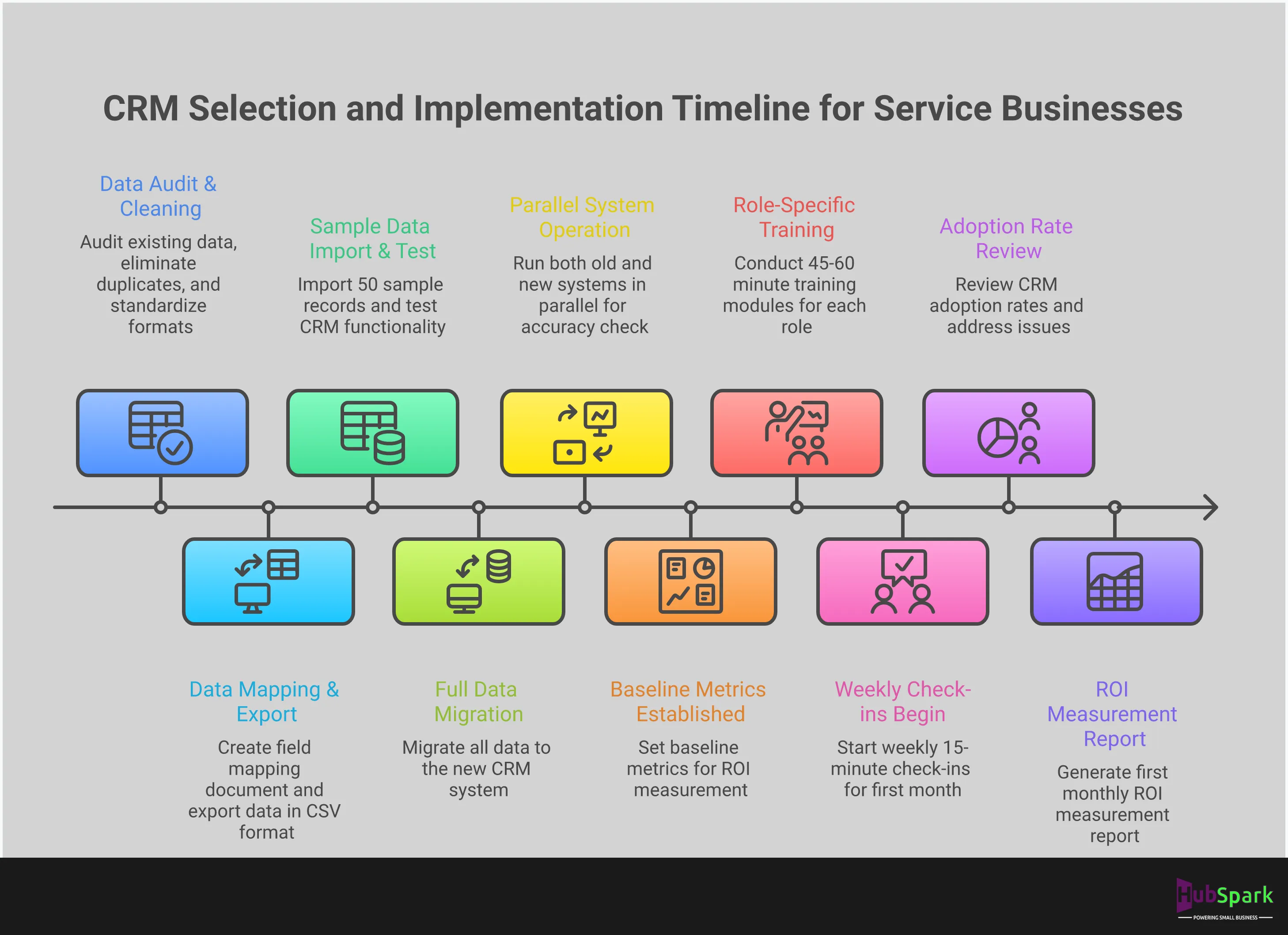
A strategic roadmap eliminates guesswork and ensures your CRM becomes a central asset from day one. The process can be broken down into three critical phases: migrating your data, training your team, and measuring your success. Each stage requires careful planning and execution to centralize your operations and accelerate growth. Follow this framework to transition smoothly and unlock the full potential of your new system. This structured approach ensures your CRM works for you, not the other way around.
Plan Your Data Migration
Your CRM is only as powerful as the data inside it. The goal of data migration is to transfer your existing contacts, job histories, and lead information into the new system cleanly and accurately. Before you move a single contact, audit your current data. This is your opportunity to eliminate duplicates, correct outdated information, and standardize formats. A clean data set is foundational to the benefits of a CRM, as it ensures your sales and marketing automation runs on reliable information. Map out exactly which data fields from your old system will go into the new one to ensure no critical information is lost in the transition.
Execute Your Team Training
A CRM’s success is determined by user adoption. If your team doesn’t use the system correctly—or at all—your investment is wasted. Do not settle for a single, one-hour training session. Develop a comprehensive training plan that includes an initial overview for everyone, followed by role-specific sessions that show how the CRM solves their unique daily challenges. Ongoing training is essential. Schedule regular check-ins to answer questions and demonstrate new features. When your team understands how the platform makes their jobs easier, from managing appointments to using unified messaging solutions, they will embrace it as an indispensable tool.
Measure Your Post-Implementation Success
The work isn’t finished once the CRM is live. You must define what success looks like and track it with clear metrics. Before you launch, establish key performance indicators (KPIs) that align with your business goals. Are you trying to reduce lead response time, increase your appointment booking rate, or improve customer retention? Track these metrics from day one. Regularly review performance data to validate your investment and identify areas for improvement. This data-driven approach allows you to refine your strategies and prove the tangible impact of your CRM, turning a software expense into a measurable revenue driver. You can directly see how you optimize website lead management and other critical functions.
Related Articles
- CRM Benefits for Business Growth | HubSpark
- Why Small Businesses Should Use HubSpark as Their CRM – HubSpark
- 7 Best Small Business Management Software of 2026
- CRM for Small Business: Boost Customer Relationships | HubSpark
Frequently Asked Questions
How do I know when I’ve outgrown my free CRM? You have outgrown your free CRM the moment you start creating workarounds. If you find yourself exporting contact lists to send marketing emails, using a separate calendar for appointments, or manually sending payment reminders, your system is creating bottlenecks. These manual processes are a clear signal that the “free” tool is costing you valuable time and you require an integrated platform to run your business efficiently.
My team resists new technology. How can I ensure they actually use the CRM? Adoption is driven by value, not features. Focus your training on how the CRM solves your team’s specific daily frustrations. Show your technicians how a mobile app eliminates end-of-day paperwork and how automated reminders reduce appointment no-shows. When your team sees the system as a tool that makes their job easier and more productive, they will embrace it. This requires clear, role-specific training, not just a single software demo.
What’s the single most important feature for a service business like plumbing or HVAC? The most critical capability is not a single feature, but the seamless integration of your core operations. A system that combines appointment scheduling, client communication, and payment processing into one unified workflow is non-negotiable. This allows you to manage the entire job lifecycle—from initial booking to final payment—from a single client record, which eliminates operational friction and professionalizes your service delivery.
How can I measure the return on investment (ROI) of a CRM? The ROI of a CRM is found in concrete, measurable improvements to your efficiency and revenue. Track the reduction in time your team spends on administrative tasks like scheduling and invoicing. Monitor the increase in your lead conversion rate now that follow-ups are automated. Calculate the direct revenue gained from fewer missed appointments and faster invoice payments. These metrics provide a clear financial justification for the investment.
Do I really need an all-in-one system, or can I just use a simple sales-focused CRM? A sales-focused CRM is designed to manage a deal pipeline, which is only one small part of a service business. You need a system that manages the entire client lifecycle, including scheduling, dispatching, job management, invoicing, and collecting reviews. An all-in-one platform is built for this purpose, eliminating the data silos and inefficiencies that come from trying to patch together multiple, disconnected applications.

I am a serial entrepreneur with a 20+ year background in marketing & advertising, with a specific focus on SEO/online/digital marketing. I have a passion for helping owners of small & medium sized businesses grow rapidly through organic search engine optimization & digital marketing. I am blessed to lead a team of some of the most hard working, brilliant, and passionate team to help all of our clients reach their revenue goals!
 App Today!