Most construction software focuses solely on project management, but running a successful contracting business requires more than just on-site execution. You must also manage leads, streamline client communication, process payments, and protect your online reputation. Juggling separate apps for these critical functions creates data silos and operational drag. A truly effective system centralizes the entire customer lifecycle, from initial contact to final invoice. This review goes beyond simple project tracking to evaluate the top 10 construction management software platforms on their ability to run your entire business. We will identify which tools are simple project managers and which offer a complete operating system for growth.
Key Takeaways
- Centralize operations to eliminate costly errors: The primary function of construction software is to replace fragmented spreadsheets and communication with a single, authoritative system for project data, client information, and financials.
- Match the software to your specific business model: Select a platform engineered for your project type—whether residential, commercial, or specialty contracting. A generic solution creates inefficiency; the right tool aligns directly with your operational workflow and growth targets.
- Execute a disciplined implementation plan: Software success depends on user adoption. Guarantee your return on investment by involving your team in the selection process, planning a thorough data migration, and deploying the new system with a strategic pilot program.
What is Construction Management Software?
Construction management software is the central command center for your entire operation. It replaces the chaotic mix of spreadsheets, text threads, and paper invoices with a single, organized system designed to manage every phase of a project. This software puts all critical project details—from initial bids and scheduling to budgets, tasks, and client messages—in one accessible place. It provides a clear, real-time view of project progress, helping you manage planning, mitigate risks, and ensure quality control from start to finish.
The objective is straightforward: to execute projects on time, within budget, and to the highest standard. By centralizing information, the software eliminates costly miscommunications and errors that erode your profit margins. It ensures your field teams and office staff are always working from the same playbook, which is critical for maintaining project momentum. Effective construction management software goes beyond just project tasks. It integrates essential business functions like customer relationship management (CRM) and financial tracking. This consolidation gives you complete control over not just the job site, but the health of your entire business, from lead capture to final payment.
Why Your Business Needs Construction Management Software
Managing a construction project with spreadsheets, scattered documents, and endless email chains is a direct path to inefficiency. This fragmented approach creates bottlenecks, invites costly errors, and limits your ability to scale. In an industry defined by tight timelines and high client expectations, relying on outdated tools is no longer a viable strategy. Your business requires a centralized system to eliminate chaos and accelerate growth.
Construction management software provides a single source of truth for every project. It helps you keep all project information in one central place, from initial bids and blueprints to daily logs and change orders. This consolidation is critical for streamlining operations. When your team can access schedules, budgets, and client communications from a unified dashboard, you reduce misunderstandings and keep projects on track. This level of organization is fundamental to delivering work on time and within budget.
Modern software does more than just organize files. It integrates every facet of your business operations. The right platform connects your field team to the back office, automates task assignments, and provides real-time visibility into project progress. It also integrates essential business functions like customer relationship management (CRM) and payment processing. By centralizing these functions, you stop wasting time switching between disconnected apps and instead focus on what matters: completing high-quality work and securing your next job.
The Top 10 Construction Management Platforms
The right software is not a one-size-fits-all solution; it’s a strategic asset that must align with your company’s size, project types, and growth objectives. Some platforms excel at managing complex, enterprise-level builds, while others are designed to streamline residential projects. And some, like HubSpark, go beyond project management to offer a complete operating system for your entire business. Here is a direct comparison of the leading construction management platforms to help you identify the system that will eliminate bottlenecks and accelerate your operations.
HubSpark: The All-in-One Operating System for Contractors
While most construction software focuses solely on project management, HubSpark is engineered to run your entire business from a single dashboard. It eliminates the chaos of using separate apps for leads, customer communication, and payments. This platform is built for service-based contractors who need to manage the whole customer lifecycle, from initial contact to final invoice.
HubSpark centralizes your operations with a powerful CRM for business growth, ensuring no lead falls through the cracks. You can automate appointment scheduling, manage your online reputation, and deploy targeted text marketing campaigns to keep your schedule full. By integrating job management with tools that attract and retain customers, HubSpark provides a clear path to scaling your contracting business efficiently.
Procore: For Enterprise-Level Project Management
Procore is a dominant force in the construction software market, recognized as a comprehensive solution for large-scale contractors. It’s designed for enterprise-level operations where managing vast amounts of data across project management, quality control, and safety is critical. The platform connects every stakeholder—from the office to the field—on a single system. If your business manages multiple complex projects simultaneously and requires robust, all-encompassing project oversight, Procore offers the necessary tools. Its strength lies in its ability to handle the intricate demands of large commercial and industrial builds, making it the go-to choice for established, high-volume construction firms.
Autodesk Construction Cloud: For BIM-Integrated Workflows
Autodesk Construction Cloud is the premier choice for firms that rely on Building Information Modeling (BIM). It connects workflows, teams, and data at every stage of construction, from design to operations. Formerly known as PlanGrid, its core strength is in document management, offering powerful tools for blueprint viewing, markups, and cloud-based field collaboration. For contractors working on projects where 3D models and data-rich plans are central, Autodesk provides an integrated environment that ensures accuracy and reduces rework by keeping the entire team aligned with the latest designs.
Buildertrend: For Residential Construction
Buildertrend is a leading cloud-based platform specifically designed for home builders, remodelers, and residential contractors. Its features are tailored to the unique demands of the residential market, focusing heavily on client management, project scheduling, and financial tracking. The software provides a client portal, which allows homeowners to track progress, make selections, and communicate directly with the builder. This focus on the client experience, combined with strong pre-sale tools like estimates and proposals, makes Buildertrend a popular choice for contractors aiming to streamline their residential projects and improve customer satisfaction.
CoConstruct: For Custom Home Builders
While similar to Buildertrend, CoConstruct carves out its niche by focusing on custom home builders and design-build firms. The platform excels at managing the complex communication and decision-making processes inherent in custom projects. Its standout features are centered on coordinating client selections, tracking change orders, and managing allowances with complete transparency. For builders whose success depends on flawlessly executing a client’s unique vision, CoConstruct provides the specialized tools needed to keep schedules, budgets, and communication clear and organized from start to finish.
PlanGrid: For Field Collaboration and Blueprints
Now part of Autodesk Construction Cloud, PlanGrid built its reputation on exceptional field collaboration and document management. Its core function is to provide the entire project team—especially those on-site—with instant access to the latest blueprints, specifications, and project documents on any device, even when offline. The ability to share, view, and mark up drawings in real-time directly from the field makes it an indispensable tool for reducing errors and improving communication between the job site and the office. It streamlines workflows for RFIs, submittals, and punch lists.
Fieldwire: For Task Management and Quality Control
Fieldwire is a top-rated application designed to optimize field management and coordination. It excels at connecting the entire project team, from project managers to subcontractors’ foremen, on a single platform. The software is particularly strong in task management, allowing teams to assign work, track progress, and resolve issues efficiently. Its features for managing drawings, creating detailed punch lists, and generating daily reports make it a powerful tool for ensuring quality control and keeping projects on schedule. Fieldwire is ideal for subcontractors and general contractors who need to improve on-site productivity and coordination.
Jonas Construction Software: For Accounting-Focused Management
Jonas Construction Software is a fully integrated solution designed for mid-to-large specialty contractors, including mechanical, electrical, and HVAC professionals. Its primary strength is its deep integration of project management with robust accounting and payroll modules. This all-in-one approach ensures that financial data flows seamlessly from the field and project managers to the back office, providing real-time insights into job costing and profitability. For contractors who need a single system to handle everything from service management to financial reporting, Jonas offers a comprehensive and time-tested solution.
Sage 100 Contractor: For Financial Management Integration
Sage has long been a leader in accounting software, and Sage 100 Contractor extends that expertise directly to the construction industry. This platform is ideal for small to mid-sized contractors who prioritize financial control. It tightly integrates project management with critical accounting functions like job costing, payroll, estimating, and billing. By providing a single source of truth for both operational and financial data, Sage 100 Contractor helps businesses maintain a clear view of their financial health on a per-project basis, ensuring that every job remains profitable.
Monday.com: For Flexible Project Workflows
While not exclusively a construction management tool, Monday.com has gained popularity in the industry due to its extreme flexibility and highly visual interface. It allows teams to build and customize their own project workflows using boards, Gantt charts, and automated notifications. This adaptability makes it an excellent choice for contractors who need a simple yet powerful way to track progress, manage tasks, and keep all stakeholders informed. Its strength lies in its ability to present complex project information in an easily digestible format, making it ideal for improving team-wide communication and collaboration.
Essential Features Your Construction Software Must Have
Selecting construction management software is not about finding the platform with the longest feature list. It’s about identifying the core functionalities that directly solve your biggest operational bottlenecks. The right software centralizes control, eliminates redundant tasks, and gives you a clear view of every project from bid to closeout. Anything less is a distraction.
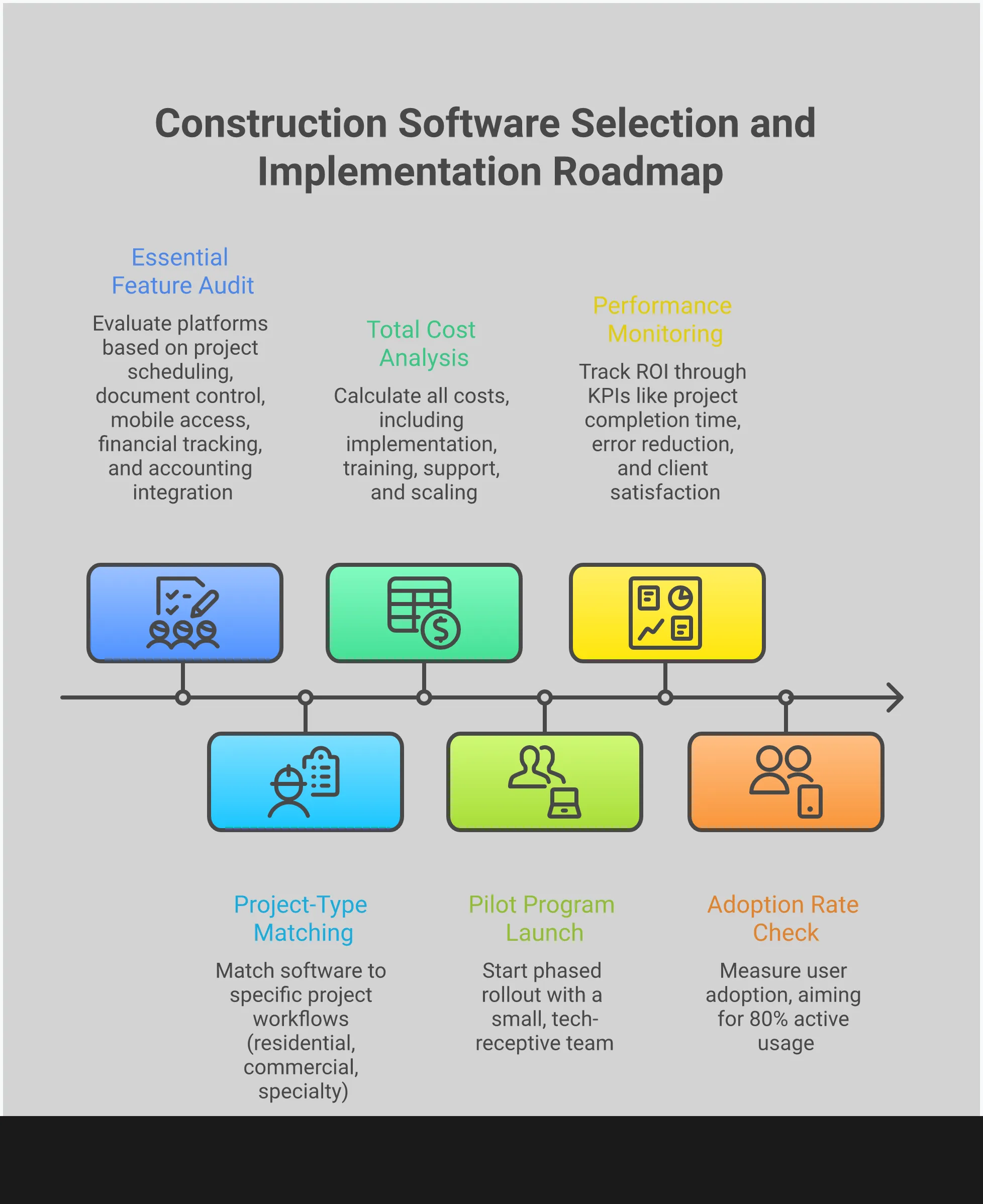
Your business requires a system built for action. This means tools for precise scheduling, ironclad document control, and real-time communication between the office and the job site. It also demands robust financial tracking to protect your margins and seamless integration to avoid creating new data silos. These aren’t just “nice-to-haves”—they are the essential components of a modern, profitable construction operation. Before you evaluate any platform, confirm it delivers on these five non-negotiable capabilities. If a system can’t master these fundamentals, it won’t effectively manage your business.
Project Scheduling and Task Management
Disorganized schedules are the primary cause of project delays and budget overruns. Effective construction software puts an end to this chaos by centralizing all project timelines. It provides a single source of truth for schedules, tasks, and deadlines, ensuring your crew, subcontractors, and office staff are perfectly aligned. Look for platforms that offer clear visual timelines, task dependencies, and milestone tracking. This functionality allows you to see how a delay in one area impacts the entire project, so you can make proactive adjustments. The goal is to move from reactive problem-solving to strategic project execution, keeping every job on schedule and on budget.
Document Control and File Sharing
A construction project runs on documents—blueprints, RFIs, submittals, and change orders. Managing these manually is inefficient and introduces significant risk. The right software provides a central repository for all project files, ensuring everyone works from the most current versions. According to Ingenious Build, this is critical for organizing RFIs, submittals, and drawings while keeping track of different versions. This eliminates the costly errors that happen when a subcontractor works from an outdated plan. A centralized system for document control means less confusion, fewer mistakes, and a clear, auditable record of all project communications and changes.
Mobile Access for Field Updates
Your projects are won and lost on the job site, not behind a desk. Any software you choose must have robust mobile capabilities. Your field team needs the ability to access plans, update daily logs, and report issues directly from their phones or tablets. As noted by experts at Planera, mobile access is a must-have for field teams to update tasks and report issues in real-time. This instant flow of information from the field to the office allows for faster decision-making and problem resolution. It closes the communication gap that plagues so many projects, ensuring that office-based project managers have an accurate, up-to-the-minute view of job site progress and challenges.
Financial Tracking and Budget Management
Profitability is the ultimate measure of a project’s success. Your software must provide real-time visibility into job costs, budgets, and cash flow. As Procore highlights, successful firms closely monitor key financial KPIs to stay ahead. Your platform should make it simple to track expenses against estimates, manage change orders, and generate accurate financial reports. This isn’t just about accounting; it’s about project control. With clear financial data at your fingertips, you can identify potential budget overruns before they become critical issues. This allows you to protect your margins and make data-driven decisions that ensure every project contributes positively to your bottom line. HubSpark’s integrated payment solutions streamline this process even further.
Integration with Existing Tools
Your construction software should not operate in a vacuum. It must integrate seamlessly with the other tools you rely on, particularly your accounting software. A lack of integration forces you into time-consuming and error-prone double data entry. The best platforms offer pre-built integrations with popular accounting systems or provide an open API for custom connections. This ensures that financial data, such as invoices and labor costs, flows automatically between systems. This creates a single, unified operational view, reduces administrative overhead, and guarantees data consistency across your entire business. An all-in-one platform like HubSpark is designed to eliminate these integration headaches from the start by consolidating your core business operations into one dashboard.
Comparing Construction Software Pricing Models
Selecting the right software is as much a financial decision as it is an operational one. The price you see advertised is rarely the final number, and the structure of that price determines the software’s long-term cost and scalability. A low monthly fee can look appealing, but it might hide limitations that force expensive upgrades later. Conversely, a high upfront cost might provide more value over time. To make a sound investment, you must analyze the pricing model, not just the price tag.
The construction software market has largely standardized around a few core models. The most prevalent is the subscription-based service, which has replaced the old model of buying a single software license. Within subscriptions, you’ll find per-user and tiered pricing, each with distinct implications for your budget as your team grows. Beyond these primary structures, you must account for additional expenses like implementation, training, and premium support. A clear understanding of these variables is essential to forecast your total cost of ownership and ensure your software investment accelerates, rather than drains, your resources. This is a critical step in optimizing your operations and centralizing your business data with a powerful CRM.
Subscription vs. One-Time License Fees
The industry standard for construction software is a subscription model. You pay a recurring monthly or annual fee for access to the platform, including regular updates and support. This approach eliminates the massive capital expenditure of a one-time perpetual license, which is increasingly rare. For most contractors, a subscription provides financial flexibility and predictability, treating software as a manageable operating expense rather than a major asset purchase. It also ensures you are always using the most current version of the software without needing to purchase new editions. While it creates a recurring line item in your budget, the benefits of continuous improvement and lower initial costs make it the superior model for most growing businesses.
Per-User vs. Tiered Pricing
Within the subscription model, costs are typically structured in one of two ways. Per-user pricing is the most common: you pay a set rate for each team member who needs an account. This model is simple and scales directly with your team size, but costs can escalate quickly as you hire more project managers, field staff, or administrators. The alternative is tiered pricing, where you purchase a package that includes a specific set of features and a maximum number of users. A higher tier unlocks more advanced features and a larger user capacity. This can be more economical for larger teams, but you risk paying for features you don’t use or being forced into a costly upgrade just to add one more team member.
Identifying Hidden Costs and Implementation Fees
The advertised subscription fee is only the beginning. To determine the true cost, you must investigate potential additional charges. Many software providers charge a one-time implementation or onboarding fee to set up your account, migrate data, and train your team. This can range from a few hundred to several thousand dollars. Furthermore, the level of customer support you receive is often tiered; basic email support may be included, but immediate phone access could be a premium add-on. Finally, scrutinize the feature list for each pricing tier. Critical functions like advanced reporting or specific integrations may be locked behind a more expensive plan. Demand a detailed quote that outlines every potential cost before you commit.
Matching Software to Your Project Type
The right software is not a one-size-fits-all solution; it’s a strategic asset aligned with your specific operational demands. A residential remodeler managing client selections has fundamentally different needs than a commercial contractor overseeing a multi-story build. Using a generic platform forces you to adapt your workflow to the software’s limitations, creating inefficiencies and bottlenecks. The correct approach is to select a tool engineered for your project type. This ensures every feature, from bidding to project closeout, directly supports your core business activities.
Consider the distinct workflows. Residential projects often involve high-touch client communication and detailed finish selections, while commercial jobs demand rigorous safety compliance, complex scheduling, and extensive subcontractor coordination. Specialty contractors need tools focused on field management and precise task execution. Choosing software that ignores these distinctions is a direct path to operational friction. While specialized construction software manages the build itself, your business operations—customer communication, lead capture, and reputation management—require a centralized system. A platform like HubSpark provides the CRM and unified messaging that integrate seamlessly with any project management tool, ensuring your entire business runs with precision. Your choice in software dictates your operational efficiency; select tools that match the complexity and scale of your work.
For Small Residential Contractors and Home Builders
For residential contractors, the focus is on client relationships and project execution. Software in this category must excel at managing selections, streamlining communication, and maintaining tight schedules. Platforms like Buildertrend are designed specifically for home builders and remodelers, offering robust tools to manage every client interaction and project detail. Similarly, CoConstruct is tailored for custom home builders, providing a seamless interface for coordinating schedules and communicating with clients. These tools are built to handle the unique challenges of residential construction, where customer satisfaction is as critical as the build quality itself. They centralize the moving parts of a home build, from initial design to final walkthrough.
For Commercial Construction Companies
Commercial construction operates at a different scale, demanding software built for complexity and control. These platforms must manage enterprise-level projects with a focus on quality, safety, and financial oversight. Procore is a leading choice for large contractors, offering a comprehensive suite for project management and strict quality control. For firms needing a scalable solution, RedTeam Flex/Go provides powerful tools for bidding, project management, and financial controls. These systems are engineered to handle the intricate logistics of commercial projects, where multiple teams, extensive documentation, and tight budgets are the norm. They provide the high-level visibility required to keep large-scale builds on track and profitable.
For Specialty Contractors and Subcontractors
Subcontractors require software that addresses their specific role within a larger project. The priority is efficient field management, accurate reporting, and clear communication with the general contractor. Fieldwire is a top-rated application for field teams, offering features for coordinating tasks, managing drawings, and creating punch lists on-site. For a more comprehensive solution, eSub is designed exclusively for subcontractors, providing essential tools for daily reports, time tracking, and managing change orders. These platforms empower specialty contractors to protect their profits and document their work meticulously, ensuring they meet their obligations while maintaining clear records.
Pros and Cons of Each Platform
Selecting a construction management platform is a critical operational decision. The right software centralizes your operations and accelerates growth, while the wrong one becomes a costly bottleneck. A platform’s true value isn’t just in its feature list—it’s in how effectively it integrates into your daily workflow. Many platforms excel in one area but create complexity in another, forcing you to juggle multiple systems to manage a single project. This fragmentation is inefficient and unsustainable for a growing business.
To make an informed choice, you must dissect the strengths and weaknesses of each contender. This requires looking beyond marketing claims and evaluating how each platform performs in a real-world construction environment. Consider the total cost of ownership, including hidden fees and the price of training your team. Analyze whether a platform is built for your specific project type—a tool designed for large commercial builds is often a poor fit for a residential contractor. The following analysis breaks down the core performance, common limitations, and user experience of leading platforms to provide the clarity you need to choose a system that truly supports your business objectives.
Performance Strengths by Software
Each platform is engineered to solve a specific set of problems. Your task is to align a platform’s core strengths with your operational priorities. For large-scale contractors, Procore offers a comprehensive suite for managing project quality and safety. Autodesk Build is dominant in blueprint markup and cloud-based field collaboration, making it ideal for BIM-heavy projects. Residential contractors often turn to Buildertrend for its specialized tools for managing clients, projects, and scheduling. For subcontractors focused on execution, Fieldwire provides a top-rated app for field coordination and punch lists. Finally, Contractor Foreman serves as a budget-friendly, all-in-one tool for growing companies that need a wide range of features without a high price tag.
Common Limitations and Drawbacks
A platform’s limitations are just as important as its strengths. Enterprise-level systems like Procore and Autodesk Build come with significant drawbacks for smaller businesses; their high costs and steep learning curves can drain resources without delivering proportional value. Procore’s pricing is tied to project value, making it unpredictable, while Autodesk is overly complex if you aren’t already invested in its ecosystem. Buildertrend, while strong for residential projects, is less effective for commercial builds, and its price increases as your team grows. Fieldwire is a specialized tool, not a complete project management system, as it lacks critical payment solutions and financial features. Understanding these trade-offs prevents you from investing in a system that restricts your growth.
Evaluating the User Experience
Software is useless if your team won’t use it. The most critical factor in a platform’s success is its user experience, especially for your crew in the field. A system must be simple enough for on-site staff to learn quickly and use effectively on mobile devices. The goal is to have a single, central place for all project information, from schedules to client communications. When your team can access everything they need from one dashboard, you eliminate errors and accelerate project timelines. This is why a platform with unified messaging solutions and an intuitive interface is non-negotiable. A clean, uncluttered design ensures high adoption rates and maximizes your return on investment.
Anticipating Software Implementation Challenges
Selecting the right software is the first step. Executing a successful implementation is what determines your return on investment. Shifting your company to a new digital platform is an operational overhaul, not just a technical update. The most common points of failure are not in the software itself, but in the planning and execution of the rollout. A poorly managed transition creates workflow disruptions, frustrates your team, and can ultimately lead to the abandonment of a tool that had the potential to accelerate your growth.
To avoid these pitfalls, you must anticipate the primary challenges before they derail your progress. The critical areas that demand strategic planning are team adoption, data migration, and workflow integration. Addressing these issues head-on ensures a smooth transition, minimizes downtime, and positions your team to leverage the new system’s full capabilities from day one. A proactive approach transforms a potentially chaotic process into a controlled, predictable, and successful operational upgrade.
Managing Team Adoption and Training
The most significant barrier to new software is human habit. Your team will only embrace a new tool if it demonstrably saves them time or simplifies their job. Therefore, adoption begins before you even make a purchase. Involve your field and office teams in software demos to secure their buy-in from the start; they are the ones who must use it daily.
Once a platform is chosen, implement a structured and continuous training plan. A single launch-day session is insufficient. Develop a library of short training videos, schedule regular refresher courses, and identify internal champions who can provide peer-to-peer support. When your team understands how a unified platform eliminates redundant tasks and improves communication, they will transition from resistant users to advocates.
Migrating Data from Existing Systems
Moving your business data from scattered spreadsheets, old software, and paper documents into a new, centralized system is almost always more time-consuming than anticipated. This process is not a simple copy-and-paste task. It requires cleaning, organizing, and standardizing years of customer information, project files, and financial records.
Allocate dedicated time for this data cleanup and migration phase in your implementation timeline. Treat it as an opportunity to purge outdated information and establish a clean, reliable data foundation for your business operations. Centralizing your client history into a new system is critical for leveraging the full benefits of a CRM, so executing this step correctly is non-negotiable. Plan for this to take longer than you expect to avoid rushing and creating errors.
Integrating with Current Workflows
New software should support your existing workflows, not force you to rebuild your entire operational model from scratch. The goal is to enhance efficiency, not to create unnecessary complexity. Before full implementation, map out exactly how the software will integrate with your daily processes, from initial lead capture to final invoicing.
Do not attempt a company-wide rollout all at once. Start with a pilot program involving a small, tech-receptive team. This allows you to identify and resolve integration issues on a small scale, gather feedback, and refine your processes before deploying the software across the entire organization. This phased approach minimizes disruption and ensures that when you do go live, the system is already optimized for how your business runs, including critical functions like appointment management.
How to Select the Right Construction Management Software
Choosing the right construction management software is not an IT decision; it’s a core business strategy. The platform you select will dictate your operational efficiency, your team’s productivity, and your ability to scale. The goal is to centralize control, not to add another disconnected tool to your workflow. A fragmented system with multiple apps creates bottlenecks, drains resources, and forces your team to constantly switch between platforms. The correct software eliminates this chaos by consolidating your operations, giving you a single source of truth for every project, from lead capture to final payment.
This selection process requires a methodical approach. You must move beyond flashy features and focus on the fundamental requirements of your business. The right platform should feel like a natural extension of your operations, simplifying complex tasks and providing clear visibility into every aspect of your projects. It should empower your team in the field and in the office with mobile access and real-time data. To make a sound decision, focus on three critical steps: defining your operational needs, confirming the software can grow with you, and securing buy-in from the team that will use it every day.
Assess Your Specific Business Needs
Before you look at any software, you must define your non-negotiable operational requirements. Document the daily tasks that consume the most time and create the most friction. Your software must solve these specific problems. Look for a platform that integrates essential functions like project scheduling, document control, and cost tracking. For most contractors, this also includes tools to manage the entire customer lifecycle. A robust system should centralize your appointment management, streamline client communication with a powerful CRM, and simplify cash flow with integrated payment solutions. Don’t get distracted by features you won’t use; create a checklist of your core needs and measure every option against it.
Evaluate Software Scalability
The software you choose today must support your business tomorrow. Consider the size and complexity of your current projects, but also your growth targets for the next five years. A simple, bare-bones system may seem adequate now, but it will quickly become a liability as you take on larger jobs and expand your team. Conversely, an enterprise-level platform can overwhelm a smaller company with unnecessary complexity and high costs. The ideal solution is a scalable platform that grows with you. It should offer a comprehensive suite of tools that you can implement as your needs evolve, ensuring you never have to migrate systems again.
Make the Final Decision
The best software is the one your team actually uses. User adoption is the most critical factor for success, so you must involve your key personnel in the decision-making process. Include your project managers, field supervisors, and office administrators in software demos. Let them test the platform and provide direct feedback on its usability. Their buy-in is essential. Once you’ve made a selection, implement it strategically. Don’t force a company-wide rollout overnight. Start with a pilot group of tech-savvy team members. Their success and advocacy will build momentum and encourage the rest of the team to embrace the new system.
Related Articles
- Building a Scalable Business: Key Steps for Sustainable Growth – HubSpark
- How to Use a CRM to Improve Customer Relationships – HubSpark
Frequently Asked Questions
What’s the difference between construction management software and an all-in-one platform like HubSpark? Most construction management software is designed to manage the project itself—things like blueprints, schedules, and on-site tasks. An all-in-one platform like HubSpark is built to run your entire business. It handles the project, but it also manages how you get the project in the first place, from lead capture and customer communication to sending invoices and collecting payments, all from a single dashboard.
Is my contracting business too small for this kind of software? This isn’t a question of size; it’s a question of process. If you are using a chaotic mix of spreadsheets, text messages, and paper notes to run your business, you have an operational bottleneck, regardless of your team’s size. Implementing a centralized system early establishes a professional foundation that eliminates inefficiency and allows your business to scale without friction.
How difficult is it to switch to a new software system? The transition is a planned operational upgrade, not just a technical switch. The most effective approach is to start with a pilot program for a single project or a small, receptive team. This allows you to refine your process and demonstrate the value of the new system before a company-wide rollout. The short-term effort of migrating data is a small price to pay to eliminate long-term inefficiency.
How do I know if the software is worth the cost? You should measure the software’s cost against the cost of your current disorganization. Calculate the hours your team loses each week to administrative tasks, tracking down information, or correcting errors caused by miscommunication. The right platform is an investment that provides a direct return by reclaiming that lost time, preventing costly mistakes, and freeing you up to focus on profitable work.
My business uses multiple apps for everything. What’s the first step to centralizing our operations? The first step is to identify your single biggest point of friction. Is it missed leads, disorganized scheduling, or chasing down payments? Instead of trying to fix everything at once, find a single platform that solves that primary problem effectively. The right system will not only fix your main issue but will also have the built-in capability to replace your other disconnected apps over time.

I am a serial entrepreneur with a 20+ year background in marketing & advertising, with a specific focus on SEO/online/digital marketing. I have a passion for helping owners of small & medium sized businesses grow rapidly through organic search engine optimization & digital marketing. I am blessed to lead a team of some of the most hard working, brilliant, and passionate team to help all of our clients reach their revenue goals!
 App Today!