
The market is crowded with invoicing tools, but a critical distinction separates the adequate from the exceptional. Most standalone apps solve one problem: they create an invoice. However, this approach creates data silos, forcing you to manually reconcile information between your scheduling software, your customer database, and your accounting ledger. This is inefficient and prone to error. A truly effective system integrates invoicing into a complete business operating system. The best invoice app for small business is one that connects directly to your CRM and appointment calendar, creating a unified workflow from initial client contact to final payment, all within a single dashboard.
Key Takeaways
- Demand an Integrated Platform, Not a Single-Use App: Standalone invoice tools create data silos and operational drag. A true business system connects invoicing directly to your CRM and scheduling, providing a unified view of the entire customer lifecycle.
- Automate Your Entire Revenue Cycle: Manual invoicing and collections are inefficient and unprofessional. Implement a system that automates recurring bills and payment reminders to stabilize cash flow and eliminate administrative waste.
- Invest in Scalability, Not “Free” Limitations: Free software often costs you more in the long run through restrictive client caps and high transaction fees. Choose a platform with a clear pricing model that supports your growth instead of penalizing it.
Why an Invoice App is Non-Negotiable for Your Business
Manual invoicing is a significant operational bottleneck. Relying on spreadsheets and word processor templates consumes valuable time, introduces the risk of costly errors, and projects an unprofessional image to your clients. To effectively manage your business finances and accelerate growth, you must move beyond these outdated methods. An invoice app isn’t a luxury; it’s a foundational tool for any serious business owner.
The primary function of an invoice app is to secure your cash flow. Getting paid on time is critical, and automated systems are your best asset in achieving this. These platforms allow you to create and send professional invoices in minutes, track their status in real-time, and automatically send payment reminders for outstanding balances. This systematic approach ensures you get paid faster, stabilizing your revenue and giving you the financial clarity needed for strategic planning.
Beyond simple billing, a dedicated app centralizes your entire payment process. It allows you to create detailed client profiles, integrate multiple payment options, and track expenses against specific projects. This consolidation eliminates the administrative drag of juggling different systems. Instead of wasting hours chasing payments and reconciling accounts, you can focus your energy on delivering excellent service and acquiring new customers. A streamlined invoicing process directly translates to a more efficient, profitable, and scalable business operation.
Comparing the Leading Invoice Apps for Small Businesses
Selecting the right invoice app is a critical decision. The market is crowded with options, each designed for a different type of business owner. Some prioritize mobile access for contractors on the go, while others offer robust accounting features for office-based teams. Your goal is to find the tool that not only sends invoices but also streamlines your entire payment collection process. This comparison cuts through the noise to show you how the top contenders stack up, so you can make a decisive choice that aligns with your operational needs and growth targets.
HubSpark: Complete Business Management with Integrated Invoicing
HubSpark is not just an invoicing app; it is a complete business operating system with invoicing built into its core. This design eliminates the need to patch together multiple tools. Your invoices are directly connected to your customer relationship management (CRM) data, appointment schedules, and communication history. When you send an invoice through HubSpark, it’s part of a unified workflow. You can track a customer from their first inquiry to their final payment, all within a single dashboard. This integration provides a level of efficiency that standalone apps cannot match, making it the definitive choice for businesses ready to consolidate their operations and accelerate growth. With HubSpark’s payment solutions, you can accept payments directly, automate reminders, and get a clear view of your revenue without ever leaving the platform.
FreshBooks: User-Friendly Interface with Time Tracking
FreshBooks has built its reputation on being exceptionally easy to use. For service-based businesses that bill by the hour, its time tracking and project management features are a major advantage. According to a review from CNBC, the platform excels at creating professional invoices and automating client follow-ups, which saves valuable administrative time. This makes it a strong option for consultants, agencies, and freelancers who need a straightforward tool for billing and expense tracking. However, FreshBooks operates primarily as an accounting and invoicing tool. While it integrates with other software, it doesn’t offer the native, all-in-one functionality of a complete business management platform.
Square Invoices: Free Unlimited Invoicing
Square Invoices is a compelling option for businesses seeking a cost-effective solution, particularly those already using the Square ecosystem for payment processing. Its main draw is a powerful free plan that allows you to send unlimited invoices to unlimited customers. This is an excellent entry point for new businesses or contractors managing a small number of clients. As noted by CNBC, the platform provides a robust free service for getting paid quickly. The trade-off is that its customization options are more limited, and its primary function is invoicing, not comprehensive business management. It solves one problem well but requires other tools to manage leads, appointments, and customer relationships.
Zoho Invoice: Comprehensive Business Suite Integration
Zoho Invoice is another strong contender for budget-conscious businesses, offering a free plan that allows for up to 1,000 invoices per year. Its strength lies in its ability to integrate with the extensive Zoho suite of business applications, including Zoho CRM and Zoho Books. This creates a connected ecosystem for businesses that are willing to commit to the Zoho platform. While the free invoicing is generous, achieving a truly unified workflow requires adopting and managing multiple Zoho products. This can introduce complexity that a single, integrated platform like HubSpark is designed to eliminate from the start.
Wave: Free Accounting with Invoice Features
Wave is a popular choice for freelancers and small business owners because it offers free, user-friendly invoicing combined with basic accounting features. If your primary need is to manage your books and send professional invoices without a software budget, Wave is a solid starting point. It allows you to track income and expenses, run financial reports, and accept online payments. The platform is entirely free for its core accounting and invoicing services, which is its main competitive advantage. The limitations often appear in the form of less comprehensive features and customer support compared to paid platforms designed for scaling businesses.
Invoice2go: Mobile-First Design for Service Businesses
Invoice2go is built for service professionals who work in the field. Its mobile-first design allows contractors, plumbers, and other technicians to create and send professional estimates and invoices directly from their phone or tablet. You can instantly convert an approved estimate into an invoice, capture client signatures, and accept payments on-site. This focus on mobile functionality makes it highly efficient for businesses that operate away from a central office. While it excels at mobile invoicing, it is a specialized tool. It does not include the integrated CRM benefits or marketing automation that are essential for managing the entire customer lifecycle.
Core Features Your Invoice App Must Have
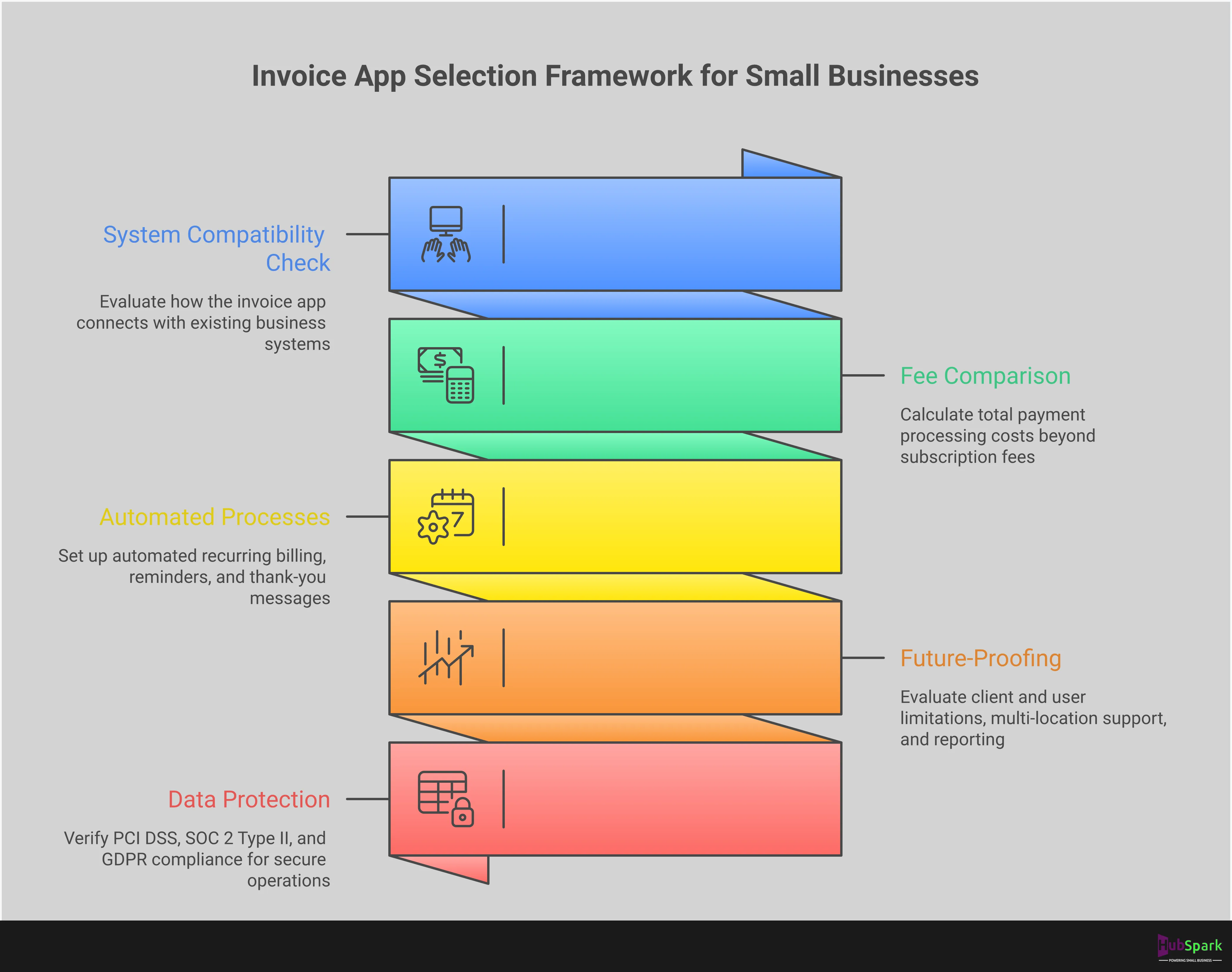
Selecting the right invoice app is not about finding the most features; it’s about finding the right ones. A disorganized invoicing process creates cash flow bottlenecks and consumes valuable time that should be spent on revenue-generating activities. To eliminate these operational drags, your chosen software must perform specific functions flawlessly. The ideal app moves beyond simple invoice generation and becomes a central part of your financial operations.
Look for a platform that integrates payment processing directly, automates routine communication, and maintains a professional brand image. It must also provide a clear view of your financial health by tracking expenses alongside income. For service businesses, mobile access is non-negotiable, allowing you to manage billing from the job site, not just the office. Most importantly, the app must connect with your other essential business tools, particularly your CRM, to create a single, unified system for managing customer interactions from lead to final payment. These core features are the standard for any serious business owner.
Payment Processing and Gateway Integration
Your primary goal with any invoice is to get paid quickly. An app that forces customers to mail a check or use a separate, clunky portal adds unnecessary friction to the payment process. Your invoice software must have built-in payment solutions that allow clients to pay online directly from the invoice. This feature accelerates your cash flow and improves the customer experience. Look for secure, integrated gateways that accept credit cards and other digital payment methods. This capability transforms your invoice from a simple bill into a direct path to revenue, eliminating delays and simplifying reconciliation for your records.
Automated Recurring Billing and Reminders
Manually chasing late payments is an inefficient use of your time. A top-tier invoice app automates this entire process. It should allow you to set up recurring billing for retainer clients or service agreements, ensuring consistent income without monthly administrative work. The system must also send automatic payment reminders for upcoming and overdue invoices. This function saves you from making awkward follow-up calls and ensures you maintain a steady cash flow. By automating these communications, you professionalize your collections process and free up your schedule to focus on managing your business and serving your customers.
Professional Invoice Templates and Customization
Every document you send to a client reflects on your brand. A generic, poorly designed invoice can undermine your professional image. Your app must provide clean, professional templates that you can customize with your company logo, colors, and contact information. This consistency reinforces your brand identity and builds trust with your clients. Effective reputation management extends to every customer touchpoint, including billing. A polished invoice signals that you are an organized, detail-oriented, and credible business worthy of prompt payment and repeat business.
Expense Tracking and Financial Management
Invoicing only shows one side of your financial story. To understand your true profitability, you need to track expenses alongside your income. A comprehensive invoice app should include features for expense management, allowing you to log receipts and categorize business costs. This provides a clear, real-time view of your financial health, including your balance sheet and income statements. When your income and expenses are managed in one place, you can make more informed business decisions, simplify tax preparation, and accurately measure the profitability of each project or service you offer.
Mobile Access and Cloud Synchronization
As a service business owner, you operate from the field, not from behind a desk. Your business software must be as mobile as you are. An essential feature of any modern invoice app is robust mobile access with cloud synchronization. You need the ability to create, send, and track invoices directly from your phone or tablet immediately after a job is completed. This ensures that all your data is instantly updated across all your devices, giving you a current and accurate view of your finances whether you are on-site, in the office, or at home.
Integration with CRM and Business Management Tools
A standalone invoice app creates data silos, forcing you to manually transfer information between systems. This is inefficient and prone to error. The most powerful invoice solutions are those that integrate seamlessly with your other business tools, especially your Customer Relationship Management (CRM) software. When your invoicing is connected to your customer data, you can instantly pull client details, job histories, and project notes into an invoice. This level of integration streamlines your entire workflow, from initial contact to final payment, and is a core component of the benefits of a CRM.
Breaking Down Invoice App Pricing Models
Selecting an invoice app requires a clear understanding of its pricing structure. The sticker price is rarely the full story. Most apps use a combination of subscription tiers, transaction fees, and usage limitations to build their pricing models. Your objective is to find a solution that aligns with your current transaction volume and supports future growth without introducing unexpected costs or operational bottlenecks. A “free” app can become expensive through high transaction fees, while a premium subscription might offer cost savings through bundled features.
Analyze each pricing model not just for its immediate cost, but for its long-term value. Consider how limitations on clients, invoices, or users will affect your operations as you expand. Evaluate transaction fees as a percentage of your revenue, not as a standalone number. The right invoicing tool is an investment in your financial operations. It should streamline your cash flow, not complicate it. A platform that integrates invoicing with other essential tools, like a CRM for your business, often provides the most predictable and scalable pricing model, eliminating the need to manage multiple subscriptions and hidden fees.
Free Plans: What You Get Without Paying
Free invoice apps are an effective entry point for new businesses or freelancers managing a small number of clients. Platforms like Wave and Zoho Invoice offer core invoicing features without a monthly subscription, allowing you to create and send professional invoices immediately. However, “free” almost always comes with limitations. These plans often restrict the number of clients you can bill, the number of users who can access the account, or lock advanced features like automated reminders behind a paywall. Use a free plan to establish your initial billing process, but anticipate that your business will eventually outgrow its constraints.
Subscription Tiers: Monthly vs. Annual Pricing
Most invoice apps operate on a subscription model with several tiers. These plans typically scale based on the number of clients, features, or users. Lower-priced tiers offer essential invoicing, while higher-priced tiers add features like project management, detailed reporting, and multi-user access. Many providers, such as FreshBooks, offer a free trial period, which you should use to test the software’s full capabilities. When you are ready to commit, choosing an annual plan over a monthly one almost always results in significant cost savings. Evaluate the feature set of each tier to ensure you are only paying for the tools you will actually use.
Transaction Fees and Payment Processing Costs
Beyond the monthly subscription, the most significant cost is often payment processing. When a client pays an invoice online via credit card or bank transfer, the payment processor charges a fee. These fees are standard across the industry; a typical rate for card payments is around 2.9% plus a small fixed fee per transaction. Some invoice apps have their own built-in payment processors, while others integrate with third-party gateways like Stripe or PayPal. It is critical to understand these rates, as they directly impact your revenue on every single transaction. Centralized payment solutions can simplify this by providing clear, predictable rates.
Client and Project Limitations by Plan
A common way invoice apps structure their subscription tiers is by limiting the number of clients you can manage. For example, a starter plan might allow you to send invoices to only five active clients, while a premium plan allows for unlimited clients. This is a critical factor to consider for any growing service business. If you anticipate adding more than a few clients per month, a plan with a low client cap will quickly become a barrier. A scalable platform should not penalize you for your success. Choose an app that provides the flexibility to grow your client base without forcing you into a premature and expensive upgrade.
Pros and Cons of Leading Invoice Apps
Selecting an invoice app requires a clear-eyed assessment of its strengths and weaknesses. A tool that works for a freelancer will not scale for a growing home service contractor. The right choice depends entirely on your operational needs, growth trajectory, and whether you require a simple invoicing tool or a comprehensive business management system. A standalone app may solve one problem today but create data silos and inefficiencies tomorrow. This breakdown analyzes the operational advantages and limitations of the top contenders, giving you the clarity to choose a platform that supports, rather than restricts, your business growth.
HubSpark: The All-in-One Business Management Advantage
The primary advantage of using HubSpark for invoicing is that it is not a standalone feature; it is a fully integrated component of a complete business operating system. When you send an invoice, it is automatically linked to the client’s profile in your CRM, their appointment history, and your overall financial reporting. This eliminates the need to manually reconcile data between different apps, which saves time and prevents errors. The core benefit is operational unity. You manage leads, book jobs, communicate with customers, and process payment solutions from a single dashboard. The only potential drawback is for businesses that believe they only need invoicing. However, this view is often short-sighted, as any growing business will quickly require the other essential tools HubSpark centralizes.
FreshBooks: User Experience vs. Client Limitations
FreshBooks is widely recognized for its clean, intuitive interface. The platform is famously simple to use, making it a popular entry point for small business owners who need a straightforward way to create and send professional invoices. Its time-tracking features are also well-regarded, particularly among freelancers and consultants who bill by the hour. The significant limitation, however, appears as your business grows. Lower-tier FreshBooks plans often restrict the number of billable clients you can manage. This forces you into a premature and often costly plan upgrade simply because your business is succeeding. For service businesses aiming to expand their customer base, this client cap represents a direct barrier to scalability, turning a simple tool into a growth bottleneck.
Square: Payment Integration vs. Customization Drawbacks
Square’s strength lies in its origins as a payment processor. Its invoicing tool integrates seamlessly with its payment gateway, offering a smooth transaction experience for customers. For businesses already using Square for point-of-sale transactions, adding its invoicing function is a logical and simple step. The platform also offers a 30-day free trial on its paid plans, allowing you to test its capabilities. The drawbacks become apparent when you need more than basic functionality. Invoice customization options are limited, which can make it difficult to align billing documents with your brand identity. Furthermore, custom pricing is typically reserved for businesses processing a high volume of transactions, leaving smaller companies with less flexibility and potentially higher effective rates.
Zoho Invoice: Free Features vs. Project Restrictions
For new or budget-conscious businesses, Zoho Invoice presents a compelling offer: a free, feature-rich invoicing platform. It allows you to send unlimited invoices and includes a client portal where customers can view their history and make payments. This makes it one of the most robust free invoicing solutions available. However, the limitations of the free plan are severe and directly impact your ability to grow. The platform restricts you to a small number of clients and projects annually. For any ambitious service business, such as a contractor or an agency, these caps are simply unworkable. While the tool is free, the operational ceiling it imposes means you will quickly outgrow it and be forced to migrate to a more capable system.
Wave: Comprehensive Free Tools vs. Limited Support
Wave offers an impressive suite of free tools, including invoicing, accounting, and receipt scanning. For a solo entrepreneur or a very small business, having access to these features without a subscription fee is a major advantage. It provides a solid foundation for tracking all your business money and managing basic financial tasks in one place. The trade-off for a free platform is a near-total lack of dedicated customer support. When a payment is delayed or an invoice fails, you are left to solve the problem on your own. Some users have reported issues with funds being held, a critical risk for any business that relies on consistent cash flow. The absence of reliable support makes Wave a high-risk choice for any business where financial operations are mission-critical.
The Best Invoice App for Your Business Type
The right invoice app is not a one-size-fits-all solution. Your industry dictates your billing process, client interactions, and operational workflow. A contractor managing on-site jobs has fundamentally different needs than a law firm tracking billable hours or a retail store managing product sales. Choosing an app that aligns with your specific business model is critical for efficiency and cash flow management. A generic tool creates friction, forcing you to adapt your process to its limitations.
Instead, select a platform built to handle the unique demands of your work. Service businesses need mobile access and project tracking. Professional services require detailed time logging and retainer management. Retailers need inventory-aware invoicing and seamless payment processing. The following breakdown identifies the best invoicing solutions for these distinct categories, helping you move beyond simple billing to a fully optimized financial system. An integrated platform like HubSpark centralizes these functions, connecting your invoicing directly to your CRM benefits and scheduling tools for a complete operational view.
Service-Based Businesses: HVAC, Plumbing, and Contractors
For contractors in the field, speed and professionalism are paramount. You need to generate accurate invoices on-site, track project expenses, and accept payments immediately. Standalone apps like Zoho Invoice offer free templates, but they operate in a silo, disconnected from your job schedule and client records. This creates unnecessary administrative work back at the office.
A truly efficient system integrates invoicing with your daily operations. HubSpark combines appointment management with payment processing, allowing you to convert a completed job into a paid invoice from a single dashboard. This eliminates manual data entry, reduces errors, and ensures you get paid faster. Stop juggling separate apps for scheduling, communication, and billing; consolidate your workflow into one powerful platform.
Professional Services: Law Firms and Agencies
Law firms and agencies operate on billable hours, retainers, and complex project scopes. Your invoicing software must provide meticulous time tracking and clear, itemized invoices to maintain client trust. While tools like FreshBooks are known for user-friendliness, they often lack the robust client management features needed to see the full picture. You need more than just an invoice generator; you need a system that tracks the entire client lifecycle.
HubSpark provides this complete view by linking invoicing directly to your client records and communication history. You can manage retainers, track project milestones, and send automated payment reminders from the same platform you use for lead management. This integration ensures every billable moment is captured and every invoice is supported by a clear record of work performed.
Retail and Product-Based Businesses
Retail and product-based businesses require an invoicing solution that handles inventory, sales tax, and diverse payment methods. Apps like Square Invoices are effective for processing transactions, but they often fall short in managing the other critical aspects of your business, such as online reputation and customer communication. A sale is more than a transaction; it’s an opportunity to build a lasting customer relationship.
To accelerate growth, your payment solutions must be part of a larger ecosystem. HubSpark integrates invoicing with reputation management and text marketing, allowing you to automatically request a review after a purchase or send a follow-up promotion. This transforms a simple payment tool into a powerful engine for generating repeat business and dominating your local market.
Evaluating Payment Processing and Collection Features
An invoice app is only as effective as its ability to get you paid quickly and reliably. Sending an invoice is the first step; collecting payment is the finish line. The right software transforms this process from a manual chore into an automated, efficient system that protects your cash flow. When evaluating options, scrutinize the payment and collection features. A system with seamless payment integration, flexible options for your clients, and automated follow-ups is not a luxury, it is a core operational requirement. These features directly impact your revenue, reduce administrative overhead, and professionalize your client interactions. A weak payment system creates friction for customers and delays for your business, while a strong one accelerates your entire financial cycle. Don’t settle for a simple invoice generator. Demand a platform that actively works to close your accounts receivable loop, ensuring the money you’ve earned makes it into your bank account without constant manual intervention. This is the difference between a tool that creates documents and a system that drives financial health for your entire operation. The features that follow are critical checkpoints in your evaluation.
Integrated Payment Gateways and Processing Fees
Your invoice app must connect directly to a payment gateway to process transactions. This integration is what allows clients to pay you online with a credit card or bank transfer right from the invoice. However, this convenience comes with processing fees, which are typically a percentage of the transaction plus a small fixed fee. Evaluate these costs carefully. Look for platforms that offer transparent, competitive rates without hidden charges. Some providers offer custom pricing for businesses that process a high volume of payments, which provides a path to lower costs as you grow. The goal is to find powerful payment solutions that minimize your costs while maximizing payment speed and reliability.
Multiple Payment Method Support
Your customers have different payment preferences. Forcing them into a single option creates unnecessary friction and can delay payment. A superior invoicing app accommodates this by supporting multiple payment methods, including all major credit cards, debit cards, and ACH bank transfers. Offering this flexibility makes it easier and more convenient for clients to pay you on their terms. This simple feature enhances the customer experience and significantly reduces the time it takes to get paid. When your billing process is this streamlined, you eliminate common excuses for late payments and strengthen your client relationships by demonstrating that you are easy to do business with.
Automated Late Payment Follow-ups and Collections
Chasing down late payments is a time-consuming and often uncomfortable task that pulls you away from revenue-generating work. Your invoice app should handle this for you. The most effective platforms include features for automated late payment reminders. You can set a schedule for the system to send polite, professional follow-up emails or texts to clients when an invoice is approaching its due date or becomes overdue. This automation ensures consistent communication without manual effort, which is critical for maintaining healthy cash flow. By implementing automated text reminders, you can maintain a professional tone and ensure that no overdue invoice slips through the cracks, all while you focus on running your business.
Free vs. Paid Invoice Apps: A Cost-Benefit Analysis
Choosing between a free and paid invoice app is not just about your budget. It’s a strategic decision that directly impacts your operational efficiency and capacity for growth. While a free tool can get you started, it often introduces limitations that create administrative bottlenecks down the line. A paid solution, especially one integrated into a larger business management system, is an investment in a streamlined, scalable operation. The right choice depends on where your business is today and, more importantly, where you plan to take it.
Understanding Free Plan Limitations and Their Impact on Growth
Free invoicing software is an attractive entry point for new businesses. Tools like Wave and Zoho Invoice offer robust features at no initial cost, which is great for managing early-stage cash flow. However, these platforms are built with ceilings. You will eventually encounter limitations on the number of clients you can bill, the users who can access the account, or the advanced features you can use. When you hit these walls, you are forced to spend valuable time on manual workarounds instead of focusing on customer acquisition and service delivery. True business growth requires systems that scale with you, not ones that hold you back.
Comparing Transaction Fees Across Platforms
Do not mistake “free software” for “free payment processing.” Every online payment you accept will incur a transaction fee, regardless of your invoicing app. These fees, typically around 2.9% + $0.60 for credit cards and 1% for bank transfers, are deducted automatically from your revenue. While these rates are standard, the real cost comes from managing disconnected systems. An integrated platform centralizes this process, consolidating your invoicing, payment processing, and financial reporting. HubSpark’s payment solutions are built directly into its business management suite, eliminating the need to reconcile data between separate apps and giving you a clear, immediate view of your cash flow.
When to Upgrade to Paid Features for Financial Sense
The decision to upgrade to a paid plan should be driven by clear business needs. It’s time to invest when your team is expanding and requires multi-user access, or when you find yourself manually sending payment reminders for overdue invoices. Hitting client or project limits on a free plan is another critical indicator. Upgrading is not an expense; it is an investment in automation and efficiency. A paid, integrated system connects invoicing directly to your customer relationship management (CRM) data, automates follow-ups, and provides the professional tools necessary to manage a growing client base without increasing your administrative workload.
Maximizing Value in Your Invoice App Subscription
Selecting the right invoice app is only the first step. The next is ensuring you secure the best possible terms for your subscription. A strategic approach to purchasing software can significantly reduce your overhead and directly impact your bottom line. Too many business owners overpay for essential tools because they overlook simple but effective cost-saving measures. Your goal is to acquire the necessary functionality without paying for unnecessary features or missing out on available discounts.
To get the most from your investment, you must treat software procurement with the same diligence you apply to other business expenses. This means looking beyond the advertised monthly price and identifying opportunities for savings. By leveraging trial periods, committing to annual plans after a successful evaluation, and seeking out promotions targeted specifically at small businesses, you can implement a powerful invoicing system that supports your growth instead of draining your resources. These tactics are straightforward and will ensure your software budget is allocated efficiently.
Leveraging Free Trial Periods and Discount Offers
A free trial is not just an opportunity to use software without cost; it is a critical evaluation period. Before you commit any capital, use this time to determine if an app can handle your specific operational demands. Many platforms provide trial periods, such as the 30-day free trial offered on some paid plans. During this window, test every critical function: create and send test invoices, connect your payment processor, and assess the user interface. This hands-on testing is the only way to confirm that a tool will streamline your workflow, not complicate it. A trial period eliminates the financial risk of adopting a new system.
Capitalizing on Annual Subscription Savings
Once you have validated an invoice app with a free trial, the most direct way to reduce its long-term cost is by choosing an annual subscription. While monthly payments offer flexibility, they consistently come at a premium. Software providers reward longer commitments with significant discounts, often saving you between 15% and 25% over the course of a year. For example, some platforms offer steep introductory discounts on annual plans that make the first year exceptionally affordable. Committing to an annual plan locks in a lower rate and simplifies your accounting with a single yearly transaction, freeing you to focus on running your business.
Finding Small Business-Specific Pricing Benefits
Many software companies design pricing plans and promotions specifically for small businesses. It is a mistake to assume you must pay standard enterprise rates. Actively search for these targeted offers. For instance, providers like Xero and Intuit QuickBooks have historically offered new users substantial discounts for the first several months. These promotions are designed to make advanced accounting software accessible to businesses with tight budgets. Always examine a provider’s pricing page for a “small business” or “starter” tier, as these plans deliver the core features you need without the cost of enterprise-level tools.
Overlooked Features That Drive Invoicing Efficiency
Standard invoice creation is a baseline expectation, not a competitive advantage. The real operational power comes from features that automate financial workflows and eliminate manual tasks. Many business owners overlook these capabilities, focusing only on sending a basic bill. This is a mistake that costs both time and money. True efficiency is achieved when your invoicing system actively manages your revenue cycle for you, from initial estimate to final payment. It’s the difference between simply getting paid and strategically managing your income.
The right platform moves beyond simple billing and becomes a tool for accelerating cash flow, securing revenue, and professionalizing your client interactions. These are not luxury add-ons; they are essential functions for any business serious about growth. By implementing automated recurring billing, payment reminders, integrated expense tracking, and multi-currency support, you transform invoicing from a reactive chore into a proactive financial strategy. This level of automation frees you to focus on delivering excellent service and acquiring new customers instead of chasing paperwork. HubSpark integrates these advanced payment solutions directly into its all-in-one platform, giving you complete control over your financial operations without juggling multiple apps.
Automating Recurring Invoices for Regular Clients
Stop manually creating the same invoice every month for your repeat clients. If you work on retainers or provide regular services like monthly maintenance or quarterly consultations, automated recurring billing is non-negotiable. Set up the invoice once, define the schedule, and let the system handle the rest. This function guarantees that bills go out on time, every time, creating a predictable and stable cash flow for your business. It eliminates the risk of human error, such as forgetting to send an invoice, and presents a consistent, professional image to your most valuable customers. This is a simple change that reclaims hours of administrative time.
Managing Automated Payment Reminders and Late Fees
Your time is too valuable to spend chasing late payments. An effective invoice app automates the entire collections process. You can schedule polite, professional reminders to be sent before, on, and after the due date, significantly reducing the number of overdue accounts. This system removes the awkwardness of manual follow-ups and ensures your payment policies are enforced consistently. For clients who are still late, the system can automatically apply pre-defined late fees to the outstanding balance. This incentivizes prompt payment and protects your business from the financial strain of delayed revenue. It’s a core component of a strong unified messaging strategy that keeps your finances healthy.
Linking Expense Tracking to Invoice Generation
Unbilled expenses are lost revenue, period. For service-based businesses that purchase materials or incur costs for specific jobs, linking expense tracking directly to invoicing is critical. When you log an expense for a project, whether it’s a part for an HVAC repair or materials for a roofing job, it should be instantly available to add to that client’s next invoice. This integration eliminates forgotten costs and ensures every billable item is captured accurately. It provides a clear, itemized breakdown for your client, justifying the total cost and improving transparency. This direct link is fundamental to understanding true job profitability and is a key benefit of a robust business CRM.
Using Multi-Currency Support for International Clients
Even if your business is local today, your next client might not be. As you grow, the ability to transact business across borders becomes a significant advantage. Multi-currency support removes friction from the payment process for international clients. It allows you to create and send invoices in their local currency, simplifying the transaction on their end and positioning your business as a professional, global-ready partner. The system handles the complexities of exchange rates, ensuring you receive the correct amount. This feature opens your business to a wider market and is essential for any company with ambitions beyond its immediate geographic area. It’s a forward-thinking capability built into modern payment solutions.
Related Articles
Frequently Asked Questions
What is the single most important feature to look for in an invoice app? While professional templates and mobile access are standard, the most critical feature is integration. Your invoicing software must connect directly with your Customer Relationship Management (CRM) system. This link eliminates the need to manually enter client data, prevents costly errors, and provides a complete financial history for every customer within a single, unified workflow.
Is a free invoice app good enough for my business? A free app can serve as a temporary solution when you are managing just a few clients. However, these plans are intentionally built with limitations on clients, features, and users. You should view a free app as a starting point, with the clear expectation that you will need to upgrade to a scalable, paid system once those limitations begin to cost you administrative time or hinder your ability to grow.
Why choose an all-in-one platform like HubSpark over a dedicated invoicing tool? A dedicated tool solves one problem, but an all-in-one platform solves your entire operational challenge. Using a standalone app creates disconnected data, forcing you to constantly switch between your scheduler, client database, and billing software. HubSpark integrates invoicing directly with your CRM, appointment management, and payment processing, giving you a single dashboard to manage the entire customer journey from initial lead to final payment.
How exactly does an invoice app help me get paid faster? An invoice app accelerates your cash flow in two key ways. First, it provides integrated payment gateways, allowing clients to pay you instantly online with a credit card or bank transfer directly from the invoice. Second, it automates the collections process by sending professional payment reminders for upcoming and overdue bills, which means you no longer have to chase payments manually.
Besides the subscription, what other costs should I expect? The most significant cost beyond a subscription is payment processing fees. Every time a client pays an invoice online, the payment processor charges a standard fee, which is typically a small percentage of the transaction amount. A transparent platform will clearly state these rates, allowing you to accurately predict your costs and manage your revenue without any surprises.

I am a serial entrepreneur with a 20+ year background in marketing & advertising, with a specific focus on SEO/online/digital marketing. I have a passion for helping owners of small & medium sized businesses grow rapidly through organic search engine optimization & digital marketing. I am blessed to lead a team of some of the most hard working, brilliant, and passionate team to help all of our clients reach their revenue goals!
 App Today!